Use Printed document templates to customize documents
Related information
 Related topics
You can use printed document templates to create customized, professional templates for your printed invoices, sales orders, purchase orders, and more. Use printed document templates across Accounts Receivable, Order Entry, Purchasing, Inventory Control, and Construction.
Printed document templates combine the formatting power of Microsoft® Word with the flexibility of merge fields from Sage Intacct. Together, these components display specific account data from Intacct on your printed documents. The templates allow you to share the information you want in the format you need.
About
Printed document templates are Microsoft Word files that use merge fields supported by Sage Intacct to create a customized, branded print format for your transaction documents.
At delivery time, Intacct replaces the merge fields in your Word document with the data values specific to the transaction you’re printing or sending. After, Intacct reproduces the document template with the transaction data in a PDF document that you can send to your customers. 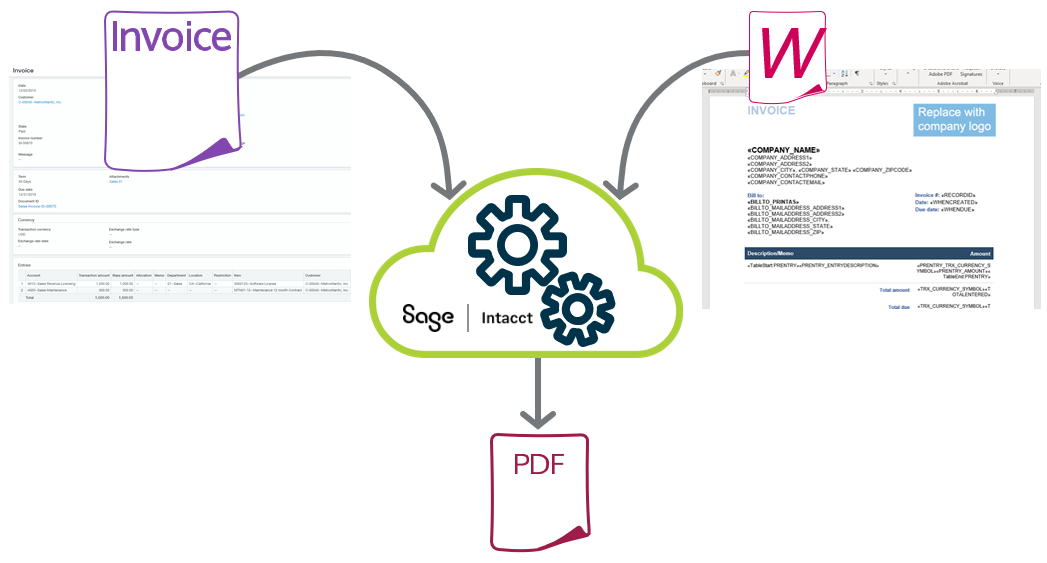
Workflow
The workflow for printed document templates, from creation to delivery, is as follows:
1. Export a sample template
- Start from a sample template provided by Sage Intacct
- Learn more about the samples
2. Customize sample template in Word
3. Upload customized template to Sage Intacct
- Save your Word template and upload it Sage Intacct
- Be sure to select the right application, template type, and locale
4. Assign template for print use
- Assign the template to a transaction or customer in Sage Intacct
- Best practice: assign to a transaction
5. Test and edit as needed
- Test incrementally, beginning with one section, such as the header, then moving on to another.
- Learn more about troubleshooting
6. Print or email documents
Supported applications
| Application | Transactions |
|---|---|
| Accounts Receivable |
|
| Construction |
|
| Inventory Control |
|
| Supplies Inventory |
|
| Order Entry |
|
| Purchasing |
|
Supported content types
You can add the following types of content to a printed document template:
| Content type | Notes |
|---|---|
|
Static text |
Static text is the actual text in the Word file. This text does not change each time you print or email your documents. Because the PDF of your document is created in Intacct, only specific fonts are available, which include:
|
|
Merge fields |
Merge fields are replaced with data from a particular field from Intacct at the time of delivery. You can add both standard and custom fields to your document templates.
What do merge fields look like?
Here is an example of a merge field: «COMPANY_NAME»
The brackets « » indicate that the item is a merge field. COMPANY_NAME is the merge field ID. |
|
Images |
You might want to add images of your company logo to your printed document templates to create the branded look and feel of your business. Supported image types include:
|
