Sage Collaborate feeds
Related information
 Related topics
The Sage Collaborate feeds are where you can review what's happening across your company at a glance. You can then jump directly to the transactions, records, or comments that need attention.
- Approvals
- Lists
- Reports
- Intacct configuration pages
Select Collaborate at the top of any Intacct page to open Sage Collaborate.

When you follow records, you see comments made on the records in your feeds. Typically, you see updates for:
- Comments and posts
- Shared links or files
| Subscription | Sage Collaborate |
|---|---|
| User type |
Sage Collaborate is available to all user types after you subscribe. |
Several feeds are available for use:
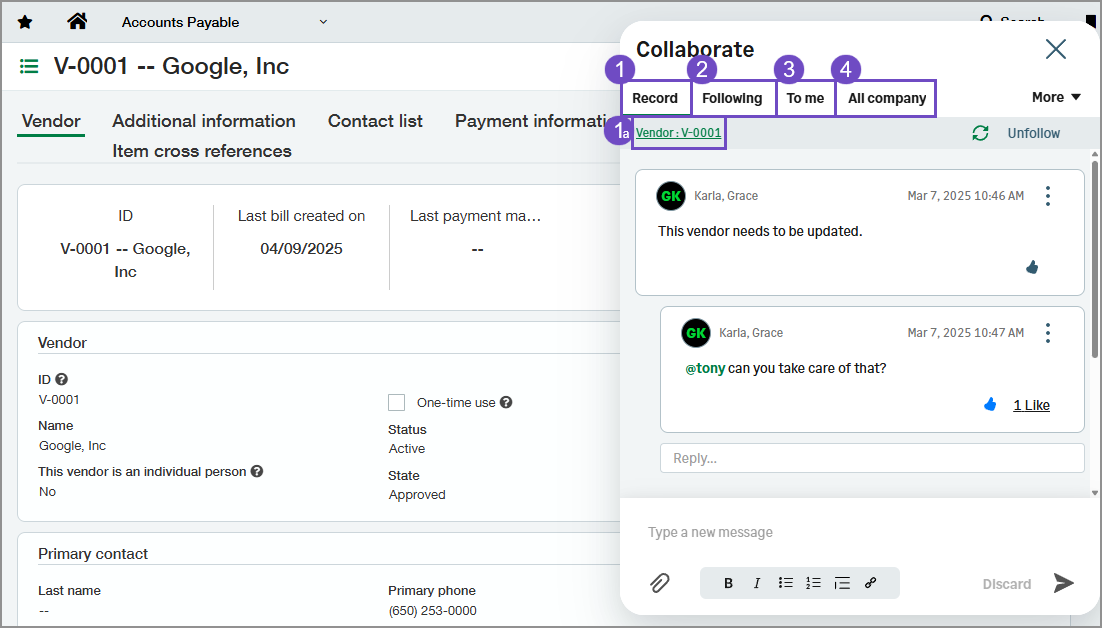
-
-
The record name. Select the record name to open it in a new browser window or tab.
-
Records
Sage Collaborate posts can be made on most record types in Intacct. When you view a record, Collaborate can be used to make comments on the record and alert team members when you need more information. You can Use @ mentions to request comment from other Intacct users.
A link to the record is displayed in the post made on that record, so that when viewed in other feeds, you can select the link to open the record.
Following
The Following feed shows updates from records that you follow or have commented on.
This feed also shows you posts from groups you’re a member of, and files and records you’re following.
To me
The To me feed shows posts that mention you, including:
- Posts and comments where you’ve been mentioned.
- Posts you made that have comments.
All Company
The All Company feed shows posts and comments from your entire company, including posts and comments from:
- People in your company
- Public groups
- Private groups you’re a member of
- Changes for records and fields and system-generated posts, if someone liked or commented on the post. You must have access to the record to see the post.
Use @mentions
Like other social media platforms, you can use @mentions to bring your posts to the attention of a specific person or group.
How to make an @mention:
- When you write a post, type @ followed by the first few letters of the person.
- Select the person from the list of matches.
The list includes all matches for:Public groups.
Private groups you’re a member of.
You can have up to 25 mentions in a single post or comment.
-
Select the Send icon to post your update.
Feeds on Approvals
Usually, all aspects of Intacct have a Collaborate feed associated with them. However, at this time, there are no Collaborate feeds associated with approvals of any kind.
