Custom numeric formats—ICRW
Related information
 Related topics
The Interactive Custom Report Writer (ICRW) shows cells with a null value as empty by default. To make the data easier to scan, you can add a hyphen to empty cells. This topic shows you how to add a hyphen to blank cells.
| Subscription | Interactive Custom Report Writer
Platform Services |
|---|---|
| Regional availability |
All regions |
| User type | Interactive Custom Report Writer: Business, Project Manager |
| Permissions |
Interactive Custom Report Writer: Run, List, View, Add, Edit, Delete Platform Services: Run, List, View, Add, Edit, Delete
|
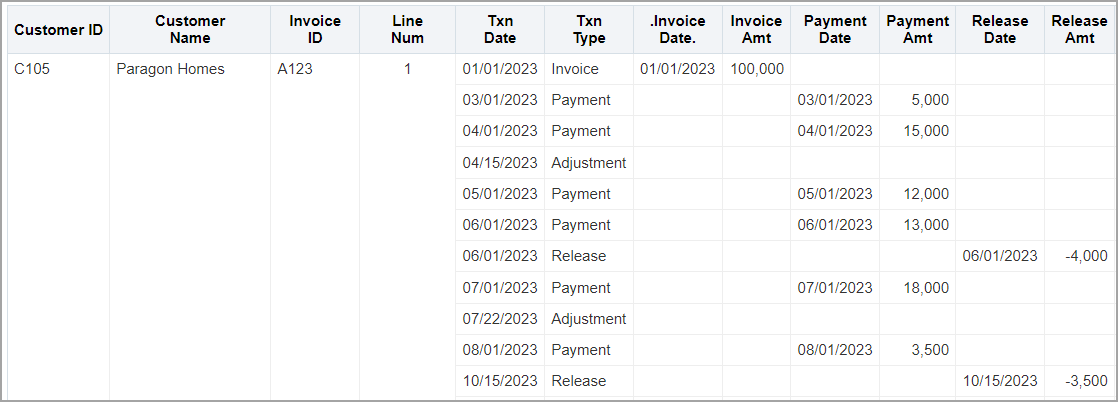
In the following example, the blank cells in the Release Amt column represent null values.
Add a custom numeric format to a column
You can add hyphens to blank cells in a selected column using a custom data format in the Column Properties for the column.
-
Open an ICRW report and go to the Define tab,
-
Select the Gear icon for a column with blank cells and choose Column Properties from the dropdown menu.
-
Go to the Data Format tab.
-
Select the Override Default Data Format checkbox, and from the Treat Numbers As dropdown, select Custom.
-
Enter the following string into the Custom Numeric Format field:
-
Repeat this process for all the columns that contain blank cells.
-
Save the report.
#,##0.00;-#,##0.00;"-"
