Accounts Receivable
Single payments for multiple customers—Early Adopter
This idea came from you!
We're launching the Early Adopter Program to support single payments for multiple customers. This is useful when you receive a single payment, but need to apply the payment to AR sales invoices from different customers.
Details
There are times when you need to receive a payment, but apply the payment to AR sales invoices that belong to different customers. For example, a school district submits payment for AR sales invoices that belong to different schools within that district. Or an insurance company submits a single payment for multiple patients at a facility.
As an Early Adopter, you can set up Accounts Receivable to support these scenarios.
How it works
After this feature is enabled and set up, the option to apply the payment to a single customer or multiple customer accounts appears on the Receive Payment page.
Options include receiving a payment for the following:
-
A single customer's AR sales invoices.
-
Parent and child customer AR sales invoices.
-
Multiple customers' AR sales invoices.
When receiving a payment for multiple customers, the new Payer name field appears.
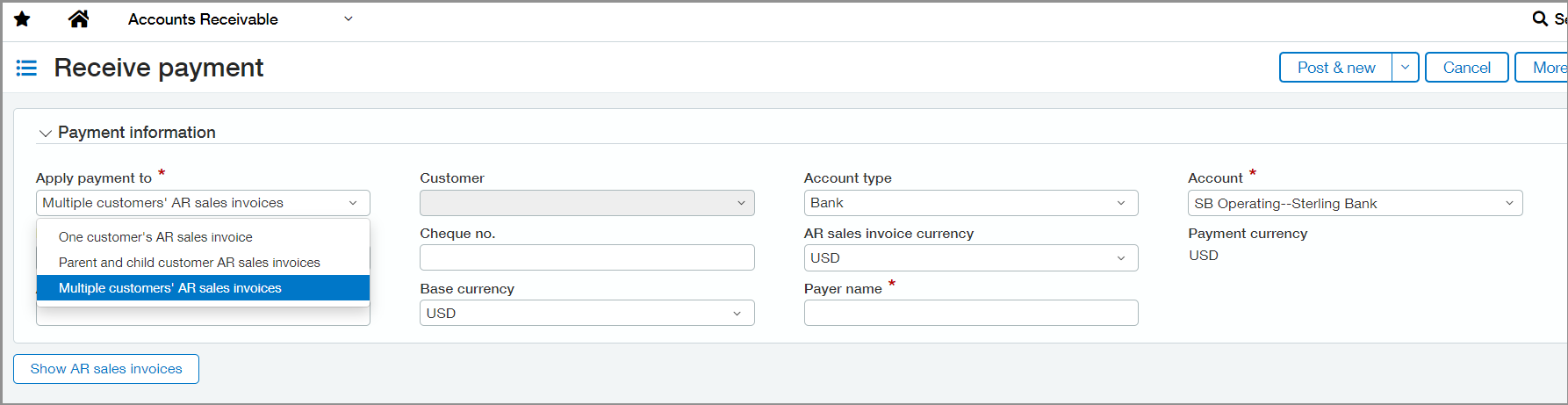
The Apply payment to option that you choose determines the AR sales invoices that you can select for payment. For example, when you select parent and child customer AR sales invoices, the payment is restricted to the defined customer hierarchy for AR sales invoices.
-
When you select A single customer's AR sales invoices, you'll choose the customer as usual.
-
When you select Parent and child customer AR sales invoices, choose a customer. The payer name auto-populates with the parent customer for the customer that you select.
-
When you select Multiple customers' AR sales invoices, enter the payer name for the payment. You can apply the payment to any open AR sales invoices.
When you enable payments for multiple customers, changes happen in reporting and reconciliation on AR payments to reflect the change.
-
AR Ledger and Sales Register reports: Select the Show payer name option when you run the AR Ledger and Sales Register reports to include the payer name as a column in the report.
-
Sales Register report: Select Display payment details to include the Payment ID as a column in the report.
-
Reconciliation: When reconciling bank transactions, the payer name appears instead of the customer name when the payment is for multiple customers.
-
Go to Accounts Receivable > Setup tab > Configuration.
-
Select Enable single payments for multiple customers.
-
Select a document sequence for Payments.
-
Select Save.
Early Adopter program
The Early Adopter program provides qualified functionality to a limited set of customers. During this release, these early adopters will help us refine our offering to deliver the functionality that's critical for business controls.
The Early Adopter program is closely monitored. We work closely with the early adopters to ensure that we focus our time and attention on what matters most to you.
Requirements
| Subscription | Accounts Receivable |
|---|---|
| Regional availability |
All regions |
| User type | Business user with admin privileges |
| Permissions | Manage Payments: List, View, Add |
| Dependencies or other requirements |
This feature is only supported in the new Receive Payments page. |
| Restrictions |
This feature is limited to Early Adopter program participants. Not supported through CSV import. |
