Accounts Receivable
Track payments with document sequencing
Now, you can track payments more easily with document sequencing for Accounts Receivable payments. This allows you refer to specific posted payments and helps with payment tracking and reconciliation.
For example, if you have a posted payment that was applied to multiple AR sales invoices and adjustments. You can run a custom report based on the Payment ID to see which transactions the payment was applied to.
Details
With document numbering sequences, Intacct automatically generates new IDs for common transactions and records. First, you set up a document sequence for AR payments. Then, Intacct automatically generates a Payment ID for all new posted payments.
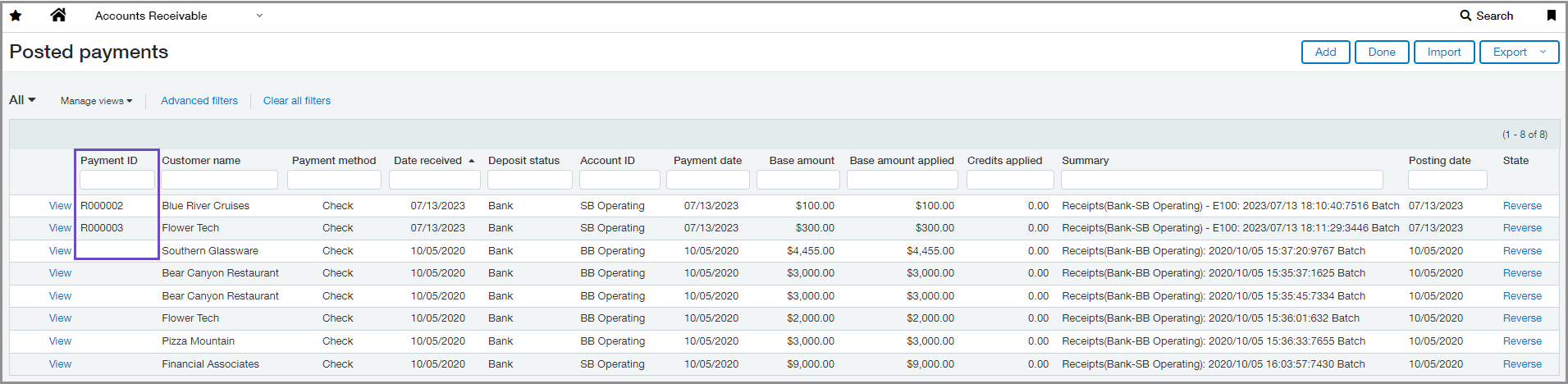
The Payment ID appears as a column in the following places:
-
Posted payments list
-
AR Ledger report
-
Receipts Register report
You can also include the Payment ID as a column in the Sales Register report when you select Display payment details.
How it works
-
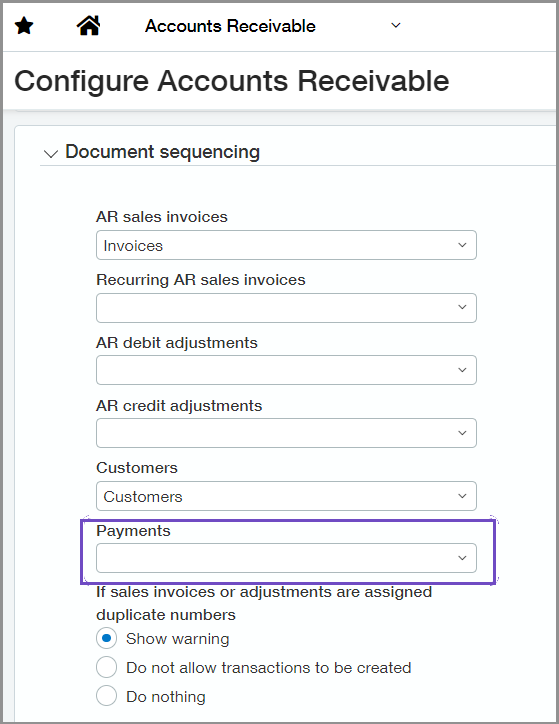
Add a new document sequence to use for payments.
-
Go to Accounts Receivable > Setup > Configuration.
-
Select the new document sequencing option for Payments.
-
Select Save.
After you save, all new posted payments with be assigned a Payment ID. Existing posted payments will not have a Payment ID.
Requirements
| Subscription |
Accounts Receivable Administration |
|---|---|
| Regional availability |
All regions |
| User type | Business user with admin privileges |
| Permissions | Application subscriptions: Configure |
| CSV import |
Payments imported through CSV are also assigned a Payment ID. |
