Contracts
Recognize sales revenue on contract line invoice
This idea came from you
Sage Intacct's Contracts application includes both a powerful subscription billing engine and fully automated revenue management. This combination supports a multitude of billing and deferred revenue scenarios that work seamlessly together. But what if you do not always need to defer revenue and simply want to record revenue when you bill a contract line?
In this release, Contracts includes an optional workflow that eliminates the requirement to defer revenue for a contract line. And if you have some contract lines that do need deferred revenue, no problem—you can mix and match revenue workflows in the same contract.
Here's how it works
First, your Intacct administrator configures the Revenue Management application to enable the ability to recognize revenue on invoice. When this option is turned on, Intacct displays the Recognize revenue on invoice field on contract lines.
Then when a user adds a contract line that does not need revenue to be deferred, the user selects the Recognize revenue on invoice checkbox on the contract line. When this option is selected, Intacct automatically assigns the "Recognize on revenue" revenue template to both revenue journals. This template indicates there's no revenue schedule or requirement for the user to post revenue separately.
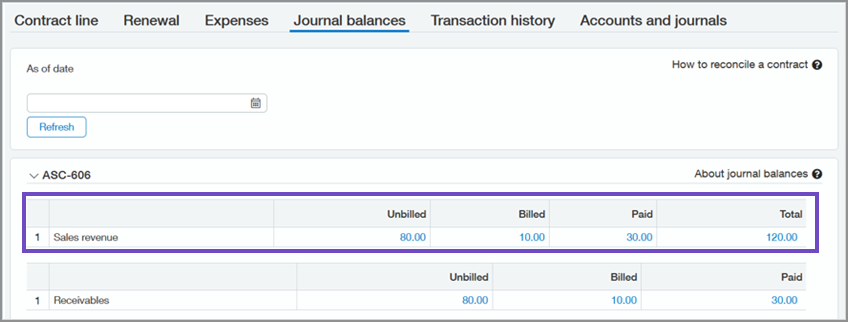
Later when the contract line is invoiced, Intacct automatically posts the revenue. The contract line's journal balances will only display unbilled, billed, and paid values for sales revenue and Accounts Receivable.
What's new
We added new fields and other user interface elements to support recognizing revenue when you invoice a contract line.
Configure Revenue Management: Enable revenue recognition on invoice field
There's a new Enable revenue recognition on invoice field in the Contracts section of the Configure Revenue Management page.
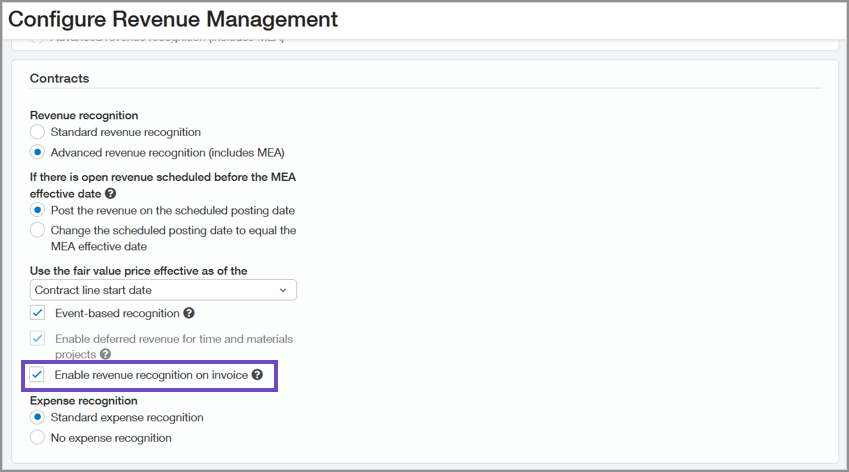
When you save the configuration with this option set to true, Intacct does the following:
- Displays a Recognize on invoice checkbox on the contract line.
- Creates the "Recognize on invoice" revenue template.
After you create at least one contract line that uses this feature, you will not be able to turn off this configuration option.
Contract line: Recognize revenue on invoice field
There's a new Recognize revenue on invoice field in the Revenue section of a contract line.
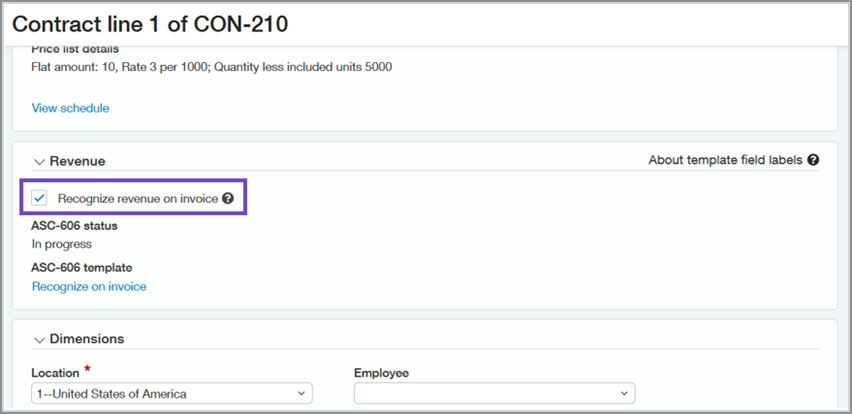
You can select this field on contract lines where the Billing method is either "Fixed price" or "Quantity-based" with "Variable" Quantity type. When you select this checkbox, Intacct automatically selects the "Recognize on invoice" revenue template for each revenue journal.
This field is not editable on contract lines where the Billing method is "Project time", "Project materials", "Project time & Materials", or "Quantity-based" with "Committed" Quantity type.
New "Recognize on invoice" revenue template
There's a new system-created revenue template named "Recognize on invoice". Intacct automatically assigns this revenue template to both revenue journals when you select the Recognize revenue on invoice checkbox on a contract line. You cannot edit or delete the "Recognize on invoice" revenue template.
The contract line's revenue is automatically recognized when it's invoiced, so there's no revenue schedule viewable on the contract line. However, Intacct does build a revenue schedule in the Contract subledger that's linked to the contract line's billing schedule. Note the following about the subledger revenue schedule:
- Any edits or changes to the contract line's billing schedule will be reflected in this revenue schedule.
- Deleting an invoice clears the associated recognized revenue.
- Reports based on the "Contract subledger links" report object may show data from this revenue schedule.
Journal balances tab display
When a contract line has Recognize revenue on invoice set to true, the Journal balances tab only displays Sales revenue. It does not display Deferred revenue values.
Transaction history tab display
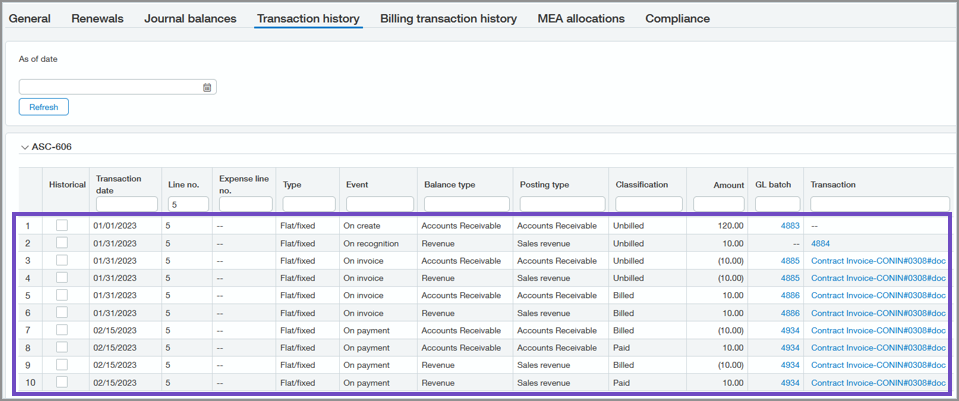
The Transaction history tab only displays posting events relevant to Unbilled, Billed, and Paid AR and Sales revenue:
- It displays 1 "On create" posting event when the contract line is created instead of 2 as in other types of contract lines.
- It displays 1 "On recognition" posting event instead of 2 as in other types of contract lines. The "On recognition" event happens when the contract line is invoiced.
- When the contract line is invoiced, it displays 4 "On invoice" posting events, which is the same as other contract lines.
- When the invoice is paid, it displays 4 "On payment" posting events, which is the same as other contract lines.
Details
- If you select the Recognize revenue on invoice field on a contract line in an evergreen contract, the contract line will use the "Recognize on invoice" revenue template instead of the "Evergreen revenue" template.
- To report on renewal forecast data for contract lines that recognize revenue on invoice, base the reports on the billing schedule and not on the revenue schedule.
- Reports based on the "Contract subledger link" object will show values posted to Unbilled Deferred revenue. If you use these reports to reconcile to the GL, reconcile the Unbilled Deferred revenue values against the GL's Unbilled Sales revenue values for these contract lines. The GL reports will also show additional reclass entries to Unbilled Sales revenue that are not included in reports based on the "Contract subledger link" object. Ignore the reclass entries when you reconcile using reports based on the "Contract subledger link" object.
Requirements
| Subscription |
Contract Billing Contract Revenue Recognition Companies who only want to use Contract Billing still need to subscribe to Contract Revenue Recognition. This module is included in your Intacct Contract Management subscription. |
|---|---|
| Regional availability |
All regions, excluding France |
| Permissions |
Business users with Admin privileges can configure Revenue Management. Contract: Add, Edit, List, View, Delete |
| Implementation |
Set Enable revenue recognition on invoice to true in the Configure Revenue Management page. |
| Dependencies or other requirements |
This feature is only supported for contract lines where the Billing method is either "Fixed price" or "Quantity-based" with the "Variable" Quantity type. This feature is only supported for items with Item type = "Non-inventory" or "Non-inventory (sales only)". It is not supported for "Kit" items. |
| Restrictions |
As revenue is not being deferred, contract lines with Recognize revenue on invoice = true cannot be included in MEA allocations. |
| CSV Import |
There's a new boolean field on the Contract line import template:
|
| Web Services |
There's a new boolean parameter on the
|
