GENERAL LEDGER
Restrict GL transactions to the entity level
In multi-entity systems, we recommend working at the top level if possible. But if you need to work at the entity level, you can now restrict the creation of General Ledger transactions to the entity level.
Details
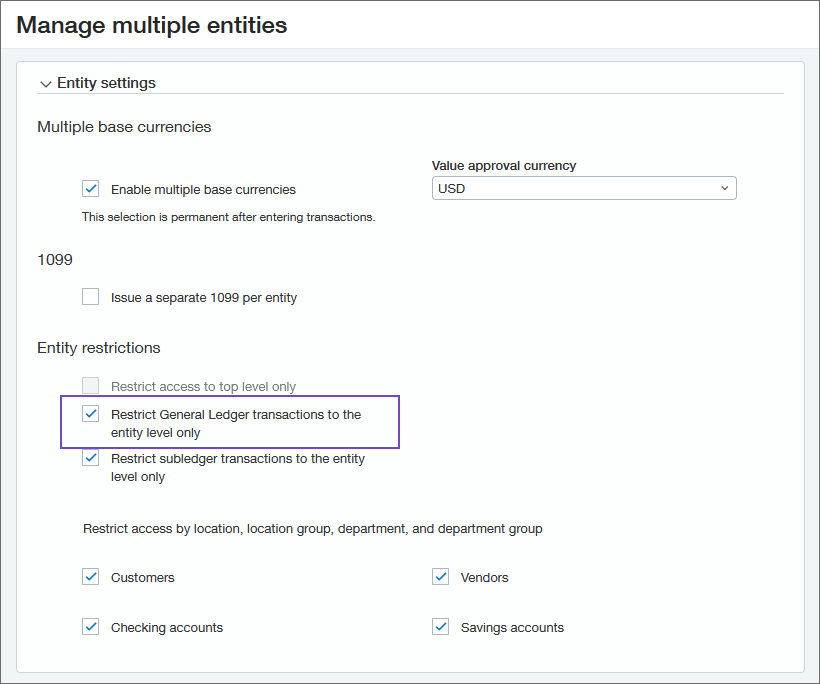
The option to restrict GL transactions to the entity level is new, and goes with an existing option that lets you restrict subledger transactions to the entity level. There's also an option to do the reverse: restrict transactions to the top level. Together, these options give you flexibility and control over where transactions are created.
You can restrict transactions to either the top level or the entity level, not both.
If you restrict transactions to the entity level, you can still view entity-specific transactions from the top level. This gives you a consolidated view of all your transactions.
Before restricting GL transactions to the entity level:
- Make sure that all top level transactions are either Approved or Posted.
- If you have any recurring journal entries set up to post to the top level, change them to post to the entity level. Otherwise, the recurring journal entries will no longer work.
How it works
- Go to Company > Admin tab > Subscriptions.
- Select Configure for Multi-Entity Management.
- On the Manage Multiple Entities page, select the Restrict general ledger transactions to the entity level only option.
Requirements
| Subscription | General Ledger |
|---|---|
| Regional availability | All regions |
| User type | Business user with admin privileges |
| Permissions | Application subscriptions: List, View, and Configure |
