Purchasing
Introducing match tolerances for Purchasing transactions
Take control of outgoing payments and make sure that your organization pays the proper amount for what you ordered.
With match tolerances, Sage Intacct automatically compares the quantities and unit prices that appear on converted Purchasing transactions. For example, if your workflow is to convert purchase orders to vendor invoices, Intacct compares the quantities and unit prices between the 2 transactions. This comparison verifies that the quantity and unit price details agree on the purchase order, PO receipt, and PO purchase invoice.
Details
Tolerance matching provides the following benefits for your business controls:
-
Reduces the risk of fraud and financial loss by preventing the reimbursement of unauthorized purchases.
-
Identifies frequent mistakes on receipts and vendor invoices that can be a sign of a broader business issue.
How it works
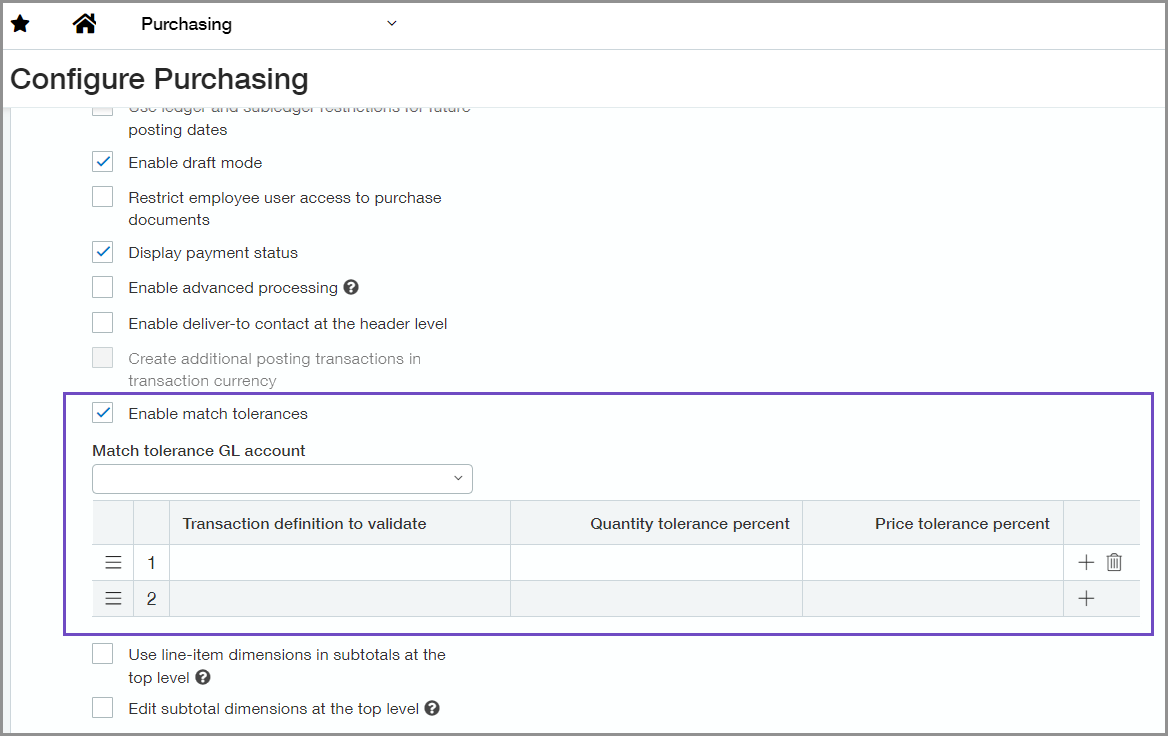
When you enable match tolerances on the Configure Purchasing page, you specify the transaction definitions to validate and the percent tolerance for the quantity and unit price. When the transaction is converted, Intacct flags any line where the percent tolerance is exceeded as an exception.
Intacct flags the line in the transaction when either the quantity, unit price, or both is higher or lower than the percent tolerance. Users with the appropriate permissions can edit transactions with exceptions to either correct or accept the variance and allow the transaction to go through the rest of the transaction workflow.
When you override a flagged transaction to accept the tolerance and it posts to Accounts Payable, Intacct creates an AP purchase invoice. If there's a price variance between the source transaction and the converted to transaction, the variance either posts to the Match tolerance GL account or to the account that's specified in the transaction definition settings.
Set it up
-
Go to Purchasing > Setup > Configuration.
-
Select Enable match tolerances.
-
Optional. Select a Match tolerance GL account.
-
Set up the transaction definitions to validate.
Any transaction converted to this definition will be compared to its source transaction. The converted to transaction is flagged as an exception if either, or both, of the following are true.
-
The quantity for a line varies from the quantity in the source transaction by more that the percent in Quantity tolerance percent, if either under or over.
-
The unit price for a line varies from the unit price in the source transaction by more than the percent in Price tolerance percent, if either under or over.
-
Requirements
| Subscription |
Administration Purchasing |
|---|---|
| Regional availability |
All regions |
| User type | Business user with admin privileges |
| Permissions |
Administration > Application subscriptions: View, Configure Purchasing transactions: List, View, Add |
| Dependencies or other requirements |
Avoid using smart events that are triggered when transactions are updated. Such smart events have the potential of incorrectly changing the status of the transaction from Exception to Pending. |
