CoNSTRUCTION
New template option for retainage release AR sales invoices
You can now assign a printed document template specifically for AR sales invoices that release retainage.
Details
Printed document templates allow you to format transaction documents using Microsoft Word and merge fields. Previously, you could set a default template for AR sales invoices, but not one specific for AR sales invoices that release retainage.
When you set up the Retainage release AR sales invoice template, this printed document template is used whenever you print an AR sales invoice that was generated from the Retainage task in Accounts Receivable.
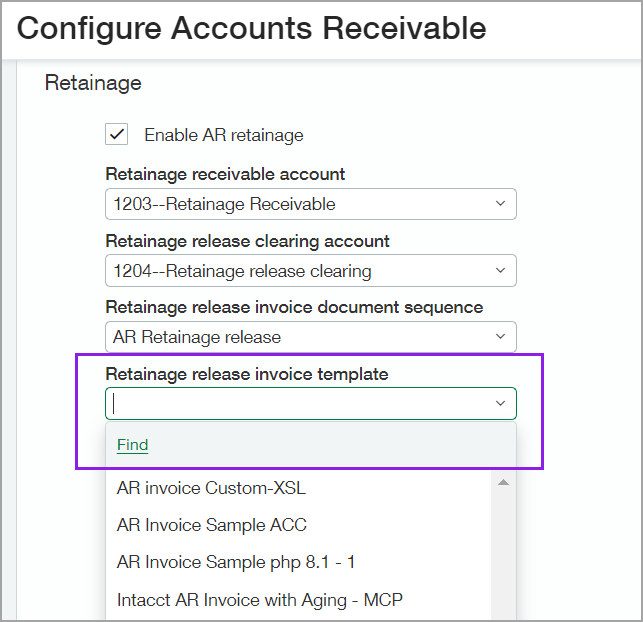
AR sales invoices that were not generated from the Retainage task continue to use the printed document template that's selected in the formatting section of Configure Accounts Receivable.
How it works
After you've uploaded the template to Sage Intacct at the top level, do the following:
-
Go to Accounts Receivable > Setup tab > Configuration.
-
In the Accounting settings section, go to Retainage.
-
Select a Retainage release AR sales invoice template.
You can add multiple printed document templates at the top level, then assign the appropriate template on the Configure Accounts Receivable page for each entity that uses retainage.
-
Select Save.
Going forward, all new AR sales invoices that release retainage use this template when you print the invoice. Existing release retainage AR sales invoices continue to use the template that was assigned when the retainage was released.
Requirements
| Subscription |
Accounts Receivable Administration Purchasing Construction |
|---|---|
| Regional availability |
|
| User type |
Business user with admin privileges |
| Permissions |
Application subscriptions: List, View, Configure |
