Procure to Pay workflow controls
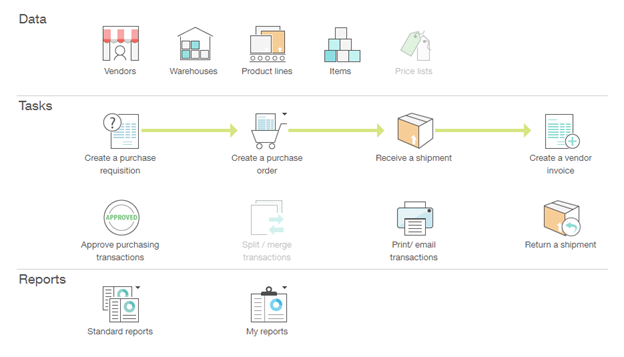
This section contains information about audit considerations, internal control options, and Sage Intacct configuration options for Procure to Pay workflows. A Procure to Pay workflow can include the following business process steps and related master data records, depending on the operational and compliance requirements of the organization:
Control selections
Internal controls should be selected based on the control objectives, the functional requirements of the control and the reasonableness of practice based on the organization’s operational reality. The following list of internal control options is grouped by process step and control objective, to streamline the evaluation and selection process.
The process steps and detailed control objectives related to Procure to Pay workflows are described in the following sections.
Purchase order
Objective type: Existence
Related control options and Sage Intacct configuration
| Control | Purchase order approval workflow |
|---|---|
| Control type | Preventative |
| Objective types | Existence, Accuracy |
| Functional requirement | All purchase orders generated manually in Sage Intacct can be required to trigger a workflow for approval (release). |
| Control rationale | This is a key control for approval of purchase orders. |
| Why it matters | It’s important that an appropriate level of review and approval is sought for purchase orders that are raised. If this doesn’t happen, it’s possible that inaccurate purchase orders could be sent to suppliers, or orders raised fraudulently, resulting in financial loss to the company. |
| Factors to consider | Is there a minimum level for which approval is needed, but below which no approval is required? |
| Sage Intacct configuration | See Purchasing approvals in Help for detailed instructions. |
| Sage Intacct Help page | Purchasing approvals |
| Evidence for control | Approval workflow audit trail indicating the raisers and approvers. |
| How to test |
See workflow control test. This should be tested in line with a standard workflow process. Note that this control covers the workflow, not the accuracy of the approvers for each level of approval. |
| Control | Purchase order approval configuration |
|---|---|
| Control type | Preventative |
| Objective types | Existence, Accuracy |
| Functional requirement | The user who releases the purchase order must be in line with the customer's defined manual of authorities and not the same user who created the purchase order. |
| Control rationale | This is a key control for approval of purchase orders. |
| Why it matters | It's important to consider at what level purchase orders should be approved, by who, and what limits those people should have. This ensures that purchase orders are properly checked and scrutinized before being sent to suppliers to make sure they're accurate and valid. |
| Factors to consider |
|
| Sage Intacct configuration | See Purchasing approvals in Help for detailed instructions. |
| Sage Intacct Help page | Purchasing approvals |
| Evidence for control |
Matrix of authorities contained in system: Purchasing > All tab > Other transaction activity > Approve transactions. |
| How to test |
This test, in conjunction with the test of Purchase order approval workflow, should focus on the correctness of the people in the workflow, rather than the configuration of the workflow. The test is conducted by comparing the list of approvers in the system to the approved . |
| Control | Purchase order reporting of non-approved purchase orders |
|---|---|
| Control type | Detective |
| Objective types | Existence, Accuracy |
| Functional requirement | If there's a de minimis limit below which purchase orders do not require approval, it must be possible to report on purchase orders that have not been approved. |
| Control rationale | This is a key control for approval of purchase orders. |
| Why it matters | Setting de minimis limits below which purchase orders don't require approval is common to prevent valuable time being spent approving very low value purchase orders, or requiring a second layer of approval for purchase orders that the person raising them would have sufficient authority to approve themselves, under normal circumstances. It ensures that effort is focused on greater value, or more material, orders. |
| Factors to consider |
|
| Sage Intacct configuration |
Custom List Views filtered by appropriate State Purchasing > All tab > Other transaction activity > View transactions > Manage views > Create new view > Step 3: Select filters > State equals (appropriate values might include: Submitted, Partially Approved, Declined, Draft, Pending) |
| Sage Intacct Help page | Add a custom view |
| Evidence for control |
Purchase order approval configuration and limits within system. View custom report configurations in: Reports > Custom Reports > Add Evidence should be retained that a reviewer has checked the report to identify any purchase orders they consider to have been raised without approval appropriately, such as a marked up copy of the report, or a digitally signed version indicating what has been reviewed. |
| How to test |
See review control test. Care should be taken to understand how inappropriate transactions are identified, and followed up. |
| Control | Purchase order reporting |
|---|---|
| Control type | Detective |
| Objective types | Existence, Accuracy |
| Functional requirement | Ability to report on purchase orders raised by person posting, amount (local and group currency), entity, cost center. |
| Control rationale | For exception reporting and identification of potential erroneous or fraudulent invoices, to support monitoring controls over procurement spend. |
| Why it matters |
This control is a review of all purchase orders, to ensure that they’re valid. This is likely to be a large list, so you will want to define how you are going to do this test each time without it being overly burdensome. Focusing on risky purchase orders, people, values or entities will help, as will a sampling methodology. The main thing is that it needs to be consistent. Some of the checks that could be done include:
Purchase order reporting of non-approved purchase orders is the control that involves reviewing just purchase orders that have no approval (if this is something that has been allowed). |
| Factors to consider |
|
| Sage Intacct configuration |
Purchasing > All > Reports Several standard reports are available to show a variety of information. Custom reports can be created to pull additional information if required. |
| Sage Intacct Help page | Summary of standard purchasing reports |
| Evidence for control |
List of purchase orders with annotations by the reviewer. Follow up queries should be evidenced. Ensure it is clear what the conclusions were and how they were reached |
| How to test |
See review control test. Take care to understand how inappropriate purchase orders are identified, and followed up. |
| Control | Unlinked purchase order review |
|---|---|
| Control type | Detective |
| Objective types | Existence, Accuracy |
| Functional requirement | Ability to report on purchase orders that do not reference another purchasing document (for example, requisition or supplier contract) |
| Control rationale | To support a requirement for teams / departments / functions that require a requisition or supplier contract for all purchase orders. |
| Why it matters |
The control looks for purchase orders that haven't been raised against a supplier contract or purchase requisition. You would use this control if you're trying to enforce the use of purchase requisitions or supplier contracts for all purchase orders, otherwise the listing would be long. |
| Factors to consider |
|
| Sage Intacct configuration |
Create specific transaction definitions for purchase orders that do not require conversion from other purchasing transactions, and create a Custom List View for these specific transaction definitions. |
| Sage Intacct Help page | |
| Evidence for control |
Annotated listing of unlinked purchase orders, with verification that the purchase order is appropriate (with reasoning and backup retained) |
| How to test |
See review test. The test should focus on ensuring the inappropriate purchase orders are correctly identified and followed up. |
Objective type: Accuracy
Related control options and Sage Intacct configuration
| Control | Purchase order approval workflow |
|---|---|
| Control type | Preventative |
| Objective types | Existence, Accuracy |
| Functional requirement | All purchase orders generated manually in Sage Intacct can be required to trigger a workflow for approval (release). |
| Control rationale | This is a key control for approval of purchase orders. |
| Why it matters | It’s important that an appropriate level of review and approval is sought for purchase orders that are raised. If this doesn’t happen, it’s possible that inaccurate purchase orders could be sent to suppliers, or orders raised fraudulently, resulting in financial loss to the company. |
| Factors to consider | Is there a minimum level for which approval is needed, but below which no approval is required? |
| Sage Intacct configuration | See Purchasing approvals in Help for detailed instructions. |
| Sage Intacct Help page | Purchasing approvals |
| Evidence for control | Approval workflow audit trail indicating the raisers and approvers. |
| How to test |
See workflow control test. This should be tested in line with a standard workflow process. Note that this control covers the workflow, not the accuracy of the approvers for each level of approval. |
| Control | Purchase order approval configuration |
|---|---|
| Control type | Preventative |
| Objective types | Existence, Accuracy |
| Functional requirement | The user who releases the purchase order must be in line with the customer's defined manual of authorities and not the same user who created the purchase order. |
| Control rationale | This is a key control for approval of purchase orders. |
| Why it matters | It's important to consider at what level purchase orders should be approved, by who, and what limits those people should have. This ensures that purchase orders are properly checked and scrutinized before being sent to suppliers to make sure they're accurate and valid. |
| Factors to consider |
|
| Sage Intacct configuration | See Purchasing approvals in Help for detailed instructions. |
| Sage Intacct Help page | Purchasing approvals |
| Evidence for control |
Matrix of authorities contained in system: Purchasing > All tab > Other transaction activity > Approve transactions. |
| How to test |
This test, in conjunction with the test of Purchase order approval workflow, should focus on the correctness of the people in the workflow, rather than the configuration of the workflow. The test is conducted by comparing the list of approvers in the system to the approved . |
| Control | Purchase order reporting of non-approved purchase orders |
|---|---|
| Control type | Detective |
| Objective types | Existence, Accuracy |
| Functional requirement | If there's a de minimis limit below which purchase orders do not require approval, it must be possible to report on purchase orders that have not been approved. |
| Control rationale | This is a key control for approval of purchase orders. |
| Why it matters | Setting de minimis limits below which purchase orders don't require approval is common to prevent valuable time being spent approving very low value purchase orders, or requiring a second layer of approval for purchase orders that the person raising them would have sufficient authority to approve themselves, under normal circumstances. It ensures that effort is focused on greater value, or more material, orders. |
| Factors to consider |
|
| Sage Intacct configuration |
Custom List Views filtered by appropriate State Purchasing > All tab > Other transaction activity > View transactions > Manage views > Create new view > Step 3: Select filters > State equals (appropriate values might include: Submitted, Partially Approved, Declined, Draft, Pending) |
| Sage Intacct Help page | Add a custom view |
| Evidence for control |
Purchase order approval configuration and limits within system. View custom report configurations in: Reports > Custom Reports > Add Evidence should be retained that a reviewer has checked the report to identify any purchase orders they consider to have been raised without approval appropriately, such as a marked up copy of the report, or a digitally signed version indicating what has been reviewed. |
| How to test |
See review control test. Care should be taken to understand how inappropriate transactions are identified, and followed up. |
| Control | Purchase order reporting |
|---|---|
| Control type | Detective |
| Objective types | Existence, Accuracy |
| Functional requirement | Ability to report on purchase orders raised by person posting, amount (local and group currency), entity, cost center. |
| Control rationale | For exception reporting and identification of potential erroneous or fraudulent invoices, to support monitoring controls over procurement spend. |
| Why it matters |
This control is a review of all purchase orders, to ensure that they’re valid. This is likely to be a large list, so you will want to define how you are going to do this test each time without it being overly burdensome. Focusing on risky purchase orders, people, values or entities will help, as will a sampling methodology. The main thing is that it needs to be consistent. Some of the checks that could be done include:
Purchase order reporting of non-approved purchase orders is the control that involves reviewing just purchase orders that have no approval (if this is something that has been allowed). |
| Factors to consider |
|
| Sage Intacct configuration |
Purchasing > All > Reports Several standard reports are available to show a variety of information. Custom reports can be created to pull additional information if required. |
| Sage Intacct Help page | Summary of standard purchasing reports |
| Evidence for control |
List of purchase orders with annotations by the reviewer. Follow up queries should be evidenced. Ensure it is clear what the conclusions were and how they were reached |
| How to test |
See review control test. Take care to understand how inappropriate purchase orders are identified, and followed up. |
| Control | Unlinked purchase order review |
|---|---|
| Control type | Detective |
| Objective types | Existence, Accuracy |
| Functional requirement | Ability to report on purchase orders that do not reference another purchasing document (for example, requisition or supplier contract) |
| Control rationale | To support a requirement for teams / departments / functions that require a requisition or supplier contract for all purchase orders. |
| Why it matters |
The control looks for purchase orders that haven't been raised against a supplier contract or purchase requisition. You would use this control if you're trying to enforce the use of purchase requisitions or supplier contracts for all purchase orders, otherwise the listing would be long. |
| Factors to consider |
|
| Sage Intacct configuration |
Create specific transaction definitions for purchase orders that do not require conversion from other purchasing transactions, and create a Custom List View for these specific transaction definitions. |
| Sage Intacct Help page | |
| Evidence for control |
Annotated listing of unlinked purchase orders, with verification that the purchase order is appropriate (with reasoning and backup retained) |
| How to test |
See review test. The test should focus on ensuring the inappropriate purchase orders are correctly identified and followed up. |
| Control | Purchase order validation |
|---|---|
| Control type | Preventative |
| Objective types | Accuracy |
| Functional requirement | Purchase orders can only be created for a valid combination of entity, profit, and cost centers. |
| Control rationale | To prevent commissioning costs that are inappropriate or not authorized. |
| Why it matters |
Limiting the combinations that can be posted reduces the possibility of postings being made to the wrong of entities, profit, and cost centers (either deliberately or in error). |
| Factors to consider |
|
| Sage Intacct configuration |
This can be controlled by a variety of actions. Access to certain transaction definitions can be limited to certain users (Purchasing > Setup > Transactions definitions, select Edit next to the applicable transaction definition, and edit the access on the Security tab). A second level would be to create Smart Rules to validate permissible dimension combinations. |
| Sage Intacct Help page | |
| Evidence for control |
System posting configuration permissions. |
| How to test |
See configuration test. The test should focus on the elements of the validation that ensure the integrity of financial reporting. |
| Control | Aged unapproved supplier contract purchase order review |
|---|---|
| Control type | Detective |
| Objective types | Completeness, Accuracy |
| Functional requirement | Report to identify old unapproved purchase orders linked to the corresponding contracts, for example, outstanding over a specified number of days. |
| Control rationale | This is a key control for completeness of liabilities and commitments. Also reduces risk of duplicate payment and fraud. |
| Why it matters |
This is similar to the unapproved purchase order review in Aged unapproved purchase order review, but this lists unapproved purchase orders in specific supplier contracts. You might not need this control if you don’t use supplier contracts or if unapproved purchase orders are not a big problem. |
| Factors to consider |
|
| Sage Intacct configuration |
Create a custom report: Customization Services or Platform Services > All tab > Custom Reports |
| Sage Intacct Help page | Custom reports wizard |
| Evidence for control |
Annotated unapproved purchase order listing, evidencing follow-up as needed / rationale for the purchase order being unapproved. |
| How to test |
See review control test. The test should focus on ensuring the inappropriate purchase orders are correctly identified and followed up. |
Objective type: Completeness
Related control options and Sage Intacct configuration
| Control | Aged unapproved supplier contract purchase order review |
|---|---|
| Control type | Detective |
| Objective types | Completeness, Accuracy |
| Functional requirement | Report to identify old unapproved purchase orders linked to the corresponding contracts, for example, outstanding over a specified number of days. |
| Control rationale | This is a key control for completeness of liabilities and commitments. Also reduces risk of duplicate payment and fraud. |
| Why it matters |
This is similar to the unapproved purchase order review in Aged unapproved purchase order review, but this lists unapproved purchase orders in specific supplier contracts. You might not need this control if you don’t use supplier contracts or if unapproved purchase orders are not a big problem. |
| Factors to consider |
|
| Sage Intacct configuration |
Create a custom report: Customization Services or Platform Services > All tab > Custom Reports |
| Sage Intacct Help page | Custom reports wizard |
| Evidence for control |
Annotated unapproved purchase order listing, evidencing follow-up as needed / rationale for the purchase order being unapproved. |
| How to test |
See review control test. The test should focus on ensuring the inappropriate purchase orders are correctly identified and followed up. |
| Control | Aged unapproved purchase order review |
|---|---|
| Control type | Detective |
| Objective types | Completeness |
| Functional requirement | Report to identify old unapproved purchase orders, for example, outstanding over a specified number of days. |
| Control rationale | This is a key control for completeness of liabilities and commitments. Also reduces risk of duplicate payment and fraud. |
| Why it matters |
If purchase orders are unapproved, there might be a delay in sending them out and getting the goods. This might be due to absence by the approver, or something going wrong in the approval workflow. It is useful to check the “unapproved purchase order” list view to ensure that the purchase order process is going smoothly. Whether this is a control that's done formally (with well-documented evidence) or informally will depend on whether this is likely to be a big problem or not. |
| Factors to consider |
|
| Sage Intacct configuration |
Custom list views filtered by appropriate state Purchasing > All tab > Other transaction activity > View transactions> Manage views > Create new view > Step 3: Select filters > State equals (appropriate values might include: Submitted, Partially Approved, Declined, Draft, Pending) |
| Sage Intacct Help page | Add a custom view |
| Evidence for control |
Annotated unapproved purchase order listing, evidencing follow-up as needed / rationale for the purchase order being unapproved. |
| How to test |
See review control test. Take care to ensure that the control meets the objective. |
Goods/Service receipt
Objective type: Completeness, Existence, Accuracy
Related control options and Sage Intacct configuration
| Control | Fully receipted purchase orders are blocked |
|---|---|
| Control type | Preventative |
| Objective types | Accuracy |
| Functional requirement | Once a purchase order has been fulfilled either by a goods receipt or a service receipt, it is automatically marked as complete and no further receipt can be made. |
| Control rationale | To prevent fraud and duplicate payments from open purchase orders. |
| Why it matters |
This control prevents the organization for recording the receipt for more of a good or service than has been properly approved through the purchase order approval process, and prevents the organization from over-paying invoices. |
| Factors to consider |
|
| Sage Intacct configuration |
Ensure that the Transaction Definition for the Goods/Service Receipt has two settings configured:
For transacting, users will go to Purchasing > All > Transactions > Purchase Order > Convert (on relevant purchase order) After the purchase order is converted fully the order will be marked as complete and no further deliveries can be made. |
| Sage Intacct Help page | Purchasing transaction definitions |
| Evidence for control |
Configuration settings in: Purchasing > Purchase Order > Convert (on relevant purchase order) |
| How to test |
See configured / coded control test. This test should focus on ensuring the blocking functionality works as expected. |
| Control | Goods or services received are automatically accrued |
|---|---|
| Control type | Preventative |
| Objective types | Completeness, Accuracy |
| Functional requirement | An automatic accrual is made for the cost of goods or services received (goods-receipt/invoice-receipt accrual) based on the cost-related items in the purchase order. |
| Control rationale | Supports core accounting controls. |
| Why it matters |
This control ensures that the organization recognizes a liability for any goods or services received in case there's a time lag between goods or services being delivered and an invoice being received. When a PO purchase invoice is received, the accrual is removed and a liability to the supplier is recognized until the invoice is paid. |
| Factors to consider |
None. |
| Sage Intacct configuration |
Fulfillment (Shipping) transaction definitions can be configured to post directly to the General Ledger to book to an accrual or encumbrance account, and the subsequent transactions (PO purchase invoice) can include the reversal of the accrual. For the fulfillment (shipping) transaction definition:
For the PO purchase invoice transaction definition:
Go to Purchasing > Setup > Configuration > Documents configuration tab and assign the correct Journal code for the accrual posting for both transaction definitions. |
| Sage Intacct Help page | |
| Evidence for control |
Configuration settings in: Purchasing > Setup tab > More, demonstrating automatic accruals enabled under Transaction definitions. |
| How to test |
See configured / coded control test. This test should focus on ensuring the accrual is automatic, and the calculation is accurate. |
| Control | Goods-receipt/Invoice-receipt accruals are reviewed |
|---|---|
| Control type | Detective |
| Objective types | Completeness, Accuracy |
| Functional requirement | Ability to review/analyze and clear down the Goods-receipt/Invoice-receipt accrual account. |
| Control rationale | Supports the Goods-receipt/Invoice-receipt reconciliation |
| Why it matters |
Aged items, where a goods receipt has been made but no subsequent invoice has been matched to that goods receipt are often an indicator of accounting errors, such as the invoice being lost, or matched to an incorrect purchase order. |
| Factors to consider |
How old does an unmatched item have to be before it requires investigation. |
| Sage Intacct configuration |
Create a financial report with dimension analysis to review accrual balances by supplier. |
| Sage Intacct Help page | |
| Evidence for control |
Annotated report. |
| How to test |
See review control test. This test should focus on how problematic receipts are identified and followed up. |
| Control | Review of self-receipted purchase orders |
|---|---|
| Control type | Detective |
| Objective types | Existence, Accuracy |
| Functional requirement | Ability to report items where a user has received goods for a purchase order that they have raised. |
| Control rationale | This is a medium segregation of duties risk that's best managed by monitoring potential exceptions. |
| Why it matters |
Self-receipting might or might not be a risk depending on the day-to-day business approach. What will be important is ensuring that the report is reviewable; otherwise there could be many items that might promote a cursory review. |
| Factors to consider |
Is self-receipting a normal occurrence? If so, this report will produce a large number of items for review. It will be important to identify which items that are genuinely risky, for example, large items, or certain types of goods or services. This threshold should be applied consistently. |
| Sage Intacct configuration |
Create a custom report: Customization Services or Platform Services > All tab > Custom Reports |
| Sage Intacct Help page | |
| Evidence for control |
Reviewed audit trail, with evidence of follow-up where the threshold (if applicable) has been exceeded. |
| How to test |
See review control test. The test should focus on how inappropriate self-receipts were identified and followed up. |
PO purchase invoice
Objective type: Completeness
Related control options and Sage Intacct configuration
| Control | Blocked invoices are reviewed |
|---|---|
| Control type | Detective |
| Objective types | Completeness, Accuracy, Cut-off |
| Functional requirement | Report available on blocked invoices by cost and supplier. |
| Control rationale | Key to ensure that differences are resolved and customer refunds are applied. Also ensures accuracy of accruals. |
| Why it matters |
Review of blocked invoices is one of several checks that should be made around the period end to ensure that all relevant liabilities have been completely and accurately recorded, and in the correct period, and from an operational perspective, the reasons for invoice differences to purchase orders are understood and resolved on a timely basis to ensure that invoices can be processed. Often a PO purchase invoice will be held for a valid reason, such as a mismatch with the purchase order, but the goods or services have been received and therefore the organization should accrue for the costs, even if the invoice has been held. |
| Factors to consider |
|
| Sage Intacct configuration |
Custom Report or Custom List Views filtered by appropriate state State equals (appropriate values can include: Submitted, Partially Approved, Declined, Draft, Pending) |
| Sage Intacct Help page | |
| Evidence for control |
Report available through: Platform Services> All > Custom Reports Evidence of control performance should be an annotated report, with comments and followup documentation retained. |
| How to test |
See review control test. This test should ensure that appropriate evidence of review and action is recorded. |
| Control | Reconciliation of invoices from third-party systems |
|---|---|
| Control type | Detective |
| Objective types | Completeness, Accuracy, Cut-off |
| Functional requirement | Ability to reconcile purchase invoice data interfaced from connected purchasing applications: number of documents, number of line items, hash total of supplier numbers and hash total of local currency. |
| Control rationale | Ensures data correctly transferred from other procurement systems into Sage Intacct. |
| Why it matters |
Not all invoices will originate from company initiated purchase orders. Many will come directly from service providers. Where these are regular purchases or involve data from other purchasing systems, it is important to be able to reconcile between Sage Intacct and the third-party system to ensure that data has been completely and accurately recorded |
| Factors to consider |
|
| Sage Intacct configuration |
Configurations will vary per integration. Create a custom report: Customization Services or Platform Services > All > Custom Reports |
| Sage Intacct Help page | |
| Evidence for control |
Report available through: Platform Services > All > Custom Reports Evidence of control performance should be an annotated report, with comments and follow-up documentation retained. |
| How to test |
| Control | Employee expense application reconciliation |
|---|---|
| Control type | Detective |
| Objective types | Completeness, Accuracy |
| Functional requirement | Ability to reconcile expense data interfaced from external expenses applications - number of documents, number of line items, hash total of supplier numbers, and hash total of local currency. |
| Control rationale | Ensures consistent recording of costs from invoices and expenses. |
| Why it matters |
Reconciling transactions between systems is a good way of checking the integrity of the interface, though the effort spent on this depends on the likelihood of interface problems - it is not worth spending a lot of time reconciling if the interface is simple and/or robust. The key thing is to demonstrate the reconciliation - where did you get the information from, how did you match them up, and what did you do with the differences? |
| Factors to consider |
|
| Sage Intacct configuration |
Configurations will vary per integration. Create a custom report: Customization Services or Platform Services > All tab > Custom Reports |
| Sage Intacct Help page | |
| Evidence for control |
Reconciliation documentation, including reconciling items and follow-up. |
| How to test |
Objective type: Existence
Related control options and Sage Intacct configuration
| Control | Invoices are only created where an active supplier exists |
|---|---|
| Control type | Preventative |
| Objective types | Existence |
| Functional requirement | Invoices can only be accepted for a supplier created and active (and not marked for removal or blocked/on-hold) in Sage Intacct |
| Control rationale | Ensure that invoices are only processed for valid suppliers. |
| Why it matters |
This control is intended to prevent payments being made to suppliers that the organization has not properly accepted, which might result in financial loss to the organization or fraudulent payments being made. |
| Factors to consider |
Will there be any circumstances where invoices might need to be accepted for emergency payments (where a supplier does not exist), or one-off payments? |
| Sage Intacct configuration |
To deactivate suppliers, which removes it from being listed:
To temporarily place a supplier on hold:
|
| Sage Intacct Help page | |
| Evidence for control |
System configuration for accounts payable suppliers and invoice acceptance. |
| How to test |
See configuration test. The test should focus on ensuring the functionality of blocking inactive or non-existent suppliers. |
| Control | PO purchase invoices with no associated purchase order are approved in workflow |
|---|---|
| Control type | Detective |
| Objective types | Existence, Accuracy |
| Functional requirement | Invoices entered directly (without reference to a purchase order or other purchasing document require a workflow for approval (for example, park and post). |
| Control rationale | Essential workflow controls for approval of invoices that are entered directly into Sage Intacct. |
| Why it matters |
Typically invoices should only be received for goods that have been properly ordered through a purchase order. Occasionally, purchases need to be made at short notice where there's no time to create a purchase order, or are for very low value purchases. In these cases, the workflow approval of the invoice compensates for this lack of approval at a purchase order stage, and ensures that the purchase is for a valid purpose. |
| Factors to consider |
|
| Sage Intacct configuration |
Create specific transaction definitions for PO purchase invoices that do not require conversion from other purchasing transactions, and create a custom list view for these specific transaction definitions. |
| Sage Intacct Help page | |
| Evidence for control |
Approval workflow audit trail indicating approvers of invoice. Approvers configured in: Purchasing > Setup > Configuration > Workflow |
| How to test |
| Control | Directly entered invoices that have not been posted are reviewed |
|---|---|
| Control type | Detective |
| Objective types | Existence, Accuracy |
| Functional requirement | Reports available for all invoices parked (entered directly) but not posted, by entity, profit center, including details of the user that entered the invoice. |
| Control rationale | Essential for completeness of accounting entries at period end close. |
| Why it matters |
This control is intended where invoices do not go through a 2-way (purchase order to invoice) or 3-way (purchase order - goods receipt - invoice receipt) process. This might be because the purchase to pay process is informal and invoices are entered directly into Sage Intacct, or because the nature of the expenditure is that a purchase order is not practical (for example, office rental, utility bills) Review of parked invoices (invoices entered directly but not posted) is one of several checks that should be made around the period end to ensure that all relevant liabilities have been completely and accurately recorded, and in the correct period. |
| Factors to consider |
|
| Sage Intacct configuration |
Create a custom report:
State values can include: Submitted, Partially Approved, Declined, Draft, Pending |
| Sage Intacct Help page | |
| Evidence for control |
Report available through: Customization Services or Platform Services > All tab > Custom Reports Evidence of control performance should be an annotated report, with comments and follow-up documentation retained. |
| How to test |
See review control test. The test should focus on the activities to prevent inappropriate postings, not simply to see invoices that are posted. This might require specific positive evidence of review. |
| Control | Duplicate invoice analysis |
|---|---|
| Control type | Detective |
| Objective types | Existence |
| Functional requirement | Duplicate invoice analysis is the ability to report across invoices processed in supporting procurement systems and invoices entered directly in Sage Intacct that are potential duplicates. |
| Control rationale | Critical control when there are multiple procurement applications in place. |
| Why it matters |
This control is intended where there are multiple purchasing systems in place, e.g purchasing through Sage Intacct and another purchase application - for example an industry-specific application. In this situation there can be a risk of duplicate payments because orders are recorded on 2 systems. |
| Factors to consider |
|
| Sage Intacct configuration |
Create a custom report: Customization Services or Platform Services > All tab > Custom Reports |
| Sage Intacct Help page | |
| Evidence for control |
Annotated report, with comments and followup documentation retained, of items defined as being potentially duplicative. |
| How to test |
See configuration test. The test should focus on prevention of duplicate invoices, according to the preset criteria for duplication (which fields are checked)? |
| Control | Invoice analysis - generic control placeholder |
|---|---|
| Control type | Detective |
| Objective types | Existence, Accuracy |
| Functional requirement | Ability to report on invoices by person posting, amount (transaction and base currency), entity, cost center, for exception reporting and identification of potential erroneous or fraudulent invoices. |
| Control rationale | Provides flexibility for a variety of controls to detect fraud, error, misstatement, or coding errors. |
| Why it matters |
Unlike most other controls, this control is not specifically designed. Invoice analysis could be used to identify fraud, or unusual activity, or to support other controls. Generally speaking, this control in and of itself would not likely directly address a financial reporting risk. It's not recommended to just implement a generic "analyze invoices" control with no specific purpose, as it will be hard to demonstrate that this is actually addressing a financial statement risk. Note that this functionality may be used to mitigate the impact of a control failure elsewhere in the purchase to pay process - to demonstrate that a weakness in control has not had a significant impact. This would be achieved by running reports of invoices in the area impacted by the control weakness. For example, an auditor may have identified a weakness in controls relating to a particular supplier, running reports on all invoices from that supplier could determine if the audit issue was a one-off, or constrain the total amount of the error. |
| Factors to consider |
Note that there are several potential controls that could be designed off the back of this report, which can achieve different purposes. Whatever control is designed, it is important that it is done consistently, with the same criteria applied each time. This prevents the risk that the control becomes overreliant on the ability and experience of the person doing the review. |
| Sage Intacct configuration |
Purchasing > All > Reports Several standard reports are available to show a variety of information. Custom reports can be created to pull additional information if required. |
| Sage Intacct Help page | |
| Evidence for control |
Annotated report, with comments and follow-up documentation retained. |
| How to test |
See review control test. The test should be carefully designed to ensure that the control objective is met - not a general check that some kind of review happened. |
| Control | Payment terms change configuration |
|---|---|
| Control type | Preventative |
| Objective types | Accuracy |
| Functional requirement | Functionality to change payment terms for a purchase order or invoice level can be blocked. |
| Control rationale | Expediting payments can facilitate fraud. |
| Why it matters |
Blocking the ability to change the payment terms will ensure people can't try to force a payment through quickly for fraudulent purposes. |
| Factors to consider |
|
| Sage Intacct configuration |
Go to Company > Admin > Roles or Users > Subscriptions > Permissions and review existing permissions. |
| Sage Intacct Help page | |
| Evidence for control |
Go to roles or permissions set up page (Company > Admin > Roles or Users > Subscriptions > Permissions) and review existing permissions to ensure access is restricted to specific individuals. |
| How to test |
See configuration/coded control test. The functionality to be tested is the blocking of changing payment terms (if enabled). |
| Control | Review of changes to payment terms |
|---|---|
| Control type | Detective |
| Objective types | Accuracy |
| Functional requirement | Where payment terms are able to be changed (for example, to expedite an urgent payment, there's an audit trail of such changes). |
| Control rationale | Expediting payments can facilitate fraud. |
| Why it matters |
Review of payment terms changes is a way to detect potential fraud, but this control needs to be done in the context of policies and expectations being communicated clearly. Ideally, you would set expectations through a policy and then review the report of changes to ensure there's no deviation from the policy. |
| Factors to consider |
|
| Sage Intacct configuration |
Run the ‘Audit History by Object Data Area Report’ filtered by appropriate object data areas. |
| Sage Intacct Help page | |
| Evidence for control | Annotated report with evidence of follow-up. |
| How to test |
See review control test. The test should focus on how the inappropriate changes were identified and followed up. |
| Control | Purchase orders, receipts, and invoices are 3-way matched |
|---|---|
| Control type | Preventative |
| Objective types | Existence, Accuracy |
| Functional requirement | Purchase invoices where the amount or price differs from the order and goods/service receipt are automatically blocked. |
| Control rationale | Three way match between purchase order, goods/service receipt, and invoice receipt. |
| Why it matters |
Three-way matches are intended to make sure that the goods or services received match up to what was ordered, and that the supplier is invoicing the correct amount for this. If this isn’t the case, the system won’t allow the invoice to be paid until the difference is resolved. To avoid very small differences preventing invoice payment, set an ‘overrage’ threshold (normally a % or absolute value) that you’re happy to tolerate. The control therefore stops suppliers being paid before they have supplied what was ordered, and highlights any problems with invoicing before the invoice is paid. |
| Factors to consider |
|
| Sage Intacct configuration |
Ensure that the transaction definitions have the following two settings configured:
For transacting, users will go to Purchasing > All > Transactions > Purchase Order > Convert (on relevant purchase order). The system does not allow a receipt in excess of the purchase order quantity. Any increase in quantity received would require a new purchase order |
| Sage Intacct Help page | |
| Evidence for control |
Three-way matching configuration set in Purchasing > Purchase Order > Convert (on relevant purchase order). The system does not allow a receipt in excess of the purchase order quantity. Any increase in quantity received would require a new purchase order. |
| How to test |
See configuration control test. The three-way match functionality should be tested, along with any threshold for acceptance and blocking of invoices above the threshold. |
Objective type: Accuracy
Related control options and Sage Intacct configuration
| Control | Blocked invoices are reviewed |
|---|---|
| Control type | Detective |
| Objective types | Completeness, Accuracy, Cut-off |
| Functional requirement | Report available on blocked invoices by cost and supplier. |
| Control rationale | Key to ensure that differences are resolved and customer refunds are applied. Also ensures accuracy of accruals. |
| Why it matters |
Review of blocked invoices is one of several checks that should be made around the period end to ensure that all relevant liabilities have been completely and accurately recorded, and in the correct period, and from an operational perspective, the reasons for invoice differences to purchase orders are understood and resolved on a timely basis to ensure that invoices can be processed. Often a PO purchase invoice will be held for a valid reason, such as a mismatch with the purchase order, but the goods or services have been received and therefore the organization should accrue for the costs, even if the invoice has been held. |
| Factors to consider |
|
| Sage Intacct configuration |
Custom Report or Custom List Views filtered by appropriate state State equals (appropriate values can include: Submitted, Partially Approved, Declined, Draft, Pending) |
| Sage Intacct Help page | |
| Evidence for control |
Report available through: Platform Services> All > Custom Reports Evidence of control performance should be an annotated report, with comments and followup documentation retained. |
| How to test |
See review control test. This test should ensure that appropriate evidence of review and action is recorded. |
| Control | Reconciliation of invoices from third-party systems |
|---|---|
| Control type | Detective |
| Objective types | Completeness, Accuracy, Cut-off |
| Functional requirement | Ability to reconcile purchase invoice data interfaced from connected purchasing applications: number of documents, number of line items, hash total of supplier numbers and hash total of local currency. |
| Control rationale | Ensures data correctly transferred from other procurement systems into Sage Intacct. |
| Why it matters |
Not all invoices will originate from company initiated purchase orders. Many will come directly from service providers. Where these are regular purchases or involve data from other purchasing systems, it is important to be able to reconcile between Sage Intacct and the third-party system to ensure that data has been completely and accurately recorded |
| Factors to consider |
|
| Sage Intacct configuration |
Configurations will vary per integration. Create a custom report: Customization Services or Platform Services > All > Custom Reports |
| Sage Intacct Help page | |
| Evidence for control |
Report available through: Platform Services > All > Custom Reports Evidence of control performance should be an annotated report, with comments and follow-up documentation retained. |
| How to test |
| Control | Employee expense application reconciliation |
|---|---|
| Control type | Detective |
| Objective types | Completeness, Accuracy |
| Functional requirement | Ability to reconcile expense data interfaced from external expenses applications - number of documents, number of line items, hash total of supplier numbers, and hash total of local currency. |
| Control rationale | Ensures consistent recording of costs from invoices and expenses. |
| Why it matters |
Reconciling transactions between systems is a good way of checking the integrity of the interface, though the effort spent on this depends on the likelihood of interface problems - it is not worth spending a lot of time reconciling if the interface is simple and/or robust. The key thing is to demonstrate the reconciliation - where did you get the information from, how did you match them up, and what did you do with the differences? |
| Factors to consider |
|
| Sage Intacct configuration |
Configurations will vary per integration. Create a custom report: Customization Services or Platform Services > All tab > Custom Reports |
| Sage Intacct Help page | |
| Evidence for control |
Reconciliation documentation, including reconciling items and follow-up. |
| How to test |
| Control | PO purchase invoices with no associated purchase order are approved in workflow |
|---|---|
| Control type | Detective |
| Objective types | Existence, Accuracy |
| Functional requirement | Invoices entered directly (without reference to a purchase order or other purchasing document require a workflow for approval (for example, park and post). |
| Control rationale | Essential workflow controls for approval of invoices that are entered directly into Sage Intacct. |
| Why it matters |
Typically invoices should only be received for goods that have been properly ordered through a purchase order. Occasionally, purchases need to be made at short notice where there's no time to create a purchase order, or are for very low value purchases. In these cases, the workflow approval of the invoice compensates for this lack of approval at a purchase order stage, and ensures that the purchase is for a valid purpose. |
| Factors to consider |
|
| Sage Intacct configuration |
Create specific transaction definitions for PO purchase invoices that do not require conversion from other purchasing transactions, and create a custom list view for these specific transaction definitions. |
| Sage Intacct Help page | |
| Evidence for control |
Approval workflow audit trail indicating approvers of invoice. Approvers configured in: Purchasing > Setup > Configuration > Workflow |
| How to test |
| Control | Directly entered invoices that have not been posted are reviewed |
|---|---|
| Control type | Detective |
| Objective types | Existence, Accuracy |
| Functional requirement | Reports available for all invoices parked (entered directly) but not posted, by entity, profit center, including details of the user that entered the invoice. |
| Control rationale | Essential for completeness of accounting entries at period end close. |
| Why it matters |
This control is intended where invoices do not go through a 2-way (purchase order to invoice) or 3-way (purchase order - goods receipt - invoice receipt) process. This might be because the purchase to pay process is informal and invoices are entered directly into Sage Intacct, or because the nature of the expenditure is that a purchase order is not practical (for example, office rental, utility bills) Review of parked invoices (invoices entered directly but not posted) is one of several checks that should be made around the period end to ensure that all relevant liabilities have been completely and accurately recorded, and in the correct period. |
| Factors to consider |
|
| Sage Intacct configuration |
Create a custom report:
State values can include: Submitted, Partially Approved, Declined, Draft, Pending |
| Sage Intacct Help page | |
| Evidence for control |
Report available through: Customization Services or Platform Services > All tab > Custom Reports Evidence of control performance should be an annotated report, with comments and follow-up documentation retained. |
| How to test |
See review control test. The test should focus on the activities to prevent inappropriate postings, not simply to see invoices that are posted. This might require specific positive evidence of review. |
| Control | Invoice analysis - generic control placeholder |
|---|---|
| Control type | Detective |
| Objective types | Existence, Accuracy |
| Functional requirement | Ability to report on invoices by person posting, amount (transaction and base currency), entity, cost center, for exception reporting and identification of potential erroneous or fraudulent invoices. |
| Control rationale | Provides flexibility for a variety of controls to detect fraud, error, misstatement, or coding errors. |
| Why it matters |
Unlike most other controls, this control is not specifically designed. Invoice analysis could be used to identify fraud, or unusual activity, or to support other controls. Generally speaking, this control in and of itself would not likely directly address a financial reporting risk. It's not recommended to just implement a generic "analyze invoices" control with no specific purpose, as it will be hard to demonstrate that this is actually addressing a financial statement risk. Note that this functionality may be used to mitigate the impact of a control failure elsewhere in the purchase to pay process - to demonstrate that a weakness in control has not had a significant impact. This would be achieved by running reports of invoices in the area impacted by the control weakness. For example, an auditor may have identified a weakness in controls relating to a particular supplier, running reports on all invoices from that supplier could determine if the audit issue was a one-off, or constrain the total amount of the error. |
| Factors to consider |
Note that there are several potential controls that could be designed off the back of this report, which can achieve different purposes. Whatever control is designed, it is important that it is done consistently, with the same criteria applied each time. This prevents the risk that the control becomes overreliant on the ability and experience of the person doing the review. |
| Sage Intacct configuration |
Purchasing > All > Reports Several standard reports are available to show a variety of information. Custom reports can be created to pull additional information if required. |
| Sage Intacct Help page | |
| Evidence for control |
Annotated report, with comments and follow-up documentation retained. |
| How to test |
See review control test. The test should be carefully designed to ensure that the control objective is met - not a general check that some kind of review happened. |
| Control | Purchase orders, receipts, and invoices are 3-way matched |
|---|---|
| Control type | Preventative |
| Objective types | Existence, Accuracy |
| Functional requirement | Purchase invoices where the amount or price differs from the order and goods/service receipt are automatically blocked. |
| Control rationale | Three way match between purchase order, goods/service receipt, and invoice receipt. |
| Why it matters |
Three-way matches are intended to make sure that the goods or services received match up to what was ordered, and that the supplier is invoicing the correct amount for this. If this isn’t the case, the system won’t allow the invoice to be paid until the difference is resolved. To avoid very small differences preventing invoice payment, set an ‘overrage’ threshold (normally a % or absolute value) that you’re happy to tolerate. The control therefore stops suppliers being paid before they have supplied what was ordered, and highlights any problems with invoicing before the invoice is paid. |
| Factors to consider |
|
| Sage Intacct configuration |
Ensure that the transaction definitions have the following two settings configured:
For transacting, users will go to Purchasing > All > Transactions > Purchase Order > Convert (on relevant purchase order). The system does not allow a receipt in excess of the purchase order quantity. Any increase in quantity received would require a new purchase order |
| Sage Intacct Help page | |
| Evidence for control |
Three-way matching configuration set in Purchasing > Purchase Order > Convert (on relevant purchase order). The system does not allow a receipt in excess of the purchase order quantity. Any increase in quantity received would require a new purchase order. |
| How to test |
See configuration control test. The three-way match functionality should be tested, along with any threshold for acceptance and blocking of invoices above the threshold. |
| Control | Invoices must have a valid accounting assignment to be posted |
|---|---|
| Control type | Preventative |
| Objective types | Accuracy |
| Functional requirement | Invoices entered directly (without reference to a purchase order or other purchasing document must have a valid cost accounting assignment (for example, cost center, location, project). |
| Control rationale | Ensures that all invoices will be coded to dimensions so that they are available for review by that dimension record manager. |
| Why it matters |
Ensuring that an invoice has a valid accounting assignment in order to be posted reduces the possibility of incorrect postings being made, or fraudulent purchases with no purchase order being hidden. |
| Factors to consider | What are the accounting assignment combinations that need to be defined and permitted? |
| Sage Intacct configuration |
Configure GL accounts to require certain dimensions, and/or set up smart rules. |
| Sage Intacct Help page | |
| Evidence for control |
Custom list view for GL accounts to include dimension requirement fields. |
| How to test |
See configuration test. The test should ensure the system blocks invoices with invalid accounting assignment. |
Objective type: Existence, Completeness, Accuracy
Related control options and Sage Intacct configuration
| Control | Tax engines |
|---|---|
| Control type | Preventative |
| Objective types | Existence, Accuracy |
| Functional requirement | Ability to integrate with third-party tax engines for country tax, state and local tax, and similar calculations. |
| Control rationale | Ensures consistent application of tax and supports optimization of cash collection and related cash flows. |
| Why it matters |
Where companies operate in markets where local tax rules are complex or rapidly changing, maintaining those tax rules in a core finance system can be hard to do and prone to error. In these cases it might be worthwhile to use local tax engines to calculate taxes and duties. |
| Factors to consider |
Are you subject to complex or rapidly changing tax regimes (such as US state & local tax) |
| Sage Intacct configuration |
There are several options for configuration of automated tax calculations, posting, and reporting. Each organization should review the options relevant to the compliance requirements. |
| Sage Intacct Help page | |
| Evidence for control |
Will usually be held in documentation for the tax engine. Users should not have access to manually maintain tax rates maintained by tax engines (as this would allow them to override). |
| How to test |
See configuration test (for configuration of tax rates) and access control test (where access should be restricted). |
| Control | Tax reconciliation |
|---|---|
| Control type | Detective |
| Objective types | Completeness, Accuracy |
| Functional requirement | Ability to reconcile tax control accounts both within Sage Intacct and make data available to external reconciliation engines for tax reconciliation. |
| Control rationale | Ensures consistent application of tax and supports optimization of cash collection and related cash flows. |
| Why it matters |
A tax control account reconciliation is important to make sure that the tax balance is correct and/or the tax submission is correct. The former is done by checking the tax balance to any expectations (practicality will prevent a review of all tax transactions), while the latter is done by checking the tax balance to the tax submission, where this is done based on data outside the system. |
| Factors to consider |
|
| Sage Intacct configuration |
Configurations will vary per tax solution. |
| Sage Intacct Help page | |
| Evidence for control |
Reconciliation documentation, including reconciling items and follow-up. |
| How to test |
Payment
Objective type: Existence
Related control options and Sage Intacct configuration
| Control | Automated check run routing |
|---|---|
| Control type | Preventive |
| Objective types | Existence, Accuracy |
| Functional requirement | Sage Intacct can be configured to ensure that check runs are automatically routed for approval to the appropriate person. Rejected check runs have to be resubmitted for approval. |
| Control rationale | Critical control over genuineness of payments. |
| Why it matters |
This is an important process consideration. In an ideal world, all payments would be generated from Sage Intacct, so that you can be sure that only payments that should be made are made, and that the payments are accurate. However, in reality you will likely need a manual workaround. The key is to ensure that the workaround is only used in the correct circumstances, and that the system is correctly updated if you use the manual approach. |
| Factors to consider |
|
| Sage Intacct configuration |
Accounts Payable > Setup > Configuration > Payment approval settings > Enable AP payments approval |
| Sage Intacct Help page | |
| Evidence for control |
System configuration |
| How to test |
See configuration control test. The test should focus on the automatic population of the payment run details, particularly those details relevant to financial reporting. |
| Control | Payment edit control |
|---|---|
| Control type | Preventive |
| Objective types | Existence, Accuracy |
| Functional requirement | When working with payment functionality users cannot add, remove, or alter line items but only approve payment requests. |
| Control rationale | To support segregation of duties. |
| Why it matters |
Control over editing payments is important to prevent fraud. When changes need to be made, it's important to have processes in place to ensure they are done in a controlled way to prevent the use of an alternative method as a way to circumvent this control. Although it might be that on the surface "no one has access", in some cases, privileged users might have the access required. It is best to restrict this as far as is practical, and monitor those cases where people do need to have the access to ensure it is not abused. Some organizations will prefer not to allow changes to payments, but reject a payment and require it to be resubmitted, in which case this control would be amended to “Edits to payments are prohibited” and become a preventive, automated control, tested through configuration. |
| Factors to consider |
|
| Sage Intacct configuration |
|
| Sage Intacct Help page | |
| Evidence for control |
System configuration |
| How to test |
See configuration/coded control test. The functionality to be tested is the blocking of changing payment details. |
Objective type: Completeness
Related control options and Sage Intacct configuration
| Control | Failed payment review |
|---|---|
| Control type | Detective |
| Objective types | Completeness, Accuracy |
| Functional requirement | Ability to report on items that were rejected for payment. |
| Control rationale | Critical control over completeness of payments. |
| Why it matters |
A review of payments that have failed is a straightforward concept, but the important thing is to ensure that the follow-up activities are done properly. |
| Factors to consider |
What's the follow-up process for failed payments? |
| Sage Intacct configuration |
Create a custom report: Go to Customization Services or Platform Services > All tab > Custom Reports |
| Sage Intacct Help page | |
| Evidence for control |
Annotated report with evidence of follow-up. |
| How to test |
See review test. The test should focus on the activities to prevent inappropriate payments, not simply to see payments that were unblocked. This might require specific positive evidence of review. |
Objective type: Accuracy
Related control options and Sage Intacct configuration
| Control | Automated check run routing |
|---|---|
| Control type | Preventive |
| Objective types | Existence, Accuracy |
| Functional requirement | Sage Intacct can be configured to ensure that check runs are automatically routed for approval to the appropriate person. Rejected check runs have to be resubmitted for approval. |
| Control rationale | Critical control over genuineness of payments. |
| Why it matters |
This is an important process consideration. In an ideal world, all payments would be generated from Sage Intacct, so that you can be sure that only payments that should be made are made, and that the payments are accurate. However, in reality you will likely need a manual workaround. The key is to ensure that the workaround is only used in the correct circumstances, and that the system is correctly updated if you use the manual approach. |
| Factors to consider |
|
| Sage Intacct configuration |
Accounts Payable > Setup > Configuration > Payment approval settings > Enable AP payments approval |
| Sage Intacct Help page | |
| Evidence for control |
System configuration |
| How to test |
See configuration control test. The test should focus on the automatic population of the payment run details, particularly those details relevant to financial reporting. |
| Control | Payment edit control |
|---|---|
| Control type | Preventive |
| Objective types | Existence, Accuracy |
| Functional requirement | When working with payment functionality users cannot add, remove, or alter line items but only approve payment requests. |
| Control rationale | To support segregation of duties. |
| Why it matters |
Control over editing payments is important to prevent fraud. When changes need to be made, it's important to have processes in place to ensure they are done in a controlled way to prevent the use of an alternative method as a way to circumvent this control. Although it might be that on the surface "no one has access", in some cases, privileged users might have the access required. It is best to restrict this as far as is practical, and monitor those cases where people do need to have the access to ensure it is not abused. Some organizations will prefer not to allow changes to payments, but reject a payment and require it to be resubmitted, in which case this control would be amended to “Edits to payments are prohibited” and become a preventive, automated control, tested through configuration. |
| Factors to consider |
|
| Sage Intacct configuration |
|
| Sage Intacct Help page | |
| Evidence for control |
System configuration |
| How to test |
See configuration/coded control test. The functionality to be tested is the blocking of changing payment details. |
| Control | Failed payment review |
|---|---|
| Control type | Detective |
| Objective types | Completeness, Accuracy |
| Functional requirement | Ability to report on items that were rejected for payment. |
| Control rationale | Critical control over completeness of payments. |
| Why it matters |
A review of payments that have failed is a straightforward concept, but the important thing is to ensure that the follow-up activities are done properly. |
| Factors to consider |
What's the follow-up process for failed payments? |
| Sage Intacct configuration |
Create a custom report: Go to Customization Services or Platform Services > All tab > Custom Reports |
| Sage Intacct Help page | |
| Evidence for control |
Annotated report with evidence of follow-up. |
| How to test |
See review test. The test should focus on the activities to prevent inappropriate payments, not simply to see payments that were unblocked. This might require specific positive evidence of review. |
Supplier Contract management
Objective type: Existence
Related control options and Sage Intacct configuration
| Control | Supplier contract approval workflow |
|---|---|
| Control type | Preventative |
| Objective types | Existence |
| Functional requirement | All supplier contracts generated in Sage Intacct can trigger a workflow for approval (release). |
| Control rationale | This is a key control for approval of supplier contracts. |
| Why it matters |
It's important that an appropriate level of review and approval is sought for supplier contracts that are raised. If this doesn't happen, it's possible that inaccurate purchase orders could be sent to suppliers, or orders raised fraudulently, resulting in financial loss to the company. |
| Factors to consider | Is there a minimum level for which approval is needed, but below which no approval is required? |
| Sage Intacct configuration |
Create specific transaction definitions (Purchase requisition workflow) for supplier contracts to be routed for approval. |
| Sage Intacct Help page | |
| Evidence for control |
Approval workflow audit trail indicating the raisers and approvers. |
| How to test |
This should be tested in line with a standard workflow process. This control covers the workflow, not the accuracy of the approvers for each level of approval. |
| Control | Supplier contract approval configuration |
|---|---|
| Control type | Preventative |
| Objective types | Existence |
| Functional requirement | The user who releases the supplier contract must be in line with a defined manual of authorities and not the same user who created the purchase order. |
| Control rationale | This is a key control for approval of supplier contracts. |
| Why it matters |
It's important to consider at what level supplier contracts should be approved, by who, and what limits those people should have. This ensures that supplier contracts are properly checked and scrutinized before purchase orders are created against them. |
| Factors to consider |
|
| Sage Intacct configuration | Assign different approval policies for supplier contract approval and purchase order transaction definitions. |
| Sage Intacct Help page | |
| Evidence for control |
Matrix of authorities contained in system: Given that supplier contracts are legal documents, consideration should be given to a repository (physical or electronic) that holds the final documents and evidence of approval. |
| How to test |
This test, in conjunction with the test of supplier contract approval workflow, should focus on the correctness of the people in the workflow, rather than the configuration of the workflow. The test is conducted by comparing the list of approvers in the system to the approved list (as opposed to testing that the system correctly routes the contracts, which is what's covered in supplier contract approval workflow). |
| Control | Supplier contract validation |
|---|---|
| Control type | Preventative |
| Objective types | Existence, Accuracy |
| Functional requirement | Supplier contracts can only be created for a valid combination of a valid combination of entity, profit, and cost center. |
| Control rationale | Supplier contracts will be coded to dimensions so that they are available for review by that dimension owner. |
| Why it matters |
Limiting the combinations that can be posted reduces the possibility of postings being made to the wrong of entities, profit and cost centers (either deliberately or in error). |
| Factors to consider |
|
| Sage Intacct configuration | Set up a smart rule to prohibit posting of invalid combinations. |
| Sage Intacct Help page | |
| Evidence for control |
System posting configuration permissions - Given that contracts are legal documents, consideration should be given to a repository (physical or electronic) that holds the final documents and evidence of approval. |
| How to test |
See configuration control test. The test should focus on the elements of the validation that ensure the integrity of financial reporting. |
| Control | Supplier contract purchase order limits |
|---|---|
| Control type | Preventative |
| Objective types | Existence |
| Functional requirement | It is not possible to raise purchase orders / call-off services more than the contract value. |
| Control rationale | Ensures budgetary control and override of the original authorization limit. |
| Why it matters |
Restricting the possibility of raising purchase orders more than the contract value acts as a control to ensure that an organization can't order more than has been properly approved, without first adjusting the contract value. |
| Factors to consider | What's the mechanism to override the contract limit if necessary? How will you deal with urgent situations where a purchase order needs to be raised which will result in the contract value being exceeded? (see Supplier contract changes) |
| Sage Intacct configuration | When transaction definitions are configured with a strict workflow (require conversion), the system will enforce limits. |
| Sage Intacct Help page | |
| Evidence for control |
System purchase order limit configuration. |
| How to test |
See configuration control test. This test should focus on ensuring the system prevents limits from being exceeded (potentially different limits for different users). |
| Control | Supplier contract changes |
|---|---|
| Control type | Detective |
| Objective types | Existence |
| Functional requirement | Changes to contracts, including the increase of the value allowed under a contract trigger a need for the contract to be re-approved. |
| Control rationale | Ensures budgetary control and override of the original authorization limit. |
| Why it matters |
Occasionally contract values are required to be amended as the nature or scope of the contract needs to change or expand. Having a control to re-approve amended contract values allows further purchase orders or call-offs to be raised against it, and ensures that the amendment has been properly scrutinized and approved by the right colleagues. |
| Factors to consider | Are there trivial contract value changes that should be permitted without approval? |
| Sage Intacct configuration | Edits to unconverted supplier contracts will trigger re-authorization. Best practice for amendments for expansion is to create a new separate supplier contract transaction for the additional amount (and include reference to the original related supplier contract). A separate supplier contract amendment transaction definition can be created for ease of reporting and assignment of a different approval policy, if appropriate. |
| Sage Intacct Help page | |
| Evidence for control |
Review configuration and reporting for supplier contract amendment transaction definition. |
| How to test |
See configuration control test. This test should focus on the requirement for a contract to be approved if amended (subject to thresholds). |
Objective type: Completeness
Related control options and Sage Intacct configuration
| Control | Supplier contract - review of performance |
|---|---|
| Control type | Detective |
| Objective types | Completeness, Accuracy |
| Functional requirement | Reporting of actual spend on contracts including percentage of spend is available. |
| Control rationale | Review of percentage spend on a contract is a key control over completeness of expenditure |
| Why it matters |
What actions are performed when a contract isn't performing as expected. Sometimes this will result in a change or cancellation of a contract, if an alternative supplier is chosen, or the contract is updated to reflect a change in demand / price / schedule. |
| Factors to consider | What criteria will management use to determine whether contract performance is not as expected and require investigation (for example, percentage deviation on quantity or price) |
| Sage Intacct configuration |
Go to Purchasing > All > Reports. Several standard reports are available to show a variety of information. Custom reports can be created to pull more information if needed. |
| Sage Intacct Help page | |
| Evidence for control |
Annotated report. Emails asking for evidence to support contract performance and adequate responses |
| How to test |
See review test. |
Objective type: Accuracy
Related control options and Sage Intacct configuration
| Control | Supplier contract validation |
|---|---|
| Control type | Preventative |
| Objective types | Existence, Accuracy |
| Functional requirement | Supplier contracts can only be created for a valid combination of a valid combination of entity, profit, and cost center. |
| Control rationale | Supplier contracts will be coded to dimensions so that they are available for review by that dimension owner. |
| Why it matters |
Limiting the combinations that can be posted reduces the possibility of postings being made to the wrong of entities, profit and cost centers (either deliberately or in error). |
| Factors to consider |
|
| Sage Intacct configuration | Set up a smart rule to prohibit posting of invalid combinations. |
| Sage Intacct Help page | |
| Evidence for control |
System posting configuration permissions - Given that contracts are legal documents, consideration should be given to a repository (physical or electronic) that holds the final documents and evidence of approval. |
| How to test |
See configuration control test. The test should focus on the elements of the validation that ensure the integrity of financial reporting. |
| Control | Supplier contract - review of performance |
|---|---|
| Control type | Detective |
| Objective types | Completeness, Accuracy |
| Functional requirement | Reporting of actual spend on contracts including percentage of spend is available. |
| Control rationale | Review of percentage spend on a contract is a key control over completeness of expenditure |
| Why it matters |
What actions are performed when a contract isn't performing as expected. Sometimes this will result in a change or cancellation of a contract, if an alternative supplier is chosen, or the contract is updated to reflect a change in demand / price / schedule. |
| Factors to consider | What criteria will management use to determine whether contract performance is not as expected and require investigation (for example, percentage deviation on quantity or price) |
| Sage Intacct configuration |
Go to Purchasing > All > Reports. Several standard reports are available to show a variety of information. Custom reports can be created to pull more information if needed. |
| Sage Intacct Help page | |
| Evidence for control |
Annotated report. Emails asking for evidence to support contract performance and adequate responses |
| How to test |
See review test. |
Supplier master data management
Objective type: Existence, Accuracy, Fraud
Related control options and Sage Intacct configuration
| Control | Supplier creation approval workflow |
|---|---|
| Control type | Preventative |
| Objective types | Existence, Accuracy, Fraud |
| Functional requirement | Creation of supplier master is subject to workflow, where any change requires approval by a different user from the one that had proposed the change. |
| Control rationale | Critical control over approval of creation and change to suppliers. |
| Why it matters |
It's important that an appropriate level of review and approval is sought for purchase orders that are raised. If this doesn't happen, it's possible that inaccurate purchase orders might be sent to suppliers, or orders might be raised fraudulently, resulting in financial loss to the company. |
| Factors to consider | Is there a minimum level for which approval is needed, but below which no approval is required? |
| Sage Intacct configuration |
Many Sage Intacct customers are leveraging features such as smart rules and smart events in Customization and Platform Services for the tailored management of master data appropriate for their business needs. |
| Sage Intacct Help page | |
| Evidence for control |
Approval workflow audit trail indicating the raisers and approvers. |
| How to test |
| Control | Review of supplier changes (non-sensitive data) |
|---|---|
| Control type | Detective |
| Objective types | Existence, Accuracy, Fraud |
| Functional requirement | Audit trail of changes to supplier data in Sage Intacct. This includes flexibility to decide which fields are recorded, and must include the user who made the change, date, and time of the change. |
| Control rationale | Critical control over approval of creation and change to suppliers. |
| Why it matters |
Although the review of non-sensitive information might not be a key control, it's useful to ensure that the changes are correct. Incorrect changes can lead to confusion. |
| Factors to consider |
|
| Sage Intacct configuration |
Run the ‘Audit History by Object Data Area Report’ filtered by appropriate object data areas. |
| Sage Intacct Help page | |
| Evidence for control |
Report with annotations by the reviewer. Follow up questions should be evidenced. Ensure it is clear what the conclusions were and how they were reached. |
| How to test |
See review control test. The test should focus on how inappropriate changes were identified and follow-up. |
| Control | Review of supplier changes (sensitive data) |
|---|---|
| Control type | Detective |
| Objective types | Existence, Accuracy, Fraud |
| Functional requirement | Audit trail of changes to sensitive supplier data in Sage Intacct (for example, bank details, payment terms). |
| Control rationale | Critical control over approval of creation and change to suppliers. |
| Why it matters |
A review of sensitive supplier changes should identify both error and fraud. And to be an effective control, a thorough check needs to be done back to the original documentation. The evidence of the check is key, for example, a positive statement or mark to show that the line has been checked. |
| Factors to consider |
|
| Sage Intacct configuration |
Set up a smart event to send an email to a reviewer when changes are made, and/or run the ‘Audit History by Object Data Area Report’ filtered by appropriate object data areas. |
| Sage Intacct Help page | |
| Evidence for control |
Report with annotations by the reviewer. Follow up queries should be evidenced. Ensure it is clear what the conclusions were and how they were reached |
| How to test |
See review control test. The test should focus on how inappropriate changes were identified and followed up. |
| Control | Restriction of access to edit sensitive supplier master data |
|---|---|
| Control type | Preventative |
| Objective types | Existence, Accuracy, Fraud |
| Functional requirement | Workflow to segregate maintenance of sensitive fields in supplier master (bank details, payment terms), from routine supplier maintenance |
| Control rationale | Critical control over approval of creation and change to suppliers. |
| Why it matters |
While many people might have access to edit the non-sensitive master data, the people who can edit sensitive data should be tightly restricted to the minimum practical number. |
| Factors to consider |
|
| Sage Intacct configuration |
Go to roles or permissions set up page (Company > Admin > Roles or Users > Subscriptions > Permissions) and review existing permissions. |
| Sage Intacct Help page | |
| Evidence for control |
Go to roles or permissions set up page (Company > Admin > Roles or Users > Subscriptions > Permissions) and review existing permissions to ensure access is restricted to specific individuals. |
| How to test |
| Control | Review of third-party application creation and changes of suppliers |
|---|---|
| Control type | Preventative |
| Objective types | Existence, Accuracy, Fraud |
| Functional requirement | Where suppliers are created using a third-party application, the ability to validate those supplier records to ensure they are following the same control standards as those created in Sage Intacct. |
| Control rationale | Preferred route for control of supplier master data. |
| Why it matters |
This control is needed if you have changes coming into Sage Intacct from other applications, where there's a risk that these changes are not valid or accurate. In this case, it's important that the change is validated to the original request / supplier information, and not just "sense checked". |
| Factors to consider |
Are there any controls over the changes in the third-party system, that, in combination with an automated interface, might preclude the need for an additional control? Or is it considered best to review the changes in Sage Intacct? |
| Sage Intacct configuration |
Go to roles or permissions set up page (Company > Admin > Roles or Users > Subscriptions > Permissions) and review existing permissions. |
| Sage Intacct Help page | |
| Evidence for control |
Reviewed listing of changes to supplier master data with follow up to approval elsewhere. This should include a check of accuracy. |
| How to test |
See review control test. The test should focus on how inappropriate changes were identified and followed up. |
Objective type: Compliance, Fraud
Related control options and Sage Intacct configuration
| Control | Compliance checks of suppliers |
|---|---|
| Control type | Dependent on implementation |
| Objective types | Existence, Accuracy, Fraud |
| Functional requirement | Ability to check supplier details against embargoed or blacklisted organizations, for example, interface to GRC or other tools that provide this service. |
| Control rationale | To ensure the organization does not contract with embargoed or blacklisted organizations. |
| Why it matters |
Most companies want, or are legally obliged, to do compliance checks to ensure they are only working with the suppliers they should be. Integration with external tools enables these checks to be done automatically, but it's important that this fits into the process flow at the right point. The best way of implementing this is to require positive verification that a supplier is acceptable before the supplier is available for use. |
| Factors to consider |
|
| Sage Intacct configuration |
Create a ‘Supplier Compliance Check” Checklist |
| Sage Intacct Help page | |
| Evidence for control |
Dependent on implementation. |
| How to test |
See review control test. The test should focus on how the checks were carried out and what evidence was inspected. |
Cycle-wide activities
Objective type: Existence, Fraud
Related control options and Sage Intacct configuration
| Control | Segregation of duties between supplier maintenance and other access |
|---|---|
| Control type | Preventive |
| Objective types | Existence, Fraud |
| Functional requirement | The system will report automatically on segregation of duties conflicts where a user has the ability to maintain a supplier and perform one of the following: create or approve purchase order, enter or release invoice, generate payments, release payments, including the creation of a downpayment request. |
| Control rationale | Critical segregation of duties requirement. |
| Why it matters |
This control is important to have in place to prevent fraud, but care should be taken as segregation of duties is easily violated if access changes regularly. |
| Factors to consider |
In a segregation of duties control, the ideal scenario is that no-one has access to do both of the activities. Even in this case, the control should ideally be operated to ensure this is true on an ongoing basis, because it is easy for someone to be given access inadvertently (or change roles and retain old access). Preventative controls within the access provisioning process should stop this occurring, but because of the risk of fraud it is important to check segregation of duties conflicts regularly. In the case of conflicts, simple approval of the conflict is not normally sufficient. The 'mitigating controls' should be identified, for example a review of activity logs to ensure the conflict is not abused. |
| Sage Intacct configuration |
Go to the roles or permissions setup screen (Company > Admin > Roles or Users > Subscriptions > Permissions) and review existing permissions. |
| Sage Intacct Help page | |
| Evidence for control |
Conflict report, annotated with mitigating controls. |
| How to test |
| Control | Segregation of duties between supplier invoice entry and ability to create payments |
|---|---|
| Control type | Preventive |
| Objective types | Existence, Fraud |
| Functional requirement | The system will report automatically on segregation of duties conflicts where a user has the ability to enter a supplier invoice and generate or release payments, including the creation of a down payment request |
| Control rationale | Critical segregation of duties requirement. |
| Why it matters |
This control is important to have in place to prevent fraud, but care should be taken as segregation of duties is easily violated if access changes regularly. |
| Factors to consider |
In a segregation of duties control, the ideal scenario is that no-one has access to do both of the activities. Even in this case, the control should ideally be operated to ensure this is true on an ongoing basis, because it is easy for someone to be given access inadvertently (or change roles and retain old access). Preventative controls within the access provisioning process should stop this occurring, but because of the risk of fraud it is important to check segregation of duties conflicts regularly. In the case of conflicts, simple approval of the conflict is not normally sufficient. The 'mitigating controls' should be identified, for example, a review of activity logs to ensure the conflict is not abused. |
| Sage Intacct configuration |
Go to roles or permissions setup page (Company > Admin > Roles or Users > Subscriptions > Permissions) and review existing permissions. |
| Sage Intacct Help page | |
| Evidence for control |
Conflict report, annotated with mitigating controls. |
| How to test |
| Control | Segregation of duties between PO purchase invoice entry and goods / service receipt |
|---|---|
| Control type | Preventive |
| Objective types | Existence, Fraud |
| Functional requirement | The system will report automatically on segregation of duties conflicts where a user has the ability to enter a PO purchase invoice and perform either goods receipt or service receipt. |
| Control rationale | Critical segregation of duties requirement. |
| Why it matters |
This control is important to have in place to prevent fraud, but care should be taken as segregation of duties is easily violated if access changes regularly. |
| Factors to consider |
In a segregation of duties control, the ideal scenario is that no-one has access to do both of the activities. Even in this case, the control should ideally be operated to ensure this is true on an ongoing basis, because it is easy for someone to be given access inadvertently (or change roles and retain old access). Preventative controls within the access provisioning process should stop this occurring, but because of the risk of fraud it is important to check segregation of duties conflicts regularly. In the case of conflicts, simple approval of the conflict is not normally sufficient. The 'mitigating controls' should be identified, for example, a review of activity logs to ensure the conflict is not abused. |
| Sage Intacct configuration |
Go to roles or permissions setup page (Company > Admin > Roles or Users > Subscriptions > Permissions) and review existing permissions. |
| Sage Intacct Help page | |
| Evidence for control |
Conflict report, annotated with mitigating controls. |
| How to test |
| Control | Segregation of duties between PO purchase invoice / AP Bill entry and AP Bill / AP Payment approvals |
|---|---|
| Control type | Preventive |
| Objective types | Existence, Fraud |
| Functional requirement | The system will report automatically on segregation of duties conflicts where a user has the ability to enter a PO purchase invoice and remove invoice blocks from that invoice. |
| Control rationale | Critical segregation of duties requirement. |
| Why it matters |
This control is important to have in place to prevent fraud, but care should be taken as segregation of duties is easily violated if access changes regularly. |
| Factors to consider |
In a segregation of duties control, the ideal scenario is that no-one has access to do both of the activities. Even in this case, the control should ideally be operated to ensure this is true on an ongoing basis, because it is easy for someone to be given access inadvertently (or change roles and retain old access). Preventative controls within the access provisioning process should stop this occurring, but because of the risk of fraud it is important to check segregation of duties conflicts regularly. In the case of conflicts, simple approval of the conflict is not normally sufficient. The 'mitigating controls' should be identified, for example, a review of activity logs to ensure the conflict is not abused. |
| Sage Intacct configuration |
Go to roles or permissions setup page (Company > Admin > Roles or Users > Subscriptions > Permissions) and review existing permissions. |
| Sage Intacct Help page | |
| Evidence for control |
Conflict report, annotated with mitigating controls. |
| How to test |
Objective type: Completeness, Existence, Accuracy
Related control options and Sage Intacct configuration
| Control | Supplier balance review |
|---|---|
| Control type | Detective |
| Objective types |
Completeness, Existence, Accuracy Note that completeness and existence will depend on the reviewer's objective. If the review is primarily looking for large balances that might be incorrect, then existence is covered. However, if the review considers large suppliers with unexpectedly low balances, then it might achieve completeness. |
| Functional requirement | Ability to report on suppliers by balance, sorted by amount, as a full list of suppliers for a selected entity, with drill-down into transactions making up that balance. |
| Control rationale | To support supplier balance review. Also allows reconciliation of supplier statements / balances where a difference is expected. And debit balances. |
| Why it matters |
The supplier balance review can be more for operational purposes (to ensure you're paying your supplier on time) or can be for financial accuracy purposes (to ensure the invoices on Sage Intacct match what the supplier thinks you owe). A reconciliation should include evidence of follow-up, perhaps with a threshold defined for the differences that need to be followed up. |
| Factors to consider | What's the purpose of your review? Are you trying to ensure you're paying people on time, or are you checking for the accuracy of balances? This will drive how you do this review. |
| Sage Intacct configuration |
Go to AP Ledger report (Accounts Payable > All tab > Reports > AP Ledger) and select relevant variables from available options. |
| Sage Intacct Help page | |
| Evidence for control |
Annotated report with evidence of follow-up of unexpected items; or reconciliation of balances to supplier statements. |
| How to test |
See review control test. The test should ensure that the objectives are being met, rather than being a test of a general review. |
| Control | Supplier volume review |
|---|---|
| Control type | Detective |
| Objective types | Existence, Accuracy |
| Functional requirement | Ability to report on suppliers by the value of transactions processed in a period, ideally by accounting period. |
| Control rationale | To support supplier balance review. |
| Why it matters |
This control can be useful to identify fraudulent supplier transactions, as the value of transactions might be high but the closing balance might be very small. Otherwise, it might be useful to give you a view of the profile of your suppliers. |
| Factors to consider | How do you determine what an unusual volume or value of transactions is? |
| Sage Intacct configuration |
Run the AP Ledger report (Accounts Payable > All > Reports > AP Ledger) and select ‘Include zero balance suppliers with activity’ |
| Sage Intacct Help page | |
| Evidence for control |
Annotated report with evidence of follow-up of unexpected items. |
| How to test |
See review control test. The test should focus on how unusual or inappropriate balances or transactions are identified and followed up. |
| Control | Lease identification review |
|---|---|
| Control type | Detective |
| Objective types |
Valuation, Presentation |
| Functional requirement | Ability to report on accounting documents related to suppliers by supplier and other parameters. |
| Control rationale | To support the review of supplier expenditure and identify potential lease transactions that would require additional accounting treatment. |
| Why it matters |
This control is to address the risk that a lease, which needs to have proper lease accounting applied to it, is accounted for purely as an expense. There might be certain indicators (such as supplier name) which could be used to help identify such transactions. |
| Factors to consider | How will you identify transactions that should be leases? |
| Sage Intacct configuration |
Create a supplier dimension group and/or dimension structure with suppliers that meet certain indicators for review. Use this supplier group/structure to review filtered financial reports or GL detail reports. |
| Sage Intacct Help page | |
| Evidence for control |
Annotated report with evidence of follow-up of unexpected items. |
| How to test |
See review control test. The test should focus on how lease transactions are identified and followed up. |
| Control | Debit balances - account reclassification |
|---|---|
| Control type | Detective |
| Objective types |
Existence, Accuracy, Ownership |
| Functional requirement | Ability to offset debit balance on a supplier with a credit balance on a related customer (same business party) |
| Control rationale | To support controls over netting debtor/creditor on related parties. |
| Why it matters |
Accounting rules require debit balances with suppliers to be disclosed as debtors rather than offset against other accounts payable balances |
| Factors to consider | Why do debit balances occur on supplier accounts / are there some suppliers where this specifically occurs? |
| Sage Intacct configuration |
When posting transactions, ensure that each line has both the correct affiliated Customer and Supplier dimension recorded. |
| Sage Intacct Help page | |
| Evidence for control |
Annotated report with evidence of follow-up of unexpected items. |
| How to test |
See review control test. The test should focus on how unusual / inappropriate balances or transactions are identified and followed up. |
Objective type: Existence, Accuracy
Related control options and Sage Intacct configuration
| Control | Foreign exchange rate automated update |
|---|---|
| Control type | Preventative |
| Objective types |
Existence, Accuracy, Valuation |
| Functional requirement | Ability to take foreign exchange rate data from a common source so that exchange rates in Sage Intacct and other connect applications are consistent. |
| Control rationale | Ensures that central exchange rate controls apply to Sage Intacct. |
| Why it matters | Differences between foreign exchange rates in systems can lead to small discrepancies - for example if balances are translated with rates from different days there can be differences in the way the balances are presented. Although these are usually relatively small, it is better to avoid them as it is not always obvious why the differences are there and can mask other reasons for there being a difference. |
| Factors to consider |
|
| Sage Intacct configuration |
Standard functionality - there's a live link with Oanda that displays in Sage Intacct under Exchange rate type as "Intacct Daily Rate". |
| Sage Intacct Help page | |
| Evidence for control |
System configuration |
| How to test |
See configuration test. The test should focus on the automatic population of correct foreign exchange rates. |
| Control | Foreign exchange rate transaction edit control |
|---|---|
| Control type | Preventative |
| Objective types |
Existence, Accuracy, Valuation |
| Functional requirement | Prevent ability to override exchange rates at a transactional level. |
| Control rationale | Ensures that central exchange rate controls apply to Sage Intacct. |
| Why it matters | Generally speaking there should be no reason to change a foreign exchange rate on an individual transaction, so this control should be in place. However, it is also important to have controlled processes in place in case an edit does need to be made. |
| Factors to consider |
What's the process and control if a foreign exchange rate does need to be edited? |
| Sage Intacct configuration |
Additional exchange rates can be added, and then assigned to individual transactions, if necessary. |
| Sage Intacct Help page | |
| Evidence for control |
System configuration |
| How to test |
See configuration test. The test should focus on the prevention of editing foreign exchange rates on specific transactions. |
| Control | Restriction of access to edit exchange rate master data |
|---|---|
| Control type | Preventative |
| Objective types |
Existence, Accuracy, Valuation |
| Functional requirement | Prevent ability to manually adjust exchange rates in Sage Intacct (for example, override exchange rate tables in Sage Intacct apart from or by automatic updates). |
| Control rationale | Ensures that central exchange rate controls apply to Sage Intacct. |
| Why it matters | If you have an automated update of exchange rate master data, which is in line with the exchange rate approach across your systems, you should not need anyone to make changes to the master data and you can therefore restrict the access to edit master data to very few people. (Manual) approval controls should be in place if you are planning to override master data. |
| Factors to consider |
|
| Sage Intacct configuration |
Go to roles or permissions setup page (Company > Admin > Roles or Users > Subscriptions > Permissions) and review existing permissions. |
| Sage Intacct Help page | |
| Evidence for control |
Go to roles or permissions setup page (Company > Admin > Roles or Users > Subscriptions > Permissions) and review existing permissions to ensure access is restricted to specific individuals. |
| How to test |
| Control | Review and posting of exchange rate revaluation |
|---|---|
| Control type | Preventative |
| Objective types |
Existence, Accuracy, Valuation |
| Functional requirement | Automatic calculation of exchange differences at period end and reporting on the accounting entries generated. |
| Control rationale | Supports manual review and oversight of automatic exchange rate calculations. |
| Why it matters | A review of the revaluation journal should be done at a level appropriate to the risk. The system should be set up to calculate the revaluation accurately and get it right first time, so the risk should normally be low, but if you have complications to your exchange rate process, you might wish to review in more detail. |
| Factors to consider |
To what level is the reviewer going to perform the review? Is it a sense check, or are they going to manually recalculate (a sample of) balances? |
| Sage Intacct configuration |
Run the relevant revaluation report in the relevant application (General Ledger/Cash Management/Accounts Payable/Accounts Receivable) > Reports > Revaluation report Set up for automated journal entry posting, if desired. |
| Sage Intacct Help page | |
| Evidence for control |
Report produced indicating updated valuation of balances. Revaluation report available in the relevant application (General Ledger/Cash Management/Accounts Payable/Accounts Receivable) > Reports > Revaluation report. Subsequent manual journal posting any differences, approved in automated workflow. |
| How to test |
See review control test. The test should focus on how the accuracy of the revaluation journal was determined (which might include a rough calculation). |
