Sample printed document templates
Related information
 Related topics
Sage Intacct offers several printed document template samples that can serve as a starting point for your own templates. This page describes some of the most useful samples, what use cases they’re meant for, and common changes some companies have found useful.
The following are notes about the samples:
- Each sample template includes pre-defined styles and other Microsoft® Word settings to help you avoid printing errors and to simplify your template creation.
- Remember to replace the logo image with your own in each template you decide to use.
- Country-specific samples use the A4 format. Other samples use the Letter format.
- This page only describes the most-up-to-date samples, which we recommend as a starting point. Other samples might appear in your list with the prefix Intacct in the name that might contain different Microsoft® Word settings.
Accounts Receivable
The following samples are specific to Accounts Receivable.
Sage Intacct provides samples specific to Australia, Canada, South Africa , and the United Kingdom. These sample templates aim to meet legal requirements in that tax jurisdiction. However, it is your responsibility to verify your legal requirements and determine whether the templates meet those requirements. These samples include:
- AR Tax Invoice Sample (AUS GST-enabled)
- OE Tax Invoice Sample (AUS GST-enabled)
- AR Tax Invoice Sample (Canadian Sales Tax-enabled)
- OE Tax Invoice Sample (Canadian Sales Tax-enabled)
- AR Tax Invoice Sample (ZA VAT-enabled)
- OE Tax Invoice Sample (ZA VAT-enabled)
- AR Sales Invoice Sample (UK VAT-enabled)
- OE Sales Invoice Sample (UK VAT-enabled)
For these templates, make limited changes, such as changing colors, updating the company logo, or changing the font. Other edits might impact the accuracy or functionality of the templates. For more customizations, like adding fields, changing the layout, or changing the header, contact professional services.
For the Canadian Sales Tax templates, you can select a template that displays the totals for PST and GST in the transaction currency or the base currency.
If you have needs outside the Australian, Canadian, South African, or United Kingdom tax jurisdictions, or if these templates do not meet your requirements, contact professional services.
| Sample template | Use case |
|---|---|
|
AR Invoice Sample |
Standard invoice template based on the line item description and amount. This sample includes an aging table at the bottom. |
|
AR Statement Sample |
Standard AR statement that includes the record number, days due, amount, charges, and payments for each line item. |
|
AR Custom Aging Statement Sample |
Standard AR statement that allows you to change the aging periods in the statement (for example, 0-14, 15-30, 31-45 days instead of the standard 0-30, 31-60 days). You need the Sage Intacct Printed Document Toolbar installed and configured to change the aging period merge fields. Make sure to update the aging period column headers and Total due calculation to reflect custom aging periods. How to update the aging period Total due calculation
|
|
AR Tax Invoice Sample (AUS GST-enabled) |
Standard tax invoice sample that includes tax per line item and the subtotal, tax subtotal, and total due. This sample contains merge fields that only apply to companies subscribed to Taxes.
|
|
AR Tax Invoice Sample (CAN GST-enabled) |
Standard tax invoice sample that includes the subtotal, tax subtotal, total due, and a tax rates table. You can select a template that displays the totals for PST and GST in the transaction currency or the base currency. This sample contains merge fields that only apply to companies subscribed to Taxes.
|
|
AR Tax Invoice Sample (ZA VAT-enabled) |
Standard tax invoice sample that includes tax per line item and the subtotal, tax subtotal, and total due. Headings also dynamic change to meet local requirements. This sample contains merge fields that only apply to companies subscribed to Taxes.
Additional print settings for South Africa
To meet invoice requirements for the South Africa tax jurisdiction, you need to set some specific options: Customers: When customers in South Africa have agreed to accept emailed documents, the text 'Computer Generated' needs to be included in the PDF. Set the Accepts emailed invoices option to true in the customer record so that the PDFs are generated with correct wording.
Accounts Receivable- After a posted invoice, credit note, or debit note is printed, all subsequent printed copies of the document need to include the text 'Copy'. In addition, the posted transactions that have been printed or emailed are not be editable. Setting two options on the Configure Accounts Receivable page ensures that these requirements are met.
Order Entry - After a posted invoice is printed, all subsequent printed copies of the document need to include the text 'Copy'. In addition, the posted transactions that have been printed or emailed are not be editable. Setting options in the Configure Order Entry page and in the transaction definition ensures that these requirements are met:
|
|
AR Sales Invoice Sample (UK VAT-enabled) |
Standard tax invoice sample that includes the subtotal, tax subtotal, total due, and a tax rates table. This sample contains merge fields that only apply to companies subscribed to Taxes.
|
Construction
The following samples are specific to Construction.
| Sample template | Use case |
|---|---|
|
Change request with entries |
Sample that lists all price entries from the change request. |
|
Change request summary |
Sample that totals all price entries from the change request into a single document. |
Contracts
The following samples are specific to Contracts.
| Sample template | Use case |
|---|---|
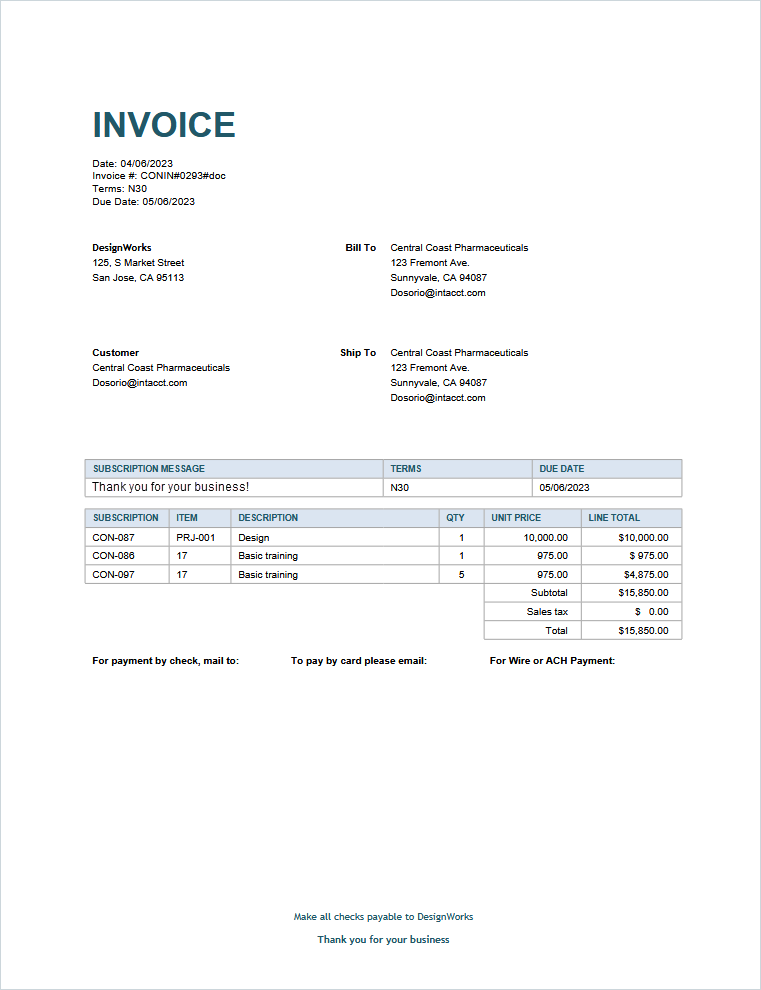
| Contracts Invoice - multiple contracts sample |
Uses "Subscription" terminology and contains fields in the details section to display amount due by contract ID. Use this template for customers who have multiple contracts. This template works best when only the Customer checkbox is selected in the Invoice by options in the Generate Invoices page.
|
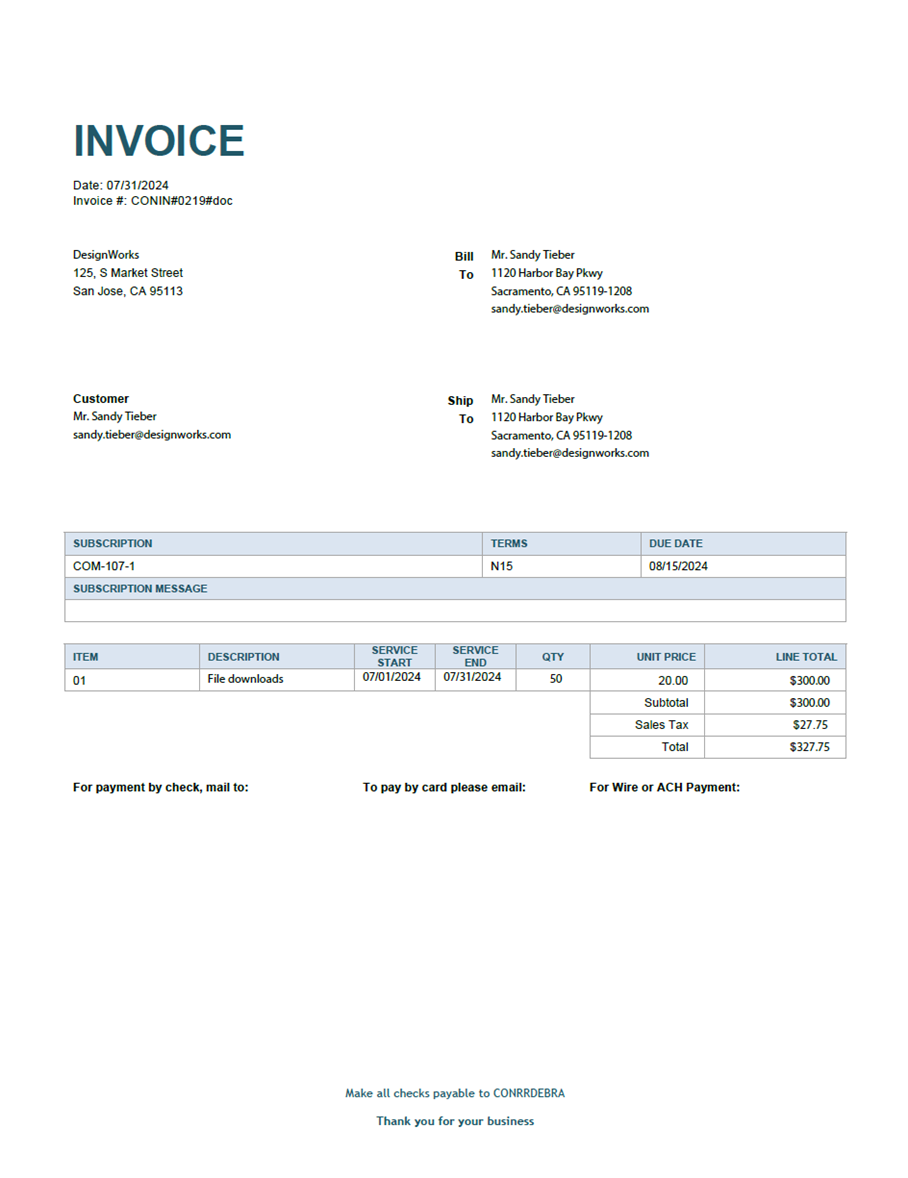
| Contracts Invoice - service period sample |
Includes the Service period start date and Service period end date in the line item details section. Use this template to give customers visibility into the exact period they're being billed for.
|
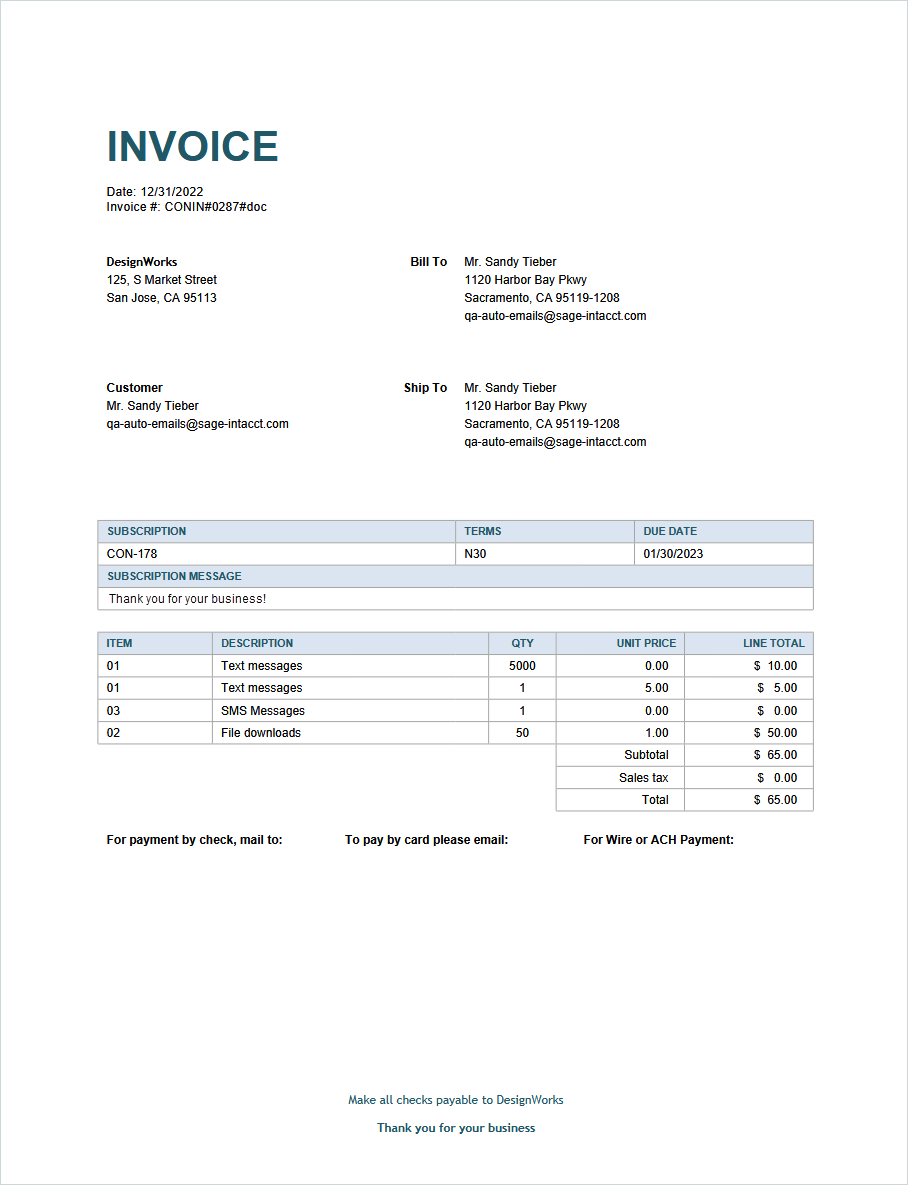
| Contracts Invoice - single contract sample |
Uses "Subscription" terminology, contains the contract ID, and lists contract lines by item ID. Use this template for customers who have one contract.
|
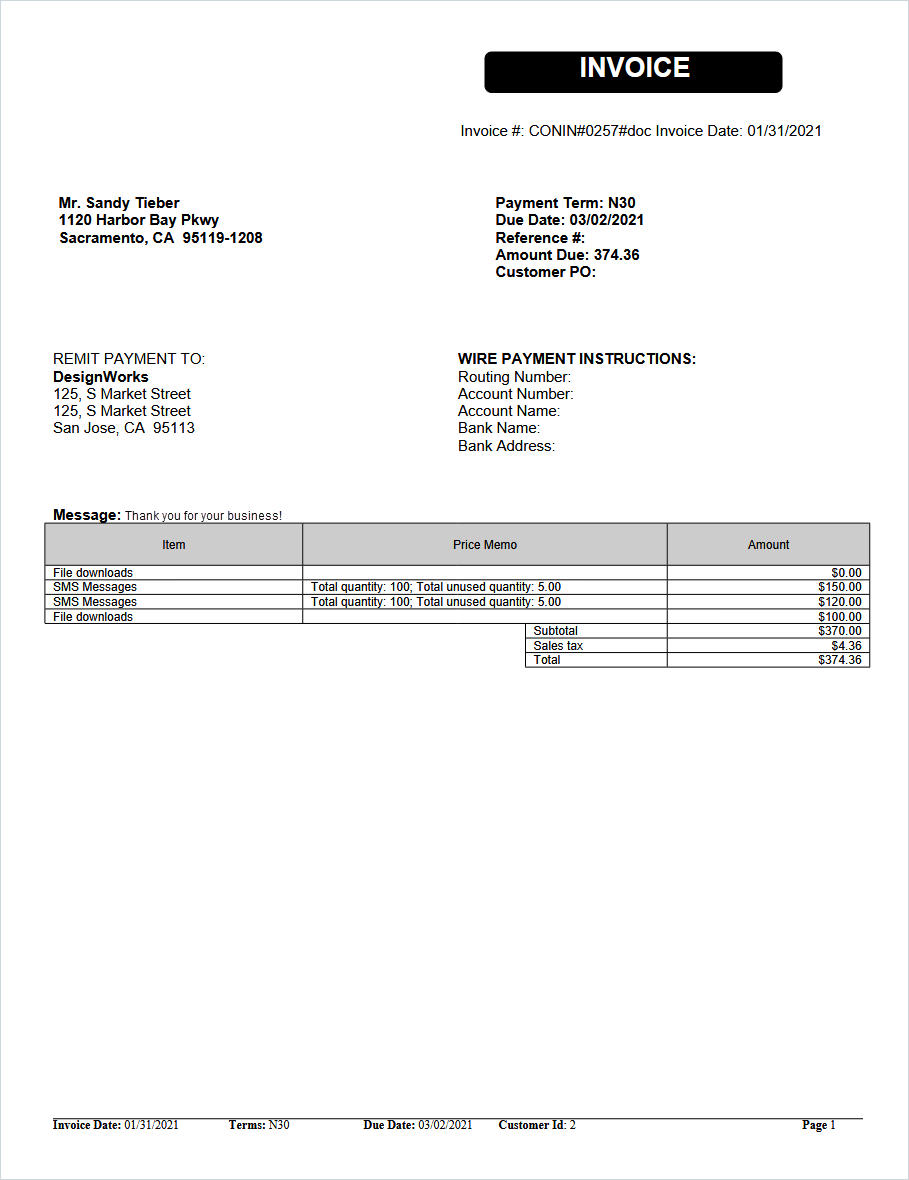
| Contracts Invoice - usage price calculation memo |
Includes the Price calculation memo field in the line item details section. This shows the details for how Intacct calculated the billing price for a usage-based contract line item. Use this template for customers that you bill for usage.
|
Inventory Control
The following samples are specific to Inventory Control.
| Sample template | Use case |
|---|---|
|
Inventory Transfer Sample |
Simple inventory transfer sample that can be used internally. This information is also held in the audit trail if you want to view the information in Sage Intacct instead. Be sure that the template type that you apply to this printed document template matches the template type set in your transaction definition, which differs from Workflow category.
|
Purchasing
The following samples are specific to Purchasing.
| Sample template | Use case |
|---|---|
|
Purchase Order Sample |
Standard purchase order with key fields like item number, unit of measure, quantity, and unit price. For further detail and customization, consider adding the Deliver-to contact fields to the description column on the template. Deliver to is enabled in Purchasing configuration.
|
Order Entry
The following samples are specific to Order Entry.
Sage Intacct provides samples specific to Australia (AU), South Africa (SA), and United Kingdom (UK). These sample templates aim to meet legal requirements in that tax jurisdiction. However, it is your responsibility to verify your legal requirements and determine whether the templates meet those requirements. These samples include:
- AR Tax Invoice Sample (AUS GST-enabled)
- OE Tax Invoice Sample (AUS GST-enabled)
- AR Tax Invoice Sample (ZA VAT-enabled)
- OE Tax Invoice Sample (ZA VAT-enabled)
- AR Sales Invoice Sample (UK VAT-enabled)
- OE Sales Invoice Sample (UK VAT-enabled)
For these templates, make limited changes, such as changing colors, updating the company logo, or changing the font. Other edits might impact the accuracy or functionality of the templates. For customization, like adding fields, changing the layout, or changing the header, contact professional services.
If you have needs outside the AU, SA, or UK tax jurisdictions, or if these templates do not meet your requirements, contact professional services.
| Sample template | Use case |
|---|---|
|
Sales Invoice Sample |
This sample serves two use cases:
|
|
Sales Invoice Aging Sample |
This sample mirrors the Sales Invoice Sample as a standard, Order Entry sales invoice, but it also includes an aging table at the bottom. |
|
Sales Invoice Fixed Price Sample |
This sample serves three use cases with extra customization:
|
|
Sales Invoice Time and Expense Sample |
Projects billing based on time and expenses, which also includes employee and task. Projects billing is unique to each business. Many companies find it useful to customize this template further. Additionally, this template also includes logic for grouping by line totals in the Qty and Line total columns.
|
|
Sales Order Sample |
Standard sales order template that offers commonly used fields and layout, including item number, description, unit, quantity, unit price, and amount for each line item. |
|
OE Tax Invoice Sample (AUS GST_enabled) |
Standard tax invoice sample that includes tax per line item and the subtotal, tax subtotal, and total due. This sample contains merge fields that only apply to companies subscribed to Taxes.
|
|
OE Sales Invoice Sample (UK VAT-enabled) |
Standard sales invoice sample that includes the subtotal, tax subtotal, total due, and a tax rates table. This sample contains merge fields that only apply to companies subscribed to Taxes.
|
| OE Tax Invoice Sample (ZA VAT-enabled) |
Standard tax invoice sample that includes tax per line item and the subtotal, tax subtotal, and total due. Headings also dynamic change to meet local requirements. This sample contains merge fields that only apply to companies subscribed to Taxes.
Additional print settings for South Africa
To meet invoice requirements for the South Africa tax jurisdiction, you need to set some specific options: Customers - When customers in South Africa have agreed to accept emailed documents, the text 'Computer Generated' needs to be included in the PDF. Set the Accepts emailed invoices option to true in the customer record so that the PDFs are generated with the correct wording.
Accounts Receivable- After a posted invoice, credit note, or debit note is printed, all subsequent printed copies of the document need to include the text 'Copy'. In addition, the posted transactions that have been printed or emailed are not be editable. Setting two options on the Configure Accounts Receivable page ensures that these requirements are met.
Order Entry - After a posted invoice is printed, all subsequent printed copies of the document need to include the text 'Copy'. In addition, the posted transactions that have been printed or emailed are not be editable. Setting options in the Configure Order Entry page and in the transaction definition ensures that these requirements are met:
|
Supplies Inventory
The following samples are specific to Supplies Inventory.
| Sample template | Use case |
|---|---|
|
Supplies Pick List Template Sample |
Standard pick list for warehouse picking activities. Includes the order line item details, warehouse quantity, and delivery destination. Customize this template to add more detailed warehouse location tracking details. |
|
Supplies Report Template Sample |
Standard pick report for tracking issued inventory includes the Supplies Pick List Template details, as well as pick status. |
