Accounts Payable
Update an AP purchase invoice that you submitted for approval
If you've ever selected submit on an AP purchase invoice, only to realize that you made an error, you'll appreciate the new recall option for AP AP purchase invoice approvals.
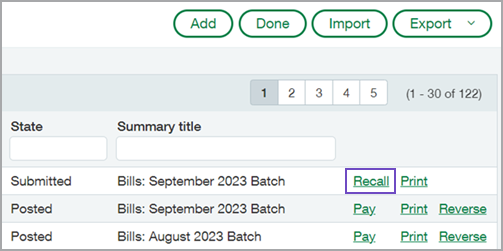
Recall allows you to remove a submitted AP purchase invoice from the approval queue and return it to an editable draft state. You can then update the AP purchase invoice and resubmit for approval.
Recall is available on the AP purchase invoices list and in AP purchase invoice detail view for AP purchase invoices that are in a Submitted state. Any user with AP purchase invoices: Edit permissions can recall an eligible AP purchase invoice.

Details
-
Approvers who are set up to receive email notifications are notified when an AP purchase invoice in their queue is recalled.
-
After a user recalls an AP purchase invoice and it returns to the draft state, only the audit trail indicates that the AP purchase invoice was previously recalled.
-
You can recall and resubmit an AP purchase invoice as often as you need to.
-
AP purchase invoices can be recalled using either the UI or the API.
How it works
- Go to Accounts Payable > AP purchase invoices.
- Find the AP purchase invoice that you want to recall in the list.
- Select the Recall link at the end of the row.You can also select Recall when you view the AP purchase invoice detail.
- To update the AP purchase invoice, select Edit on the same row.
You can now make any necessary corrections and re-submit the AP purchase invoice when ready.
Requirements
| Subscription |
Accounts Payable |
|---|---|
| Regional availability |
All regions |
| User type | Business |
| Permissions |
Bills: Edit |
| Configuration |
Requires that AP AP purchase invoice approval be enabled. |
| Restrictions |
|
