Company setup checklist overview
Related information
 Related topics
Use the Company Setup Checklist to do the following:
- Add accounting data to a new company.
- Quickly clear some or all the records from an existing company.
- Choose which parts of your existing accounting package that you want to import.
- Upload external lists to avoid entering the data manually.
About the Company setup checklist
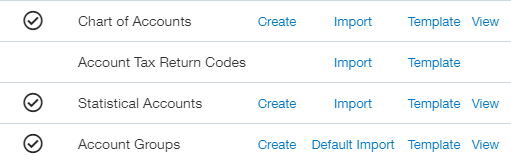
When an item has a check mark next to it, its setup is complete.
-
Select Create to open the application and create a record.
-
Select Import to import information from CSV or Excel files.
-
Select Default Import to have Intacct create a list of default items.
-
Select Template to download an Excel .xls template. In addition to standard columns, Intacct templates include columns for the following:
-
Dimensions enabled in your company.
-
Custom fields that you created.
-
Custom objects that you created.
-
Standard fields.
-
Custom fields.
-
Descriptions of requirements for each standard field.
-
-
Select View to see any records that you already have.
