About Marketplace agents
Related information
 Related topics
Marketplace Agents are AI-powered assistants that help users complete specialized tasks and access information through Sage Copilot. Marketplace Agents are created and maintained by Sage-approved partners and are available for purchase in the Agent Marketplace in Sage Intacct.
After a Marketplace agent is purchased and associated with your company, an administrator must enable the agent and assign it to the appropriate roles. Users can access the agent in Sage Copilot only when the agent is enabled, assigned to their role, and available with the permissions assigned to that role.
Marketplace agent workflow
Marketplace agents extend the capabilities of Sage Copilot by providing specialized capabilities for specific business scenarios.
The process for making a Marketplace agent available to users includes the following steps:
-
Review available agents in the Marketplace.
-
Purchase a Marketplace agent.
-
Associate the subscription with an Intacct company.
-
Activate the Marketplace agent.
-
Assign the Marketplace agent to one or more roles.
-
Use the Marketplace agent in Sage Copilot.
For information about purchasing and setting up a Marketplace agent, see Purchase and set up a Marketplace Agent.
The Marketplace Agent experience
The Marketplace Agent experience includes three areas:
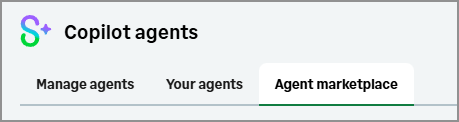
Manage agents
Administrators use the Manage agents tab to review purchased agents, activate or deactivate agents, and view agent details. Agent details can include: required permissions, documentation, support resources, terms and conditions, and privacy policy information.
Administrators review required permissions and legal information before making a Marketplace agent available to users.
Your agents
View the Marketplace Agents assigned to your role and use them in Sage Copilot.
Agent marketplace
Administrators use the Agent Marketplace to review available agents, view agent details, and purchase agents. The agent purchasing process is completed through the AWS Marketplace.
User access
Making a Marketplace agent available to users requires both administrator activation and role assignment.
A user can access a Marketplace Agent only when:
-
The company has a Finance Intelligence Agent (FIA) subscription.
-
The Marketplace agent has been purchased and associated with the company.
-
The Marketplace agent is activated.
-
The Marketplace agent is assigned to the user's role.
-
The user's role includes the permissions required by the Marketplace agent.
If any of these requirements are not met, the Marketplace agent does not appear in the list of agents available from the @ picker in Sage Copilot.
Admins typically review an agent's required permissions and assign the agent to one or more roles before making it available to users. Admins control access to agents through role subscriptions and permissions.
Understanding agent responses
Marketplace Agent responses include information that helps users understand the source of the response and how it was generated.
Responses can include:
-
Agent attribution that identifies which Marketplace agent generated the response.
-
How AI worked it out, which explains the data and reasoning used to generate the response.
-
Informational disclaimers provided by the Marketplace agent provider.
Review AI-generated content before making business decisions.
Permissions and other requirements
To purchase and manage Marketplace Agents, you must have:
-
An active Sage Intacct subscription.
-
An active Finance Intelligence Agent (FIA) subscription.
-
A paid AWS account.
-
A business user with admin privileges in Sage Intacct.
-
A roles-based company.
Only business users with admin privileges can purchase, enable, and manage Marketplace Agents.
| Subscription |
|
|---|---|
| Regional availability |
|
| User type |
To subscribe to the Marketplace Agents:
To purchase and assign agents:
To use agents:
|
| Permissions |
To subscribe to the Marketplace Agents:
To purchase and assign agents:
To use agents:
|
| Configuration |
Available only in roles-based companies. |
