About Purchasing transaction definitions
-
- Whether the transaction includes subtotals
- How partially fulfilled transactions are processed
- Which users, groups, or both have access to the transaction
- What effect the transaction has on accounting
Learn more about transaction definition settings.
The level of flexibility you have to add and edit transaction definitions depends on whether your company is using standard or advanced workflows.
If you are using standard workflows
You cannot delete the standard transaction definitions. You can edit some configuration settings, such as specifying which users or groups have access to the transaction definition or whether to allow editing.
Default Purchasing transaction definitions
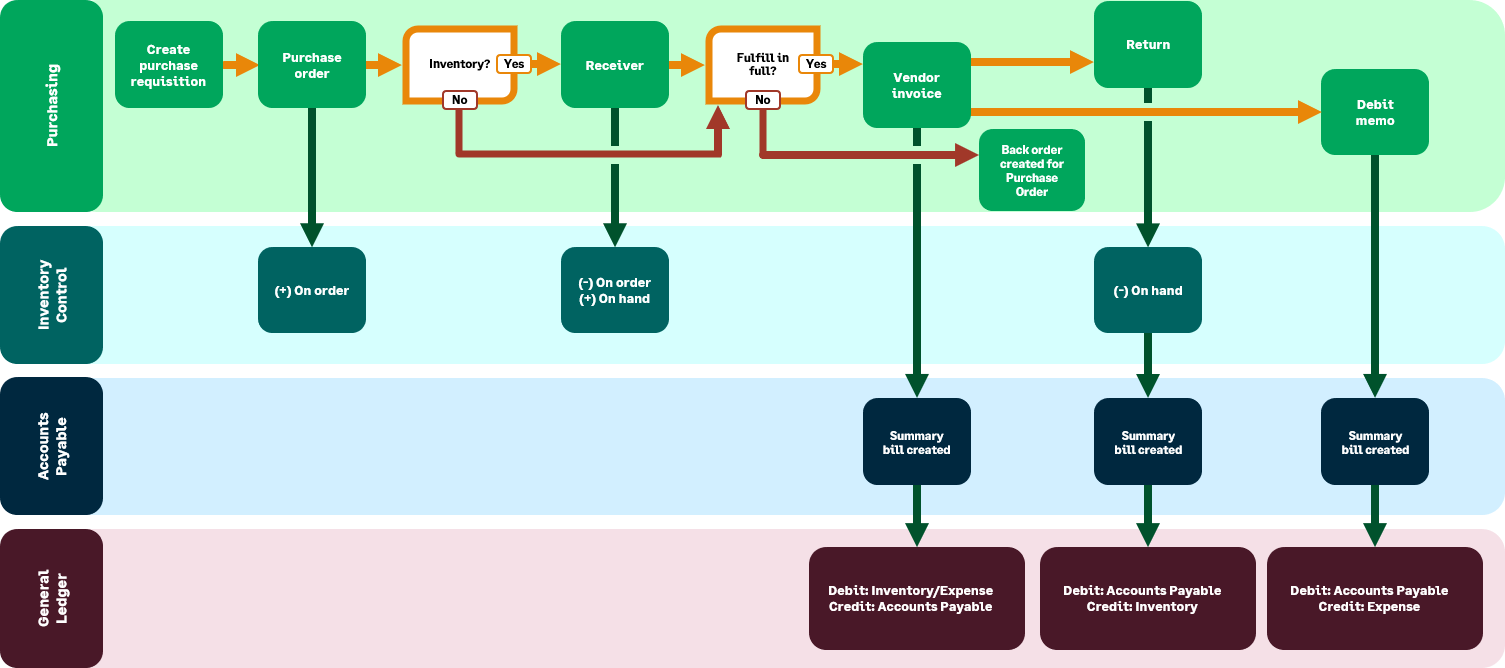
The standard workflow that you install determines which Purchasingtransaction definitions are installed. When you select the workflow in the product interface, a graphic appears that shows the transaction definitions and their effect on Inventory Control, Accounts Payable, and General Ledger.
The workflows are:
- Purchase requisition
- Purchase order
- Vendor invoice
- Purchasing debit memo
- Purchase requisition
- Purchase order
- Vendor invoice
- Purchasing debit memo
- Purchase requisition
- Purchase order
- Receipt
- Vendor invoice
- PO Return
- Purchasing debit memo
- Purchase requisition
- Purchase order
- Receipt
- Vendor invoice
- PO Return
- Purchasing debit memo
- Purchase requisition
- Purchase order
- Receipt
- Vendor invoice
- PO Return
- Purchasing debit memo
- Purchase requisition
- Purchase order
- Receipt
- Vendor invoice
- PO Return
- Purchasing debit memo
No transaction definitions are installed.
If you are using advanced workflows
After using standard workflows and enabling advanced workflows, you can customize some of the preconfigured standard transaction definitions to suit your business needs. An advanced workflow provides you with greater flexibility to determine the types of transactions included in a workflow, the order in which the transactions are processed, and the accounting rules for each transaction definition. Advanced workflows are recommended for Inventory Control.
Supplies Inventory is preconfigured to use advanced workflows, and a supplies purchase transaction definition is automatically generated for you, SYS-Supplies requisition. If you have department-specific approval policies, you can create duplicate supplies request transaction definitions to use with specific approval policies. Learn more about purchasing supplies items.
Because this flexibility impacts subledger and GL accounts and inventory valuation, Sage Intacct recommends that these types of transaction definition adjustments be made by someone skilled in making this type of business-process change.
Learn more about standard versus advanced workflows.
Example of transaction definitions in a workflow
The following is an example of how a Purchasing transaction definition workflow impacts Inventory Control, General Ledger, and Accounts Receivable.