Use functions in calculation columns—ICRW
Related information
 Related topics
You can add functions to a column calculation. Functions are most often used in addition to other calculation items, such as filters and operands.
| Subscription | Interactive Custom Report Writer
Platform Services |
|---|---|
| Regional availability |
All regions |
| User type | Interactive Custom Report Writer: Business, Project Manager |
| Permissions |
Interactive Custom Report Writer: Run, List, View, Add, Edit, Delete Platform Services: Run, List, View, Add, Edit, Delete
|
Functions are an advanced feature. Before you use them, you need to understand how they work. For a good example, see Example report with calculations—ICRW.
Functions require the following syntax:
- A double-quotation mark (") around folder and field names
- A single quotation mark (') around string values
- A comma (,) between arguments
- Parenthesis ( ( ) ) to close an argument
Add a function to a calculation column
- Open an ICRW report, go to the Refine tab, and select the Calculation column icon
 .
. - Give the new calculation a Folder title and Column title.
- Optionally, select a Totals row from the dropdown list. This option adds the calculated totals to the column.
- Go to the Calculations section and select f(...) to open the Functions dialog.
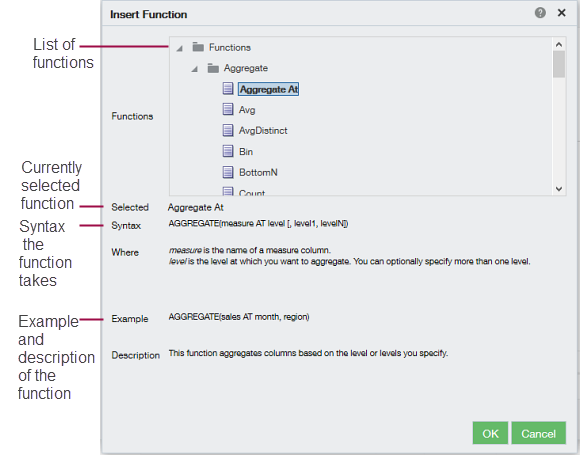
- Select the function and select OK to add it to the calculation.
- Repeat the process to add more functions.
- Save your report.
