Change column sort order
Related information
 Related topics
In Interactive Custom Report Writer (ICRW), you can change the way the results appear in a column. Each column can be sorted differently.
| Subscription | Interactive Custom Report Writer
Platform Services |
|---|---|
| Regional availability |
All regions |
| User type | Interactive Custom Report Writer: Business, Project Manager |
| Permissions |
Interactive Custom Report Writer: Run, List, View, Add, Edit, Delete Platform Services: Run, List, View, Add, Edit, Delete
|
Specifying the column order
You can include multiple sorts in the same report, using different columns. For example, to add cumulative sorts you might first sort by ascending name and then sort by descending date. You can sort by selecting Add ascending sort or Add descending sort.
Sorting with the Define tab
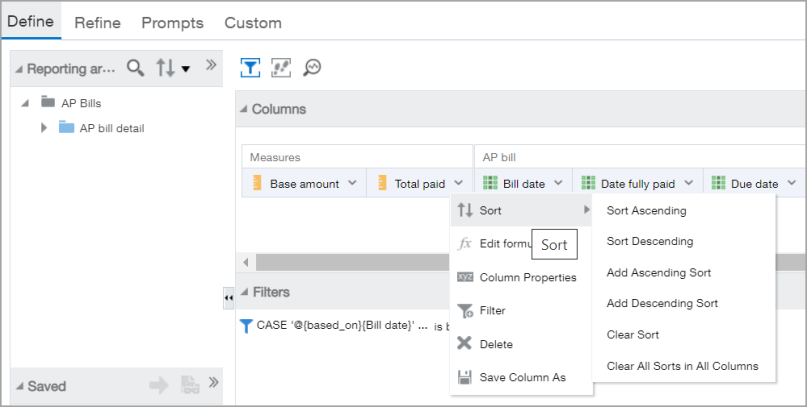
- Open an ICRW report and go to the Define tab.
- Find the column that you want to sort.
- Select
 (Options) to the right of the column title.
 - Select Sort.
- Choose the desired sort order.
Sorting with the Refine tab
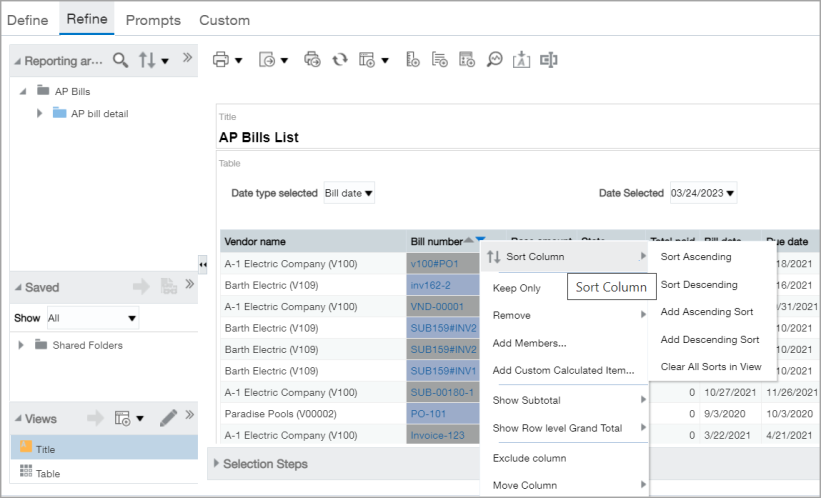
- Open an ICRW report and go to the Refine tab.
- Find the column that you want to sort.
- Right-click the column title.
- Select Sort Column.
- Choose the desired sort order.