Set up revenue recognition with installment billing—Order Entry
Related information
 Related topics
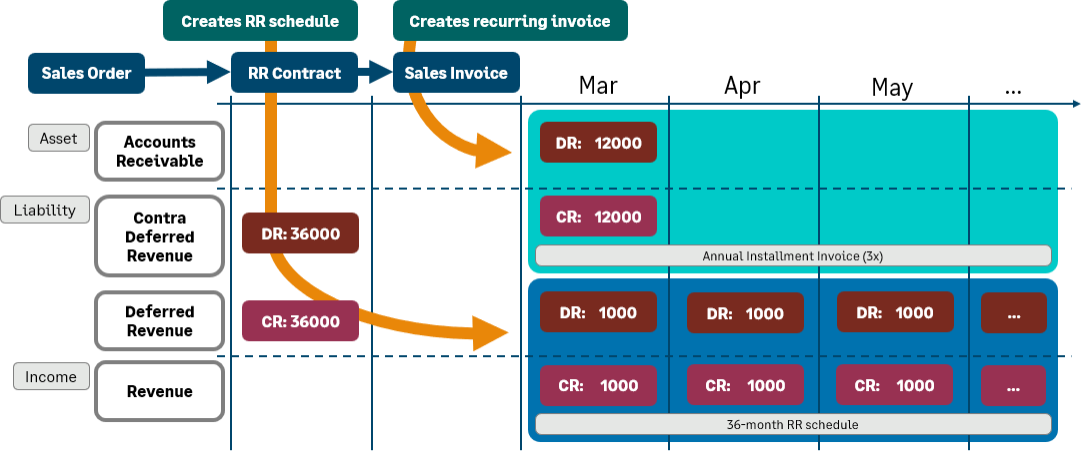
If your company will typically need more than one invoice per a contract for which you want to recognize revenue, Sage Intacct recommends that you set up a workflow that separates the revenue recognition and billing. In this workflow, a single transaction will contain the revenue recognition schedule for the full contract term for each line item. Individual invoices will subsequently be generated for each billing period independent of the revenue recognition schedule.
To set up revenue recognition with installment invoicing, you’ll create three transaction definitions (you can name the transaction definitions whatever you want):
- Sales order
- Revenue recognition activation transaction (In this example, Revenue contract)
- Sales invoice
| Subscription |
|
|---|---|
| Regional availability |
All regions |
| User type |
|
| Permissions |
|
| Configuration |
|
1. Create the sales order transaction definition
The sales order is typically the first step of a revenue recognition with installment invoicing workflow. The sales order transaction in this workflow does not affect accounting.
The following table shows the transaction definition settings required for the sales order in this workflow. You can also use this sales order transaction definition for items without revenue recognition, and you can use this same sales order transaction definition in other workflows. You can set other sales order transaction definition options that are not listed in this table as applicable to your business process.
Learn more about creating transaction definitions.
| Transaction definition field | Setting | Notes |
|---|---|---|
|
Template type |
Order |
|
|
Workflow category |
Order |
|
|
Transaction posting |
None |
The sales order does not post to the GL or to AR. |
|
Partial conversion handling |
Close transaction |
You cannot create back order sales orders for partially fulfilled sales orders in this workflow. |
|
Enable revenue recognition |
Display only |
This lets you attach the revenue recognition template to a line item and set the start and end dates. It does not generate the revenue recognition schedule when the sales order is posted (saved). |
|
Posting configuration tab |
No mapping |
No mapping required because the sales order does not affect accounting in any way. |
2. Create the revenue recognition activation transaction definition
The revenue recognition activation transaction is the second workflow step. In this procedure, we’re referring to this transaction definition as the revenue contract, but you can name it whatever you want.
There are three types of GL accounts associated with the revenue contract:
- Sales revenue account: identified for each item GL group in the Posting configuration tab of the transaction definition
- Contra deferred revenue account: identified for each item GL group in the Posting configuration tab of the transaction definition. The contract deferred revenue account is a liability account that will increase when debited.
- Deferred revenue account: identified in each item GL group definition
When a user posts the revenue contract, Intacct:
- Generates a revenue recognition schedule for the full amount of the contract for each line item for which revenue is being deferred. The revenue recognition schedule lists the future journal entries that will credit the sales revenue account as revenue is recognized.
- Debits the full contract amount to the contra deferred revenue account
- Credits the full contract amount to the deferred revenue account.
The following table shows the transaction definition settings required for the revenue contract.
You can set other transaction definition options that are not listed in this table as applicable to your business process.
Learn more about creating transaction definitions.
| Transaction definition field | Setting | Notes |
|---|---|---|
|
Template type |
Invoice |
If you’re using project revenue recognition and are billing a Fixed Fee project, use Order instead of Invoice as the Template type so that you can attach the billing template to the revenue recognition activation transaction. |
|
Workflow category |
Invoice |
|
|
Transaction posting |
General Ledger |
The full amount of the revenue posts directory to the GL. |
|
Partial conversion handling |
Leave transaction open |
|
|
Enable revenue recognition |
Post |
Intacct will generate the revenue recognition schedule when the user posts the revenue contract. |
|
Enable line-item conversion |
Checked |
This lets the user convert the revenue contract transaction line item into a recurring transaction, which creates the actual invoices according to the associated recurring schedule. |
|
Posting configuration tab |
Map each applicable Item GL group to:
|
When a user posts a revenue contract, Intacct debits the total contract amount to the contra deferred revenue account and credits the amount to the deferred revenue account that's associated with the Item GL group, which nets to zero. For example, say that you have an item GL group called Licensing. In the Transaction posting GL account mapping table for the revenue contract transaction definition:
If you want to use this revenue contract with items without revenue recognition, you must specify the applicable debit/credit accounts in the Posting configuration tab for the applicable item GL groups. The best practice is to only use the revenue contract for items with revenue recognition. |
|
Convert from |
Sales order |
3. Create the sales invoice transaction definition
The sales invoice is the third transaction definition required for the revenue recognition with installment invoicing workflow. Users do not convert the revenue contract directly into the sales invoice. Instead, they convert the revenue contract line items to one or more recurring transactions that are defined to use this sales invoice transaction definition.
The recurring transaction generates the sales invoice automatically according to the recurring schedule. The sales invoice debits Accounts Receivable and credits the contra deferred revenue account for each invoice generated.
The following table shows the transaction definition settings required for the sales invoice.
You can set other transaction definition options that are not listed in this table as applicable to your business process.
Learn more about creating transaction definitions.
| Transaction definition field | Setting | Notes |
|---|---|---|
|
Template type |
Invoice |
|
|
Workflow category |
Invoice |
|
|
Numbering sequence |
Select a numbering sequence |
As the invoice will be generated from a recurring transaction, you must select the applicable numbering sequence or the recurring transaction will fail. |
|
Transaction posting |
Accounts Receivable |
|
|
Enable revenue recognition |
Do not enable |
|
|
Partial conversion handling |
Close transaction |
|
|
Enable line-item conversion |
Not checked (false) |
|
|
Posting configuration tab |
Map each applicable Item GL group to debit AR (defined as offset) and credit its contra deferred revenue account |
Each invoice relieves the contra deferred revenue account. You can also use this sales invoice transaction definition for items without revenue recognition, but you must specify the applicable debit/credit accounts in the transaction definition Posting Configuration tab for the applicable item GL groups. |
|
Convert from |
Revenue contract |
4. Identify journals for the revenue recognition activation transaction definition
After you create the transaction definitions, you need to identify the revenue recognition journal and sales journal to which the revenue recognition activation transaction will post via the Documents configuration tab of the Configure Order Entry page. Sales journal definition is required for transactions that post directly to the GL.
Learn more about document configuration.
