CONSTRUCTION
New project contract billing tab reflects invoice billing totals
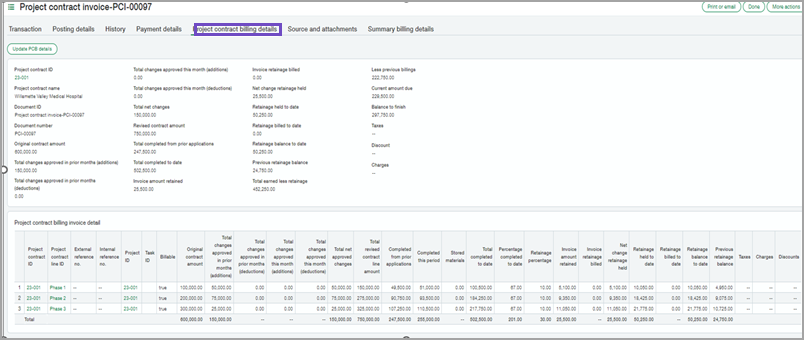
With this release, you can now use a new read-only Project contract billing details tab to view the latest invoice billing totals for new and existing project contract lines and project contracts. Project contract billing details are also available in new printed document templates and Interactive Custom Report Writer (ICRW) reporting objects.
The new ICRW objects:
-
Retrieve information from the project contract invoice
-
Combine project-related transactions across applications and subledgers
-
Replace the need to use custom SQL to write most construction-related job reports
How it works
New invoice formats are created using the totals from this new tab.
This new tab shows information as you would see on a typical payment application form and continuation sheet. No more duplicate lines! Only one line displays retainage held and billed totals. Unsummarized Time and Materials invoices create a single line for each billed expense.
-
Go to Projects > All tab > Project contracts.
-
You will initially see a list of all active project contracts. To create a new project contract, select Add.
-
Enter a project contract name and ID (both required).
-
Select the new tab to see the billing totals.
Examples
You generated and posted a project contract invoice billing through August 1 and printed it. Then:
-
You approved a project change order and backdated it with a price effective date of July 31. You want to re-print the invoice to reflect the updated revised contract price.
-
You created a retainage release invoice backdated to July 31. You want to re-print the project contract invoice to reflect the correct retainage balance.
-
You edited project contract invoices prior to the current one.
Requirements
| Subscription |
Project Costing and Billing Construction |
|---|---|
| Regional availability |
|
| User type |
Business user Project manager |
| Permissions |
Projects, Project contracts: View, Add, Edit, Delete |
