CONSTRUCTIoN
Use compliance tracking to prevent paying vendors with outstanding lien waivers
This idea came from you!
With this release, you can now avoid paying Accounts Payable (AP) bills to non-compliant vendors with outstanding lien waivers.
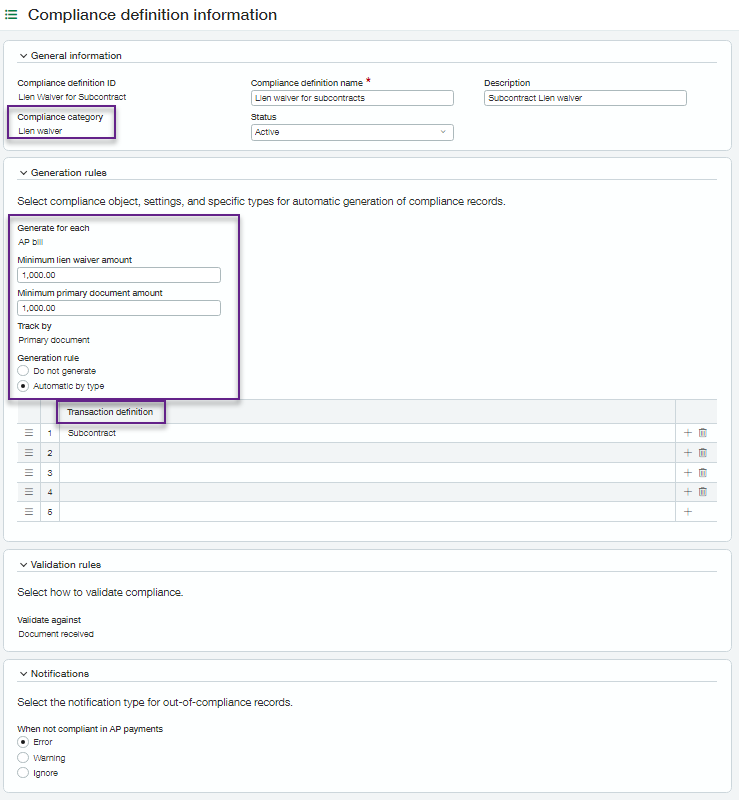
First, create compliance definitions and types that generate lien waiver records automatically for primary document-enabled Purchasing transaction definitions. The newly created lien waiver records are incorporated automatically into our compliance tracking and notification system. Using the system-generated compliance records, you can then print or email lien waiver documents using your customized templates.
Then, the lien waiver generation and notification rules you defined prevent you from paying a commitment-related (AP) bill to a vendor associated with outstanding lien waivers.
How it works
-
Enable the Vendor Compliance subscription, included with your Construction subscription.
-
In Purchasing, assign compliance setup and compliance records permissions to users.
-
If you have not already done so, enable the primary document option on appropriate Purchasing transaction definitions.
-
Create compliance definitions for the compliance category of lien waiver with the following information:
-
Identify whether to generate lien waiver compliance records when creating commitment-related bills or when paying those bills in Accounts Payable (AP).
-
Set minimum values for generating compliance records.
-
Choose the primary document-enabled Purchasing transaction definitions that generate lien waivers.
-
Determine the notification (warning or error) to receive during payment when lien waivers are not received.
-
-
Create compliance types with the following information:
-
Use an auto number sequence.
-
Associate with a compliance definition.
-
Identify printed document templates to use for lien waivers and final lien waivers.
-
- In Purchasing > All > Vendor compliance > Compliance records:
-
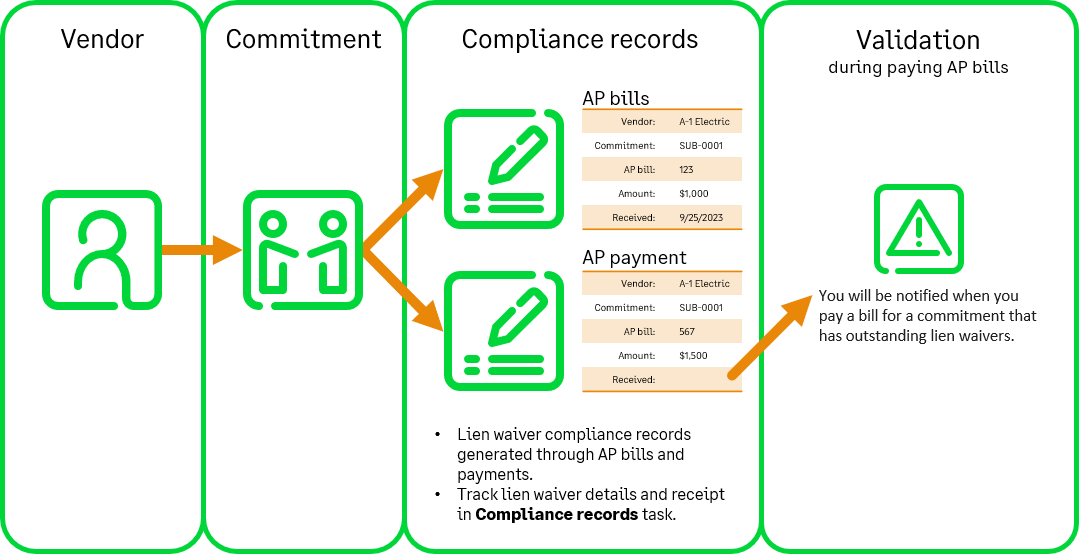
Lien waiver records are generated automatically based on your selections and minimums and include links to the primary document, AP bill, or AP payment information.
-
Lien waivers set to generate on AP payments validate on the next payment for the primary document.
-
Voiding, reversing, or deleting the associated bill or payment voids the compliance record automatically.
-
You can delete a lien waiver record at any time. And, you can print a lien waiver record or email it to your vendors.
Examples:
-
Conditional lien waiver:
Vendors can include a signed conditional lien waiver when they submit a bill. When you pay the vendor's bill, you can see if that vendor has outstanding conditional lien waivers. Because the vendor sent a completed lien waiver with their bill, you do not need to print it. -
Unconditional lien waiver:
Vendors agree to return a signed unconditional lien waiver after you pay them. If you do not receive the signed lien waiver, you can withhold future payments. Print the lien waiver form and send it to the vendor after payment.
Requirements
| Subscription |
Vendor Compliance subscription, included with Construction subscription |
|---|---|
| Regional availability |
|
| User type |
Business user Project manager |
