nonprofit
Change billable-related labels to reflect grant management terminology
The term billable does not always make sense for nonprofit organizations working with grants. By selecting one checkbox, you can change the Billable label to Qualified expense. All related labels are updated. The list of affected areas is in the following section.

Details
The updated labels appear in the following locations:
|
Functional area |
Page name |
Tab or button |
Current label |
New label |
|---|---|---|---|---|
|
Cash Management |
Credit card transactions |
- |
Billable |
Qualified expense |
|
Time & Expenses |
My expenses |
- |
Billable |
Qualified expense |
|
Time & Expense |
Staff expenses |
- |
Billable |
Qualified expense |
|
Time & Expense |
My timesheets |
- |
Billable |
Qualified expense |
|
Time & Expense |
Staff timesheets |
- |
Billable |
Qualified expense |
|
Accounts Payable |
Bills |
- |
Billable |
Qualified expense |
|
General Ledger |
Journal entries |
- |
Billable |
Qualified expense |
|
Purchasing |
Transactions |
- |
Billable |
Qualified expense |
|
Projects |
Project |
Additional info |
Billing |
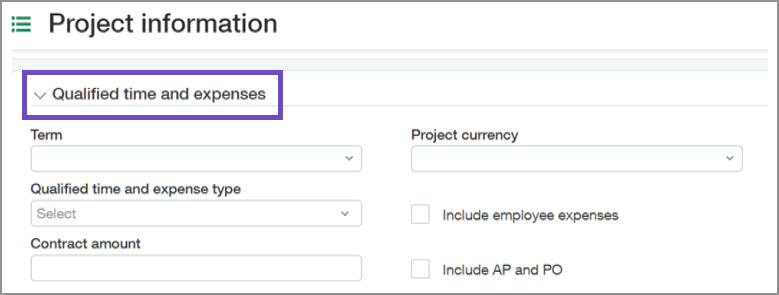
Qualified time and expenses |
|
Projects |
Project |
Additional info |
Billing type |
Qualified time and expense type |
|
Projects |
Project |
Additional info |
Billable employee expenses |
Include employee expenses |
|
Projects |
Project |
Additional info |
Billable AP and PO |
Include AP and PO |
|
Projects |
Project |
Project summary |
Actual billings |
Actual qualified Time and expenses |
|
Projects |
Project |
Project summary |
Budgeted billing amount |
Projected qualified time and expense amount |
|
Projects |
Project |
Project summary |
Budget billing amount difference |
Projected qualified time and expense amount difference |
|
Projects |
Project |
Project summary |
Budget billing percentage variance |
Projected qualified time and expense percent variance |
|
Projects |
Task |
|
Billable |
Qualified time and expense |
|
Projects |
Generate invoices |
Display options |
Choose billable transactions |
Choose qualified time and expense transactions |
|
Projects |
Generate invoices |
Preview |
Budgeted billing amount |
Projected qualified time and expense |
|
Projects |
Generate invoices |
Preview |
Billed to date |
Applied expenses to date |
|
Projects |
Generate invoices |
Preview |
Billed to date hours |
Applied hours to date |
Change billable and related labels
-
Go to Projects > Configuration.
-
Under Billable field label, select Grant (Qualified expense).
The Billable field label section is available if the Enable grant fields checkbox is selected.
Requirements
| Subscription |
Projects or Grants |
|---|---|
| Regional availability |
All regions |
| User type | Business user with admin privileges |
