Taxes
1099 e-filing powered by TaxBandits
We're excited to announce the general availability of our 1099 e-filing integration with our trusted partner, TaxBandits. TaxBandits is authorized by the IRS as a 1099 e-filing provider.
Overview
Skip the manual printing of 1099 forms and send tax information directly to TaxBandits, where you then prepare it and submit it to the IRS. Because TaxBandits automatically verifies your tax information against IRS requirements, you can avoid filing corrected forms and paying penalties.
From TaxBandits, you can also file state forms, send forms by postal mail, and grant online access to recipients.
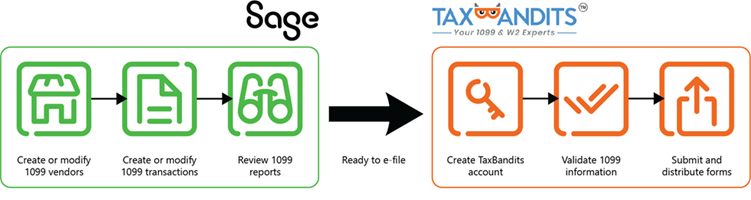
Get started
-
Make sure you are subscribed to Sage Cloud Services.
You won't be charged for this subscription.
-
Go to Configure Accounts Payable and click Enable1099 e-filing powered by TaxBandits.
After you enable the feature, you can access the E-file submissions option in the Accounts Payable menu.
-
Create a TaxBandits account.
How you create an account in TaxBandits is important, so be sure to read the Help topic on how to do so.
-
Verify 1099 information.
Run the 1099 report. You can also export a file to check that your total taxable amounts are as expected. Update 1099 information as needed.
Workflow
The process of creating and filing batches of 1099 forms is easy, thanks to tight integration between Sage Intacct and TaxBandits.
Create a batch for a range of vendors or a batch of a type of form, such as 1099-MISC. Then, with the click of a button, send the batch of files to TaxBandits where you continue the e-filing process. You can create and send multiple batches to TaxBandits.
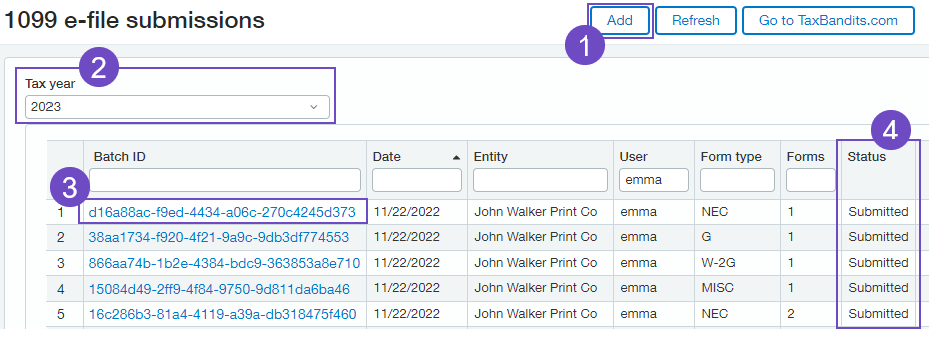
-
Begin the e-filing process in Sage Intacct by creating a batch of 1099 files.
-
Select the tax year for which you're filing.
-
When the batch has been successfully submitted to TaxBandits, click the Batch ID link and go to the TaxBandits website to complete the e-filing process.
-
Check the status of your batch.
Depending on how many files are in the batch, it might take some time before it arrives in TaxBandits. You can refresh the page in Sage Intacct to view the latest batch status.
Requirements
| Requirement | Description |
|---|---|
|
Subscription |
Accounts Payable Sage Cloud Services |
| Regional availability | United States |
| Configuration | Enable 1099 e-filing powered by TaxBandits on the Configure Accounts Payable page |
|
Permissions |
Form 1099: Run |
