CoNSTRUCTION
New option to display all project contract billing amount fields
Previously, Sage Intacct displayed summary project contract billing fields on project contract invoices. This release, Intacct has hidden those additional fields. You can now find project contract billing information in the new Project contract billing details tab on invoices.
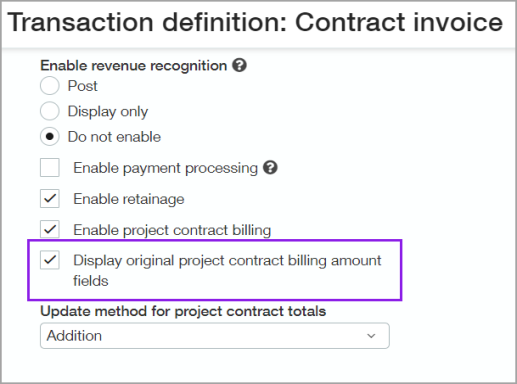
If you still want to see the original fields on project contract invoices, you can enable the Display original project contract billing amount fields option.
Details
When you enable the Display original project contract billing amount fields option, you will see the following fields on project contract invoices:
-
Billing summary fields in the Project contract section.
-
Project change order summary fields in the Project contract section.
-
Additional fields in the Entries section.
How it works
To select the Display original project contract billing amount fields checkbox, you must also select the Enable project contract billing checkbox.
-
Go to Order Entry > Setup tab > More > and select Transaction definitions.
-
Find a transaction definition for Project contract invoices and select Edit.
-
On the General tab, scroll to the Accounting section.
-
Below Multi-currency, select the Enable project contract billing checkbox.
-
Select the Display original project billing amount fields checkbox.
-
Select Save.
Requirements
| Subscription |
Order Entry Projects Construction |
|---|---|
| Regional availability |
|
| User type |
Business user Project manager |
| Permissions |
Order Entry transaction definitions: List, View, Add, Edit, Delete |
