CoNSTRUCTION
Track insurance and miscellaneous compliance records by primary document
With this release, you can now use the Primary document to track commitment-specific insurance and miscellaneous compliance records. This is useful when you need to keep track of additional insurance coverage or have special permitting or certification related to a particular subcontract or purchase order.
Details
Previously, you could track insurance and miscellaneous compliance records by vendor only. Now, you can track insurance and miscellaneous compliance records by Primary document to keep track of compliance records associated with a specific commitment.
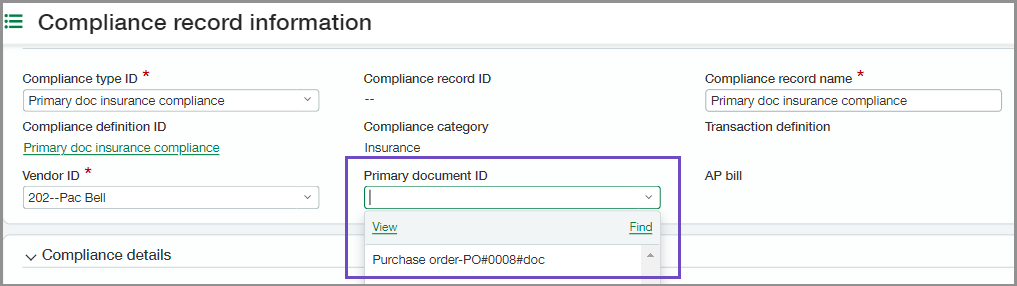
How it works
Follow these steps to set up compliance records for primary documents. You can add two compliance definitions and compliance types, one to track insurance records and another to track miscellaneous compliance records.
-
Go to Purchasing > Setup tab > Vendor compliance > and select Compliance definitions.
-
Select Add.
-
Enter a compliance definition name and ID.
We recommend giving the compliance definition a name and ID that identifies how it's tracked. In the above example, the definition name is Primary doc insurance compliance.
-
Select Insurance or Miscellaneous for the compliance category.
-
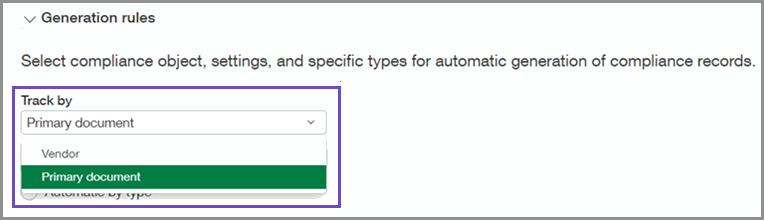
Under Generation rules, select Primary document to Track by.
You cannot change the Track by after the compliance definition is saved.
-
Set other Generation rules for how you want compliance records generated.
-
Choose the Validation rules if available.
-
Set the Notifications.
-
Save your changes.
-
Go to Purchasing > Setup tab > Vendor compliance > and select Compliance type.
-
Select Add.
-
Enter a compliance type name and ID.
We recommend giving the compliance type a name and ID that identifies how it's tracked. In the above example, the type name is Primary doc insurance compliance.
-
Select the Compliance definition that you created.
-
Select a Compliance record ID numbering sequence to use.
-
Select Save.
After you set up compliance definitions and types for primary document tracking, select the new compliance type when you add a new compliance record to associate it with a primary document.
Requirements
| Subscription |
Purchasing Construction subscription with Vendor compliance enabled |
|---|---|
| Regional availability |
|
| User type |
Business user Project manager |
| Permissions |
Compliance setup: List, View, Add, Edit, Delete |
