Real estate
Enhanced integration with Sage Intacct Real Estate
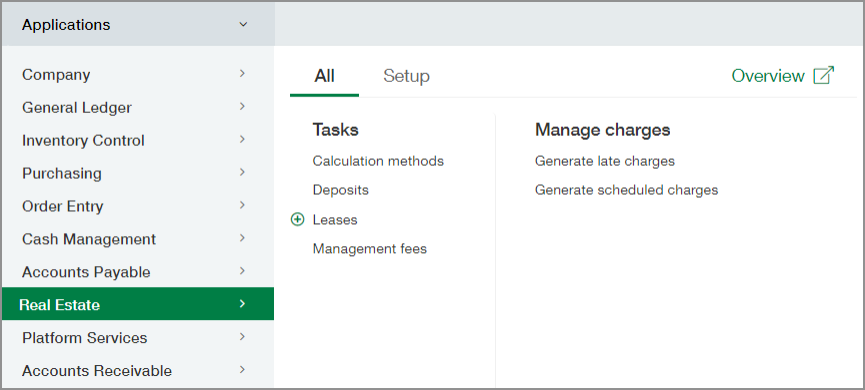
You no longer need to switch back and forth between Sage Intacct and Sage Intacct Real Estate. Access Real Estate directly from the Intacct applications menu.
Details
Sage Intacct Real Estate is now an option on the Company Subscriptions page. Enable the subscription to add Real Estate to the Intacct applications menu. After enabling the subscription, grant permissions to determine who can access the individual items in the Real Estate menu.
How it works
Enable the subscription.
-
Go to Company > Admin > Subscriptions.
-
Select the Real Estate slider so that it turns green.
-
Select Done.
Set up permissions
Sage Intacct Real Estate permissions set in Sage Intacct determine which menu items users can access from the Intacct application menu.
-
Go to the Permissions page.
The steps to access this page vary depending on whether your company is using role-based permissions or user-based permissions. For details, see one of the following topics:
-
In the row for Real Estate, select Permissions.
Each item on the Real Estate menu has a corresponding Menu checkbox.
-
Select the appropriate Menu checkboxes to give access to the role or user.
-
Select Save and then select Save again.
Other recent updates
The enhanced integration isn't the only new feature! The following enhancements have been added to Sage Intacct Real Estate.
-
Flexible transaction posting: You can now choose between posting transactions by the Entity dimension only or by the Property at the Location dimension, providing you with increased flexibility in managing your financial data.
-
Property setup with Department dropdown: The new Department dropdown in the Property setup provides additional categorization options to tag accounts payable transactions.
-
Export reports to Excel: You can now export the following reports to Excel for easy analysis and sharing of crucial financial insights.
-
Standard Rent Roll Report
-
Generate Schedule Charges
-
-
Detailed invoice information: Each invoice now populates the property name and address to provide recipients with a comprehensive overview of the associated property details.
-
Diversified calculation types for late charges: You now have the flexibility to choose from additional calculation types for late charges so that you can tailor late payment penalties to suit your specific needs.
Requirements
| Subscription |
Real Estate |
|---|---|
| Regional availability |
Canada United States |
| User type |
Business user with admin privileges to give access |
| Permissions |
Menu option for each feature to determine whether it appears on the Applications menu |
| Configuration |
|
| Implementation |
Requires:
|
