Accounts Payable
Edit tax information for bills in draft state
To help support AP Automation for companies using the Taxes application, we no longer validate tax fields while bills are in a draft state.
This means that you can continue to work on a bill and save your progress before you select a tax solution or provide tax details. You can also change this information before you post the bill. The tax solution, tax details, and the vendor are validated when you post the bill.
Details
When you have a subscription to the Taxes application and you create a bill, you can select the Transaction has tax implications checkbox. This lets you enter the tax solution and adds line-level fields for tax detail, tax rate, and transaction tax.
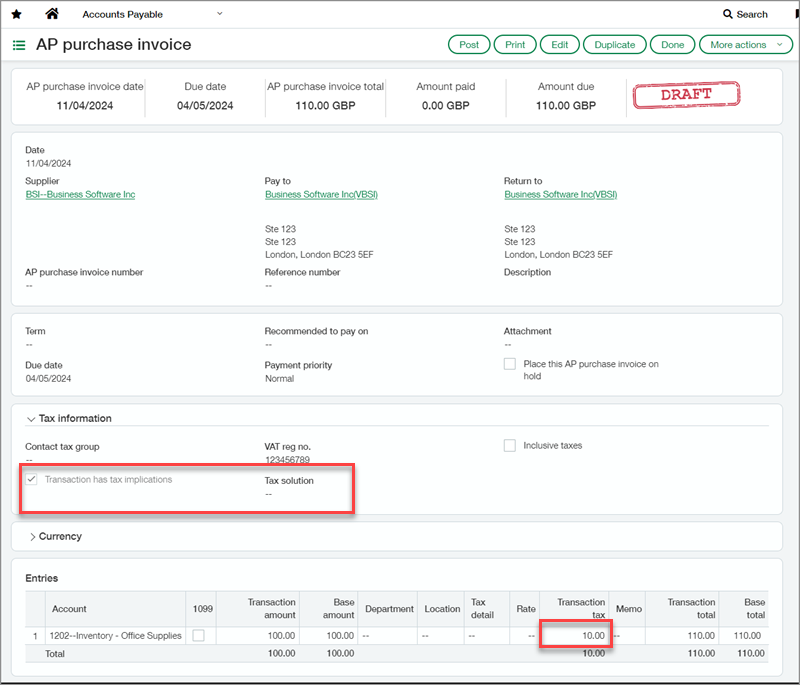
As long as the bill hasn't been posted, you can leave these fields blank, manually enter amounts for the transaction tax, or edit the entries you made.
Until you enter a tax solution, you cannot enter multiple taxes per line. The multiple taxes per line checkbox is not available without a tax solution.
If you change the tax solution, any selected tax details not associated with the new solution are removed. The calculated transaction totals remain unless you manually change them or recalculate by assigning and then changing the tax details at the line level.
Requirements
| Subscription |
Accounts Payable Taxes |
|---|---|
| Regional availability |
All regions |
| User type | Business user |
| Permissions |
Accounts Payable
|
