TAXES
Cash basis VAT capture for France
Capture taxes for VAT reporting at the point of payment with cash basis VAT capture. This enhanced functionality works with our existing invoice basis VAT capture, letting you select how and when to capture taxes for each line in a transaction.
Details
By default, the Taxes application captures VAT or GST at the time an invoice or bill is issued, a process known as invoice basis tax capture. In entities using a French tax solution, you can choose instead to capture VAT or GST at the time an invoice or bill is paid. This process is known as cash basis tax capture.
Supported transaction types that have VAT or GST implications include a new column where you can mark a line item for cash basis tax capture. Simply select the Capture payment tax checkbox on the applicable line item of a transaction. When you post the transaction to create the bill or invoice, Intacct generates tax records for any unchecked line items. Line items marked with Capture payment tax generate tax records when the line items are paid off.
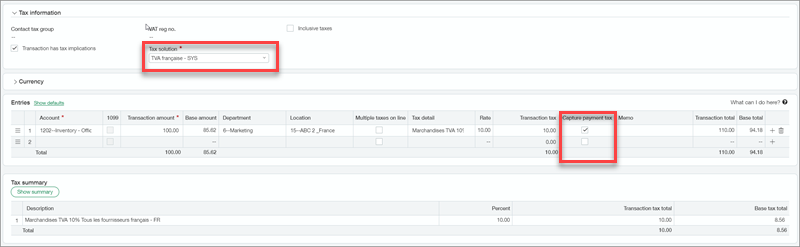
Transactions with a mix of invoice and cash basis tax capture can be reported over multiple tax submissions. You can capture tax on full or partial payment transactions.
The following transaction types are supported for cash basis tax capture:
-
Accounts Payable bill
-
Accounts Payable adjustment
-
Accounts Receivable invoice
-
Accounts Receivable adjustment
-
Order Entry sales invoice
-
Purchasing vendor invoice
When you check Capture payment tax in a Purchasing or Order Entry transaction, that selection carries over to the associated taxable Accounts Receivable or Accounts Payable transaction.
How it works
Mark a line item for cash basis tax capture when you create a supported transaction.
Enter VAT in an Accounts Payable transaction using the following steps:
- Go to Accounts Payable > All and select the + sign beside Bills.
-
Enter the header information.
- Add the line items.
For each line item, enter the Account, the Transaction amount, and select the appropriate Tax detail. When you select a Tax detail, Intacct displays the rate percent for that tax detail, and then calculates the tax based on the selected tax detail.
- To use cash basis tax capture instead of the default invoice basis tax capture, select the Capture payment tax checkbox.
Requirements
| Subscription |
Taxes |
|---|---|
| Regional availability |
France |
| Permissions |
Accounts Payable
Accounts Receivable
Order Entry
Purchasing
|
