Accounts Payable
Pay bills from the Vendors list
Pay a vendor directly from the Vendors list without interrupting your workflow, using the Pay option.
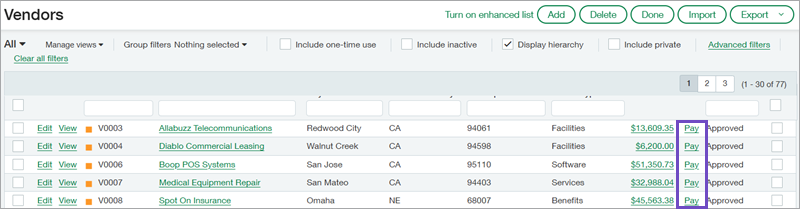
What's new
-
- Pay is available at both the top level and entity level.
- There are some conditions when bills cannot be paid from the Vendors list and must be paid from Pay bills, instead. The Help Center provides more information about these conditions.
Key benefits
-
Reduces the number of steps required to
-
Allows you to make payments while staying on the Vendors list.
-
Improves efficiency for
-
All actions are logged in the Posted payments audit trail.
Good to know
When you select Pay, Sage Intacct opens the Pay bills page and displays open bills for the selected vendor. If you have a default advanced filter set up in Pay bills, it is automatically applied to the list.
Intacct shows bills with the same currency of your default bank. If you have no default bank set in Configure Accounts Payable, Intacct loads bills that match your base currency.
Permissions and other requirements
| Subscription |
Accounts Payable |
|---|---|
| Regional availability |
All regions |
| User type |
Business |
| Permissions |
Vendors: List, View Pay bills: Run |
