Accounts Payable
Get notified when automated transaction documents bounce back
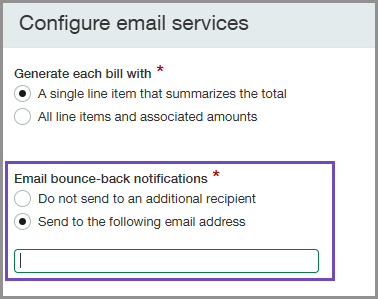
When your vendors send documents to Sage Intacct for processing through AP Automation, they receive an email if the transaction processing is not successful with details on what went wrong. Now, you can configure AP Automation to send those bounce-back notifications to you as well. We added a new option in the AP Automation email configurations where you can enter the email address that should receive these notifications.
Key benefits
- Receive notifications when emailed automated transaction documents do not get processed.
- Experience more transparency on when and why emailed documents do not get processed.
- Stay informed and proactively communicate with vendors when the original sender has a no-reply inbox or their billing email inbox is not actively monitored.
How it works
-
Go to Accounts Payable > Setup > Configuration and find the Bill automation settings section.
-
Select Configure next to Email services.
-
Select Send to the following address.
-
Enter the email address that you want to receive a notification when emails bounce back.
-
Select Save.
The email address that you enter will receive a copy of any bounce-back notifications as soon as your AP Automation email addresses use the @ai.sage.com domain.
Permissions and other requirements
| Subscription |
Accounts Payable AP Automation Administration |
|---|---|
| Regional availability |
All regions |
| User type | Business |
| Permissions |
Administration
|
| Configuration |
Contact your Account Manager or Channel Executive to start using AP Automation |
