Sage AI and Automation
Custom text retained in Copilot-generated email messages
When using the Draft with Copilot feature to revise email templates for Close Workspace and Variance Analysis, your custom text is now incorporated into any Copilot-generated content.
Key benefit
You can use Copilot to refine the length and tone of your email messages saving any edits that you've already made to the text.
How it works
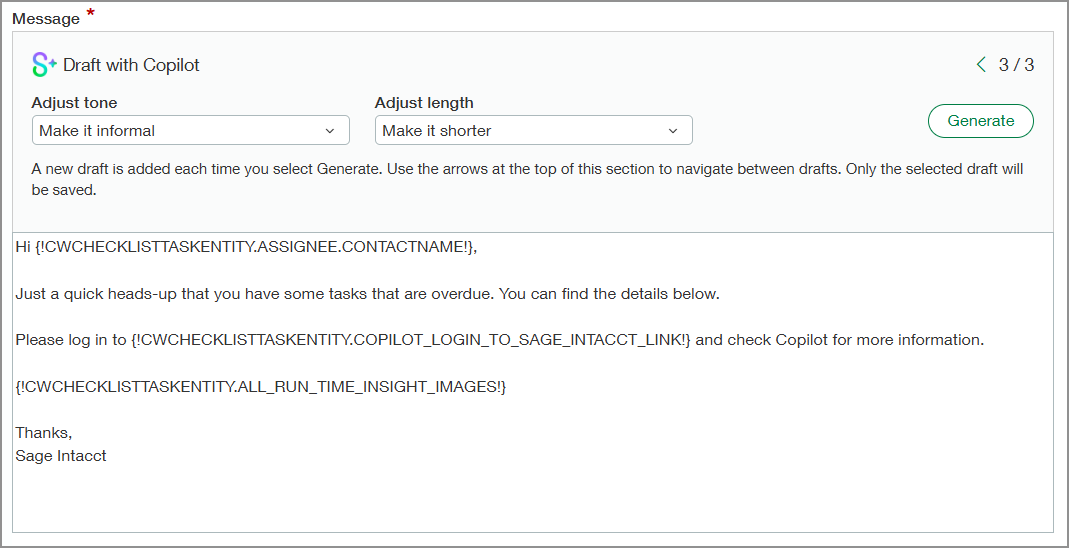
When you're configuring Close Workspace or Variance Analysis, select the Draft with Copilot button for any of the email templates. On the Email Template page, you'll see a default email message in the Message content section.
You can change the default message and then have Copilot refine it further. Optionally, change the selections in the Adjust tone and Adjust length fields, and then select Generate.
Copilot updates the message based on the selections in the adjustment fields while keeping the changes that you already made.
Permissions and other requirements
| Subscription |
Sage Copilot Close Automation |
|---|---|
| Regional availability | All regions |
| User type |
Business user with admin privileges |
| Permissions |
Application subscriptions: Configure |
