Company & Administration
Block email addresses from automated document processing
Prevent unwanted or suspicious email addresses from generating transactions in Sage Intacct through AP Automation, Sage Expense Management, and E-Invoicing. By blocking specific email addresses before documents enter Intacct, you can help reduce fraud and maintain greater control over automated transaction processing.
Key benefits
-
Reduce fraud risk: Prevent known fraudulent or suspicious email addresses before documents enter automated workflows.
-
Improve data quality: Exclude unwanted documents from processing and help ensure that only trusted submissions are considered.
-
Centralize administration: Manage blocked email addresses at the company level for consistent protection across all automation workflows.
How it works
-
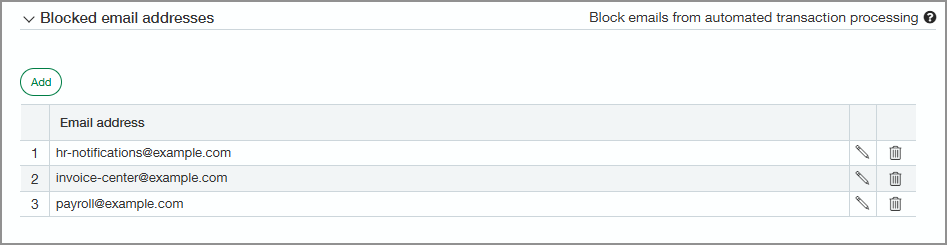
Add an email address to the Blocked email addresses section of the Company information page.
-
Going forward, documents submitted from that email address are automatically rejected and not processed.
Good to know
Email blocking is based on exact email address matching.
Permissions and other requirements
| Subscription |
Administration One of the following:
|
|---|---|
| Regional availability |
All regions |
| User type |
Business user with admin privileges |
| Permissions |
Administration
|
