Reporting & insights
New ICRW data caching capabilities
You can now switch the data caching status for an Interactive Custom Report Writer (ICRW) report effortlessly with a prompt. This new capability expedites building reports and improves performance when viewing previously generated reports.
Key benefits
Data caching stores previously generated report results for later use, thereby enhancing performance. After a report has run, the cached data can be used for subsequent executions of the report, saving the time it would take to request the data again.
You can switch the data caching status effortlessly, on report-by-report basis, through the use of a presentation variable prompt.
-
Enabled data caching retrieves the data once, providing enhanced performance. This is helpful when a report is configured to use As Of date prior to the current today. In this case, any current entries and transactions have no effect on the data for the report's As Of date.
-
Disabled data caching provides the most recent version of the data, ensuring the report is up to date. This is helpful when you need to see the data for the most recent transactions in the report.
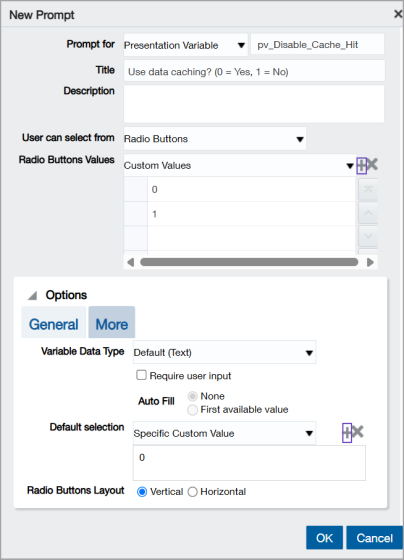
You define the data caching settings in the ICRW Prompt dialog, as show in the following screen shot. You then activate the prompt in the report XML, as described in How it works.
How it works
You can switch the data caching status on a report-by-report basis with a presentation variable prompt, in the following way.
-
Set the data caching configuration for a report.
-
Create a presentation variable prompt in the report to enable and disable data caching.
-
Activate the presentation variable with a line of XML code in the report.
-
Select the data caching status from the prompt at run time.
For detailed instructions, see Switch the data caching status in an ICRW report.
Permissions and other requirements
| Subscription |
Interactive Custom Report Writer Customization Services OR Platform Services |
|---|---|
| Regional availability |
ICRW: All regions |
| User type |
Interactive Custom Report Writer: Business user with admin privileges Business |
| Permissions |
Interactive Custom Report Writer
|
| Dependencies or other requirements |
Access to data in the report. |
