
Sync Products
Related information
 Related topics
Salesforce Products synchronize with Intacct Items.
Products overview
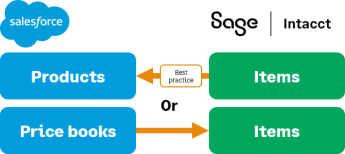 Salesforce Opportunity Products use Items available in Intacct to create Intacct transactions. These same Intacct Items are used for both Order Entry and Contracts.
Items/Products are synced based on the selected Product synchronization direction:
- Salesforce to Intacct: Products are pushed from Salesforce to Intacct based on the Sync with Intacct field value, or by selecting Sync to Intacct. To have your changes sync successfully to Intacct when using Sync to Intacct, you must edit the Opportunity Product before selecting Sync to Intacct.
- Intacct to Salesforce: All active Items from Intacct are pushed to Salesforce when synchronization is enabled.
The sync direction is most commonly set to Intacct to Salesforce because Items in Intacct have accounting-specific information. This information is managed only within Intacct and can include usage pricing for usage-based products, price tiers, and General Ledger account associations.
For example, if the sync is set Intacct to Salesforce, add the name of any Salesforce Product records to Intacct or will not ever be synced. Salesforce allows duplicate Product names. Intacct doesn’t. When possible, avoid using duplicate names in Salesforce.
The first time you sync Intacct Items to Salesforce Products, the integration finds and matches existing Intacct Items in your Salesforce company. After the initial sync, you use the Sync with Intacct checkbox to adjust what Products are synced, if you’re syncing from Salesforce to Intacct. You can delete Product records for Products you do not want to sync. Deleting the Product record does not delete the record in Intacct. The record is deactivated.
If syncing Intacct to Salesforce, after initial sync, you can adjust what products sync by deactivating the items you do not want to sync.
Products and Items are also influenced by the Price Lists and Price Books synchronization. For more information, see Price Lists.
Enable Products synchronization
To enable and set the synchronization direction for Products:
- Log in to Intacct as an administrator.
-
Go to Company > Admin > Subscriptions > Advanced CRM Integration and select Configure.
- On the Settings tab, in the Products section of the Synchronization options, select the Enable Product synchronization checkbox.
When checked, changes made to the product are synchronized to the other application. When a record is saved, the field mapping rules and synchronization direction are applied. - Select the Product synchronization direction and Save your changes.
See Product field mapping for more information about field mapping for Products.
In this topic