Introduction to reporting accounts for alternate Charts of Accounts
Reporting accounts is an optional feature in the General Ledger that lets you generate and display reports using account sets other than your General Ledger accounts. This is most common for companies that have clients, owners, or other governing bodies who need to see reports in their own charts of accounts.
With reporting accounts, you can:
- Define reporting account sets that represent alternate charts of accounts. Within each account set, you define reporting accounts and how they map to your General Ledger accounts.
- Let yourself or others display reports using an alternate reporting account set. The option to select a reporting account set is available for all financial reports and some standard reports.
- Optionally, set a default reporting account set for users who log in to your company.
Reporting Accounts
Reporting accounts can be used with the following standard reports.
- General Ledger
- General Ledger
- Trial Balance
- Comparative Trial Balance
- Account Balances
- Journals
- Accounts Payable
- AP supplier invoices Register
- Cheque Register
- Accounts Receivable
- Sales Register
- Receipts Register
What are reporting account sets?
In your company, you have a set of General Ledger accounts that you use for transactions and reporting. These General Ledger accounts are equivalent to your chart of accounts. But, what if you have clients or owners with their own chart of accounts? How do you provide reports that show accounts that make sense for them?
For example, suppose that you have a part-owner named Davis Associates. This part owner uses a different chart of accounts, with different account numbers and titles. In addition, this owner categorizes income and expenses differently–for example, rolling up expenses such a painting and carpet cleaning into a single "Maintenance" account.
With the new reporting capabilities, you simply create a reporting account set for Davis Associates. Because the reporting account set contains the mapping of General Ledger accounts to reporting accounts, reports can be generated specifically for Davis Associates.
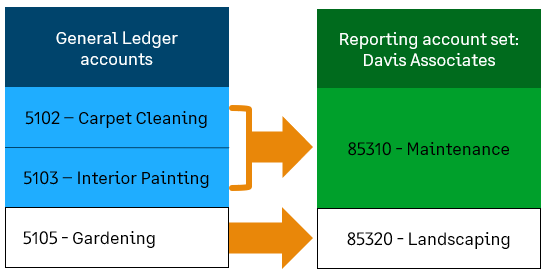
When reports using a reporting account set are displayed:
- General Ledger accounts are automatically translated to the corresponding reporting accounts. The report reflects the account numbers and titles of the reporting account set.
- If more than one General Ledger account is mapped to a single reporting account, the report automatically rolls up amounts into the single reporting account.
- Drilling down from an amount displays supporting detail, which is also translated to reporting accounts.
Manage reporting account sets
When you enable alternate reporting account sets, you:
- Enable the ability to define reporting account sets, each of which corresponds to the chart of accounts of another individual or company. The list of reporting account sets that have been created are available on the Reporting Account Sets list (General Ledger > Reporting accounts).
- For each account set, define how General Ledger accounts map to reporting accounts. This mapping is what enables reports to be displayed using a reporting account set.
- Enable financial reports and selected standard reports to be displayed using an alternate reporting account set. Users can display a report in any reporting account set that they have permission to use, as specified in the definition for each reporting account set.
List of supported reports
The ability to select a reporting account set is available for all financial reports and for selected standard reports.
| Report type | Report name |
|---|---|
|
Financial reports |
All financial reports To enable users to display a report using any reporting account set that they have access to, set a prompt for the reporting account set.
|
|
General Ledger reports |
Account Balances |
|
Standard reports |
Bank register |
