Create an immediate warehouse transfer
Related information
 Related topics
An immediate warehouse transfer moves inventory from one warehouse to another without allowing for the time it takes to move (or ship) the inventory being transferred. When an immediate transfer is posted, the ONHAND quantities at the source warehouse (the from warehouse) are decreased and the ONHAND quantities at the destination warehouse (the to warehouse) are increased.
The value of the transferred inventory is also moved from the from warehouse to the to warehouse.
| Subscription | Inventory Control |
|---|---|
| User type | Business, Warehouse |
| Permissions | Warehouse transfer: List, Add, Edit |
| Prerequisites | Inventory Control is configured for warehouse transfers. |
- Go to Inventory Control > All and select Add (circle) next to Warehouse transfers.
The Warehouse transfer page appears.
For a description of every field on the Warehouse transfer page, see field descriptions.
- If the Transfer type dropdown list appears, ensure that Immediate is selected.
The dropdown appears only if Inventory Control is configured for in-transit warehouse transfers.
- Enter a Date.
The date is used as the transaction date for the underlying transfer-out and transfer-in transactions that are automatically generated.
- Use the From warehouse dropdown list to select the warehouse you want to transfer the items from.
- Use the To warehouse dropdown list to select the warehouse you want to transfer the items to.
- If you’re transferring items between warehouses in two different entities that use different base currencies, review the exchange rate information and change as needed.
- Add a least one line item.
Non-inventoried items can’t be transferred.
Details for items with FIFO/LIFO cost methodYou cannot select the Unit and the costs aren't displayed until you save the transaction. When you go back and edit or view the warehouse transfer, you'll see the extended cost. When the underlying transfer-out and transfer-in transactions are automatically created, these transactions include one or more lines for the item to show the quantity and costs at each cost layer.
Details for items with trackingIf the item is bin, serial, lot, or expiration tracked (or any combination of those), complete the following steps:
- Open the Details area for the line item.
- Use the table in the details area to select the tracking information and specify the Quantity to transfer.
- Ensure the total quantity to transfer matches the value for Quantity multiplied by unit above the table.
For example, assume you want to transfer 100 units of a bin-tracked item, and those units are in two different bins in the from warehouse. The From bin dropdown menu displays only the bins in which the item is located, and the Quantity available column shows the number of units that can be transferred from each bin.
The To bin dropdown menu displays the bins at the to warehouse into which the units can be moved. Bins need to exist at the to warehouse for the transfer to work. If the item is already in any bins, the quantity that's present is indicated. This helps you decide which bins to move the quantity to.
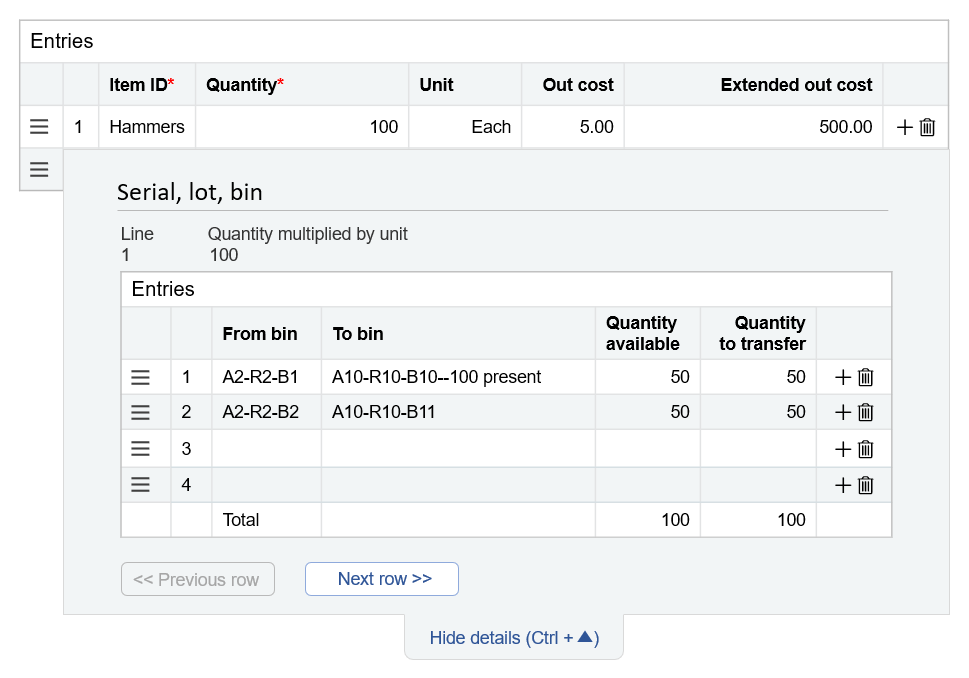
In the above example, the 100 hammers will be moved from 2 bins at the from warehouse, each of which has 50 hammers. The bins at the to warehouse can hold up to 150 hammers. So, 50 hammers will be moved into a bin that already contains 100 hammers. The other 50 hammers will be moved into another bin that is empty.
- Optional. If you aren’t ready to post the transfer, select Draft. Details
For example, you might need more time to research what needs to be transferred before posting the transaction. Or you might want to print the transfer information to a PDF file to use as a pick list.
When you’re ready to post the transaction, open the transfer in Edit mode:
- Go to Inventory Control > All > Warehouse transfers.
- In the Warehouse transfers list, find the warehouse transfer and select Edit.
- On the Warehouse transfer page, select Post.
Sage Intacct automatically creates a transfer-out transaction and immediately converts it to a transfer-in transaction and adds a record of the transfer to the list of warehouse transfers.
- If you transferred standard cost items that have a different costs at the from and to warehouses, create manual journal entries to move the difference in value from your clearing accounts to your variance account.
