Project transaction rule examples
Related information
 Related topics
Indirect labor costs (such as, consulting services)
- Retrieve the labor cost amount.
- Calculate and post an indirect payroll cost of 30% of the actual cost.
- Calculate and post an additional general overhead cost of 10%.
- Subtotal lines 1 and 2 and calculate an additional 10% cost for general overhead.
Unbilled AR or work-in-progress (WIP)
You can work on a project for weeks, months, or longer before invoicing the customer. Use transaction rules to capture the billable value of timesheet entries and post them to a balance sheet account, such as unbilled AR or work-in-progress (WIP).
- Retrieve the labor billing amount.
- Post the amount to an unbilled AR or WIP account.
Indirect labor costs by employee or employee group
Different employees or employee groups might have different indirect rates, or burden, than standard employees. For example, contractors might not have indirect costs, like vacation time or sick leave.
- Create a separate transaction rule for each contractor.
- Assign each rule a different rate by selecting from the Employee/Employee Group dropdown in the Transaction Rule Details table.
Direct labor costs by project or type of work
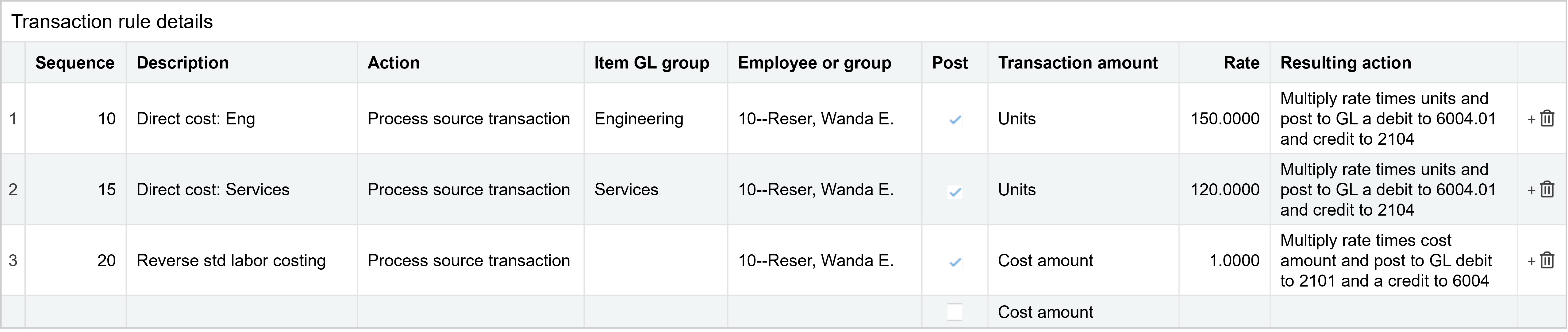
A contractor might bid a project with one cost rate for engineering, and another cost rate for project management. Create two records to calculate and post the direct labor cost.
- Create one transaction rule with the contractor's employee ID in the Employee/Employee Group column and choose Engineering in the Item GL Group column. Set the transaction amount to Units and specify the hourly engineering cost rate.
- Create another rule with the same employee ID, but choose Product management in the Item GL Group column. Set the transaction amount to Units, and specify the hourly product manager cost rate.
- To reverse the standard labor costing, enter another rule with the Transaction Amount set to cost amount. Then, credit your standard labor cost account and debit the standard offset account.
- Assign this transaction rule to a project to enable your contractor for costing based on type of work.
The transaction detail rules for this transaction rule post to the General Ledger using the appropriate labor expense account and offset account.
Post statistical account data
To automate labor hour allocations, create transaction rules to post statistical transactions (such as, headcount, square footage, new customer count) to a statistical journal.
- Select a statistical journal for posting statistical transactions in the Journal field.
- Set the Transaction Amount to Units.
- Apply the transaction rule to a submitted invoice to post the statistical data.
Calculate and relieve work in progress (WIP)
Calculating work-in-progress (WIP) (also known as unbilled AR) is similar to calculating indirect costs, except:
- In the initial steps, you retrieve the billing amount for timesheet entries rather than the cost amount.
- In the final step, you subtotal the billing amounts retrieved in the previous lines and post the full value (rate =1.0000) to a WIP account.

The journal entry defines the posting details for posting to WIP. To define the journal entry, click in the step and then click  to the right of the checkmark in the Post column.
Relieve WIP as you invoice or recognize revenue
Relieving WIP depends on when you invoice customers and, most importantly, when you want to recognize revenue.
- At invoicing time, use a custom invoice workflow.
- As you recognize revenue, use project revenue recognition.
- As needed, manually enter a journal entry.
Relieve WIP at invoicing time
Use an intermediary pre-bill invoice that is later converted to an actual invoice. This method works well for Time and Materials projects and can also be used for fixed price projects.
- At invoicing time, create a transaction definition to use when generating invoices to relieve revenue WIP (unbilled AR) and to recognize revenue at the same time.
- On the General tab, expand the Accounting section and select these options for Transaction Posting:
- Post to Accounts Receivable (AR):
AR transaction posting relieves revenue WIP.
On the Posting Configuration tab, set debit to AR and credit to revenue WIP (unbilled AR). - Enable additional posting:
Additional GL posting recognizes revenue so that revenue is exactly the amount invoiced.
On the Posting Configuration tab, set debit to deferred revenue and credit to revenue. - Don’t enable revenue recognition
- Generate Sales Invoices (Projects > All > Invoices > Generate Invoices).
- In Order Entry configuration, on the Document Configuration tab, identify the journal for the additional posting.
- Generate the pre-bill invoice and then convert it to an actual invoice.
For time and materials projects, the relieved WIP amount matches the original WIP amount exactly, unless you manually write down billable items. For fixed price billing, you might have to reconcile WIP at the end of the project.
Relieve WIP through revenue recognition
If you want to recognize revenue on a schedule that's independent from your invoice schedule, then the OE sales invoice transaction used by Generate Sales Invoices debits AR (and post to AR), and credits WIP, leaving deferred revenue.
In this option, creating an invoice relieves revenue WIP (Unbilled AR). Set up revenue recognition on a separate Order Entry transaction, making it independent from the invoicing process. Based on when you want to recognize revenue, you can then use project revenue recognition to recognize based on percent complete (hours, cost, or observed) or commonly, at the end of the project (observed set to 100%).
Calculate layered indirect costs
With the ability to subtotal lines, you can easily create a transaction rule that calculates more complex, layered costs. Using a simple example, define a rule for time spent on general consulting services.
- Retrieve the actual labor cost and hold the result.
- Action = Process source transaction
- Post = Unchecked
- Source = Cost Amount
- Rate = 1.000
- Calculate and post an indirect payroll cost of 30% of the actual cost.
- Action = Subtotal previous lines
- Post = Checked, with an associated journal entry
- Subtotal = Previous line
- Rate = 0.3000
- Calculate and post an additional general overhead cost of 10%.
- Action = Subtotal previous lines
- Post = Checked, with an associated journal entry
- Subtotal = Previous two lines
- Rate = 0.1000
