Hidden effects of Hide and Exclude
Related information
 Related topics
When you hide or exclude a column, it might appear that you are actually hiding and excluding the column data in the report. This is a misunderstanding that can cause unexpected output data in the columns that remain visible. Hidden and excluded columns simply remove the columns or rows from view. However, the data in the hidden or removed columns is still used in calculations applied to the visible columns.
This topic covers the underlying effects of hiding and excluding columns in Interactive Custom Report Writer (ICRW) reports.
| Subscription | Interactive Custom Report Writer
Platform Services |
|---|---|
| Regional availability |
All regions |
| User type |
Interactive Custom Report Writer: Business, Project Manager, Warehouse Platform Services: Business, Project Manager |
| Permissions |
Interactive Custom Report Writer: Run, List, View, Add, Edit, Delete Platform Services: Run, List, View, Add, Edit, Delete
|
Effects of hiding a column
There are different ways to hide data in a report:
-
Go to Column Properties -> Column Format tab and selecting the Hide checkbox.
-
Use the Custom CSS Style display:none.
Both methods shrink the column to an infinitesimally small width. The hidden column is not visible in the report, and the number of rows has not changed.
To visualize the effect, start with the following table for a customer invoice and payments.
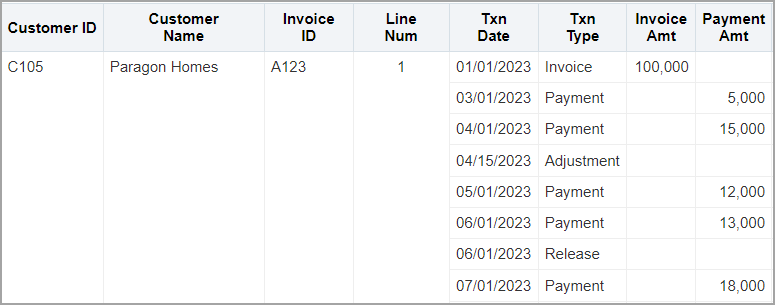
Hiding the Txn Date column from the Column Format tab or the Custom CSS Style display:none, provides the following results. The Txn Date column is no longer visible and the rows remain unchanged.
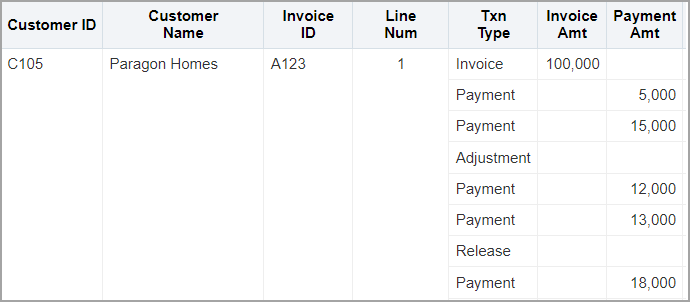
Without the Txn Date column, it is difficult to know what the different payment amounts represent. Hiding column data can result in ambiguity for interpreting the data.
Effects of excluding a column
Excluding a column results in a different effect than hiding the same column. When you exclude a column, it is removed from the view in a table or pivot table. Excluding the Txn Date column in the example table produces the following result:
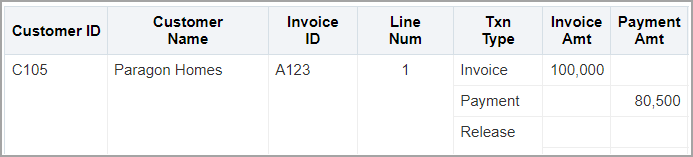
Excluding the column combines the data for individual transaction dates. The $80,500 is a sum of the transactions for all the dates in the report.
