Enhanced interface
Clear subscription data—Sage People Integration
Sage People Administrators can clear Sage People Integration subscription values in Sage People using the Clear Subscription Data button. The button allows you to clear subscription information for a specific Sage People org that's linked to a specific Intacct company so you can link to a different Intacct company. The Clear Subscription Data button clears this information, allowing you to resubscribe without uninstalling and reinstalling the Sage People Integration package in Salesforce.
The Clear Subscription Data button is only for use with sandboxes. The button does not become available in Sage People unless the link between your Intacct company and your Sage People org has been broken.
Before you clear your data
Before clearing subscription data, consider the following:
- The Clear Subscription Data button only clears configuration data that allows the synchronization to work. Records are not deleted, including standard objects, custom objects, and managed lists.
- Intacct will attempt to match existing records of other managed lists, such as terms or templates.
- Mapped users are unmapped and will have to be mapped again.
- After you’ve cleared the subscription data, you must restart your Sage Intacct subscription to use the Sage People Integration.
Clear subscription data
The following steps are for the Salesforce Classic UI.
- Log in to Sage People as an administrator.
- Go to the App Launcher and select Sage Intacct.
The Intacct app opens. - Go to the Intacct Configuration page. A popup opens, alerting you that you are not subscribed to Intacct. If your configuration data has not been previously cleared, the Clear Subscription Data button is available.
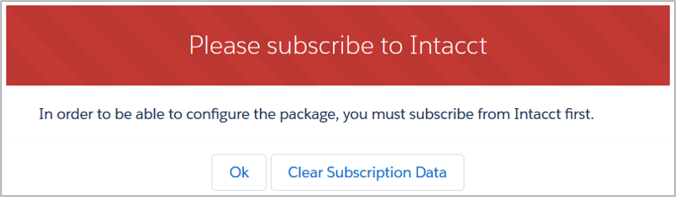
- Select the Clear Subscription Data button.
A popup alert asks you to confirm that you want to clear the subscription data.
If your subscription data has been cleared already, the button is not available for use.
