About Supplies Inventory
Related information
 Related topics
Every organization has ongoing costs related to running their business. These costs can include internal office and facility supplies your employees need day-to-day, and program-related supplies that support your mission or operations. Tracking these consumable expenses ensures that you have a more accurate picture of your financial health.
Here's a few examples:
-
Medical supplies a healthcare organization uses, such as gloves and cotton swabs, to deliver quality care.
-
Mission-specific items provided by nonprofit community groups, such as blankets for regional shelters.
-
Janitorial and cleaning supplies required by a business to maintain a sanitary environment for employees or guests.
Flexible subscription options
Supplies Inventory is available as a feature you can enable in your Inventory Control subscription, or you can choose only to subscribe to Supplies Inventory.
With Supplies Inventory you're able to manage requests and purchases with efficiency, maintain optimal inventory levels, and enhance your internal cost controls. Benefits include:
-
Streamline supplies request and sourcing workflows.
-
Monitor supplies inventory levels and replenish when needed to avoid availability delays and procurement issues.
-
Gain insights into usage trends and cost insights across periods.
Centralized request management
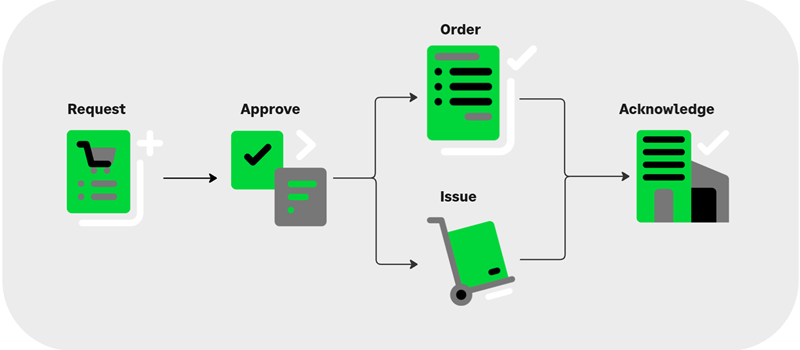
Using the Supplies workbench, you can easily manage your supplies order workflow:
-
Request: When a staff member needs supplies, they create a purchase request that's routed based on your approval policy. If you do not set up an approval policy, the request can be processed immediately.
-
Approve: After a request is submitted and an approval is required, it’s routed to the approver. After it's approved, the request can be filled based on the requested item's availability.
-
Process the request as an Issue or Order: With stock on hand, you can immediately issue items. If quantity is needed to fill a request, look up a substitute, create a supplies purchase order, or link the request to an existing purchase order. You'll issue ordered items when they arrive.
To reduce handling time, you can also choose to create a direct-shipment order to send items directly from a vendor to the requester. -
Acknowledge: To ensure accurate inventory management, the supplies workflow includes an acknowledgment step to confirm products have arrived at their intended destination.
You can also use the Supplies workbench to ensure that your teams always have the items they need:
-
Transfer items between warehouses for easier distribution.
-
Replenish your on-hand stock to meet expected demand.
Easily identify supplies items
Items used to operate your business are marked as supply items on the item details page, and are not available as items you can sell. When adding supply items, the following requirements apply:
-
New inventory items and stockable kits can be created as supply items. Learn more about item types.
-
You can track supply items in the same way as non-supply items, such as quantities ONHAND or ONORDER.
-
Supply items can be purchased, transferred, built, or disassembled.
-
You cannot change an existing inventory item to a supply item or a supply item to a regular inventory item, if it has been used in a transaction.
-
Supply items cannot be sold in Order Entry.
Differences between Supplies Inventory and Inventory Control
| Supplies Inventory | Inventory Control |
|---|---|
|
Manage inventory items that you purchase to operate your business. You cannot sell supplies inventory items. For example:
|
Manage inventory items and services that you sell to customers. Items can include parts or materials you buy to create items you sell. For example:
|
|
Uses an advanced workflow. You’re required to manage the workflow by editing the system-generated transaction definitions with your GL account posting information. You also need to define your supplies purchase order transaction definitions. System-generated transaction definitions for Supplies Inventory:
|
Uses standard or advanced workflow (advanced workflow is recommended). You are provided with these editable transaction definitions that are automatically installed for Inventory Control:
|
|
When you subscribe to or enable Supplies Inventory, the following settings are configured automatically and cannot be changed:
|
Configuration settings available in Inventory Control: You can choose to enable Maintain inventory valuation MIV costing updates (we recommend that you enable this option for valuation report accuracy). Negative inventory at warehouses is allowed for sales items. Negative inventory globally is allowed for sales items. To use Supplies Inventory with Inventory Control, complete the Supplies Inventory setup requirements.
|
|
Supplies Inventory includes these Inventory Controlfeatures:
|
Inventory Control includes these features:
|
