Troubleshoot Sage Intacct Community login
Related information
 Related topics
The following are common problems that you might encounter when signing in to the Sage Intacct Community.
-
Select Forgot your password? on the Community login page.
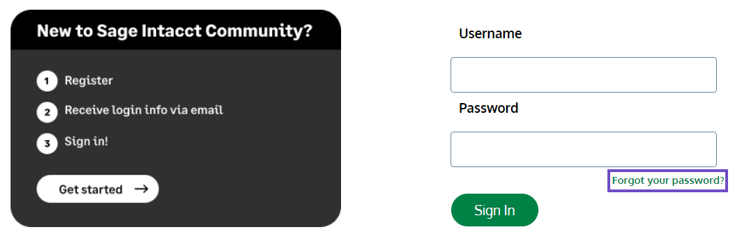
- On the Forgot Your Password page, enter your Sage Intacct Community username.
Your Community username is different than your Sage Intacct username and is typically firstname.lastname@intacctcommunity.com.
- Select Continue. A reset password email will be sent to the email address associated with your Community username.
Your username was provided when you registered for the Community. Your Community username is different than your Sage Intacct username and is typically firstname.lastname@intacctcommunity.com.
If you cannot find your username, contact your designated support resource. They can log a case with Support to get your Community username.
The reset password email is sent to the email address associated with your Community username.
Check your spam or junk email folders and any email folders containing filters or rules that might have captured these messages.
If you cannot find the password reset email, contact your designated support resource. They can log a case with Support to reset your Community password.
This could happen for the following reasons:
-
If you did not fully activate your Community account after creating it by using the link from the email that was sent to you within its time limit.
In this scenario, ask your designated support user to call Sage Intacct Support. Support can then perform an override reset of your Community account password.
-
If you have email server protection software, it could be interfering by automatically expiring the link.
In this scenario, try the following:
Copy and past the password reset link into your browser rather than selecting the link directly. Copying the link can sometimes bypass the check from the email server protection software.
Have a Salesforce admin from your company enable the Don't immediately expire links in forgot password emails policy setting in the Password Policies of your user profile. This policy setting bypasses the email server protection that causes the link to expire. More information on this is available to your Salesforce admin in the Salesforce Help.
Contact the support team of the software that's likely causing this interference with the password link to ask them to allow emails coming from Salesforce. You can also reach out to the internal department that manages the software.
Known software that can cause the password link to expire:
McAfee feature 'Link Protect'
Mimecast Anti-spoofing software
Covenant Eyes - Internet Filtering
Outlook all versions (corrupted rules)
Your designated support user (US only) or your Intacct administrator can help you with most of your Community login issues.
If they cannot resolve your issue, ask them to contact Sage Intacct Support for further assistance.
You can also send an email to NA-Intacct-Community@sage.com and the Community team will try to resolve your issue.
