Records, transactions, and lists overview
Related information
 Related topics
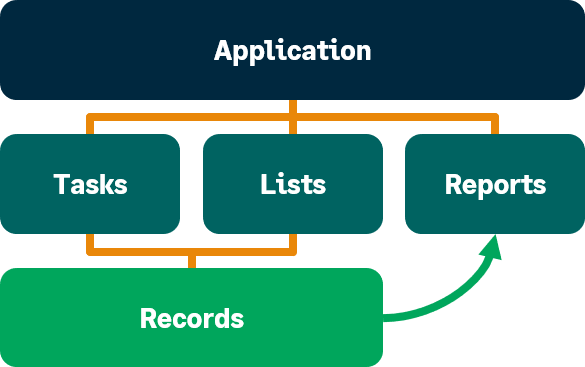
The most common and frequently used pages in Sage Intacct are the record, transaction, and list pages. Records and transactions are the basis for tracking your business and generating insight into your company's financial health. Records are used as the building blocks for creating transactions, and all your records and transactions can be viewed in lists. Also, records often appear in reports.
Records
Records provide basic building blocks for creating transactions. Records enable you to enter specific information about a particular aspect of your company, such as your customers, vendors, and employees. For example after you create a customer, vendor, or employee record, you can create a transaction based on that record, such as an invoice, bill, or expense report respectively.
In many cases you can even categorize and group records. You could create a group of records that references a number of customers based on the same sales territory or region, or a group of records that references vendors who provide the same type of service, such as shipping. Later on, you could create reports to compare how shipping charges vary among vendors so that you can set a policy for using shipping vendors.
There are many types of records in your company depending on the applications that you use. Here are just a few:
- Accounts
- Budgets
- Vendors
- Customers
- Employees
- Items
- Warehouses
Transactions
Transactions enable you to post the day-to-day activities of your business to the subledger or GL and get insight into your financials. The most frequently entered transactions are bills and invoices. Transactions generally include information from records. For example, a bill requires a vendor.
In some applications, transactions can often be acted upon by transaction definitions or templates, which determine, among other things, the workflow and accounting rules, or processing of the transaction, such as how revenue will be amortized over time.
Among the many types of typical transactions are:
- Bills
- Invoices
- Expense reports
- Sales orders
- Purchasing orders
Lists
Lists provide a means of viewing similar records, transactions, or other information in list format, for example, a list of vendors. Most list pages display a default set of columns that are sorted alphanumerically, for example displaying vendors in order based on Vendor ID.
You can do quick simple filtering on columns on the fly using operators.
Learn more about filtering and sorting a list.
