Record to Report workflow controls
This section contains information about audit considerations, internal control options, and Sage Intacct configuration options for Record to Report workflows. A Record to Report workflow can include the following business process steps and related master data records, depending on the operational and compliance requirements of the organization:
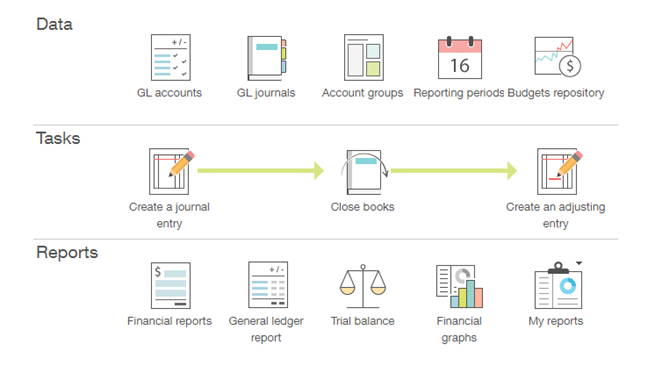
Control selections
Internal controls should be selected based on the control objectives, the functional requirements of the control and the reasonableness of practice based on the organization’s operational reality. The following list of internal control options are grouped by process step and control objective, to streamline the evaluation and selection process.
The process steps and detailed control objectives related to Record to Report workflows are described in the following sections.
General Ledger (GL) master data
Objective type: Existence, Accuracy, Fraud
Related control options and Sage Intacct configuration
| Control | Access to GL master data is restricted |
|---|---|
| Control type | Preventative |
| Objective types | Existence, Accuracy |
| Functional requirement | Ability to restrict access to general ledger account maintenance |
| Control rationale | General Ledger master data should be managed centrally for all parts of an organization as a prerequisite for supporting centralization of financial controls (and consequent control cost savings). |
| Why it matters |
Controlling access permissions to the system is an important task. It helps ensure that data cannot be accidentally changed by staff members who do not have responsibility for maintaining data, and it reduces the possibility of changes being made for fraudulent purposes. It's important to check access permissions regularly to confirm they are appropriate, and also when staff move roles within the organization to check that previous access permissions have been removed and are replaced by new ones to ensure that staff do not have access rights to perform tasks that should be undertaken independently. |
| Factors to consider |
|
| Sage Intacct configuration | Go to roles or permissions set up page (Company > Admin> Roles or Users > Subscriptions > Permissions) and review existing permissions. |
| Sage Intacct Help page | General Ledger permissions |
| Evidence for control | Go to roles or permissions set up page (Company > Admin> Roles or Users > Subscriptions > Permissions) and review existing permissions. |
| How to test | See restricted access control test. |
| Control |
Changes to GL master data are reviewed and approved |
|---|---|
| Control type | Preventative |
| Objective types | Existence, Accuracy |
| Functional requirement | Changes to GL master data (set up of GL accounts can be subject to workflow, for example, changes made by one user are subject to review by another) |
| Control rationale | This is a key basic control over changes to master data. It is also important where assets would propose changes to the Chart of Accounts that need to be reviewed. |
| Why it matters |
It's important to have a separate review to ensure that any changes made are reasonable and accurate, and to reduce the potential for changes being made for fraudulent purposes. Evidence for workflow can be difficult, ideally the system should be configured so that the approver is recorded and the date and time of their approval can be recorded on an audit trail (see Review of changes to GL master data). |
| Factors to consider | Changes should be reviewed by someone suitably experienced who understands the nature of the area, and ideally who does not have access to change master data themselves. |
| Sage Intacct configuration | Many Sage Intacct customers are leveraging features such as Smart Rules and Smart Events in Customization and Platform Services for the tailored management of master data appropriate for their business needs.
|
| Sage Intacct Help page | |
| Evidence for control | After a workflow has been developed, the relevant configuration should demonstrate how the approval process works. Approvals might also be recorded as part of the audit trail (see Review of changes to GL master data). |
| How to test | See workflow control test. |
| Control | Review of changes to GL master data |
|---|---|
| Control type | Detective |
| Objective types | Existence, Accuracy |
| Functional requirement | Audit trail of changes to general ledger master data. This includes flexibility to decide which fields are recorded. It must include the user who made the change and the date and time of the change. |
| Control rationale | This will be required to demonstrate to external auditors that no local changes to the Chart of Accounts have been performed. |
| Why it matters | This control is especially useful if you have many changes being made or your teams are large. The main thing is to focus on how you will identify those changes that should not have been made among the potentially large numbers of changes that might be made. |
| Factors to consider |
|
| Sage Intacct configuration | No configuration required, standard audit trail report attached to various records throughout the system. For example, Accounts Payable > Vendors, view a vendor, and then select More actions > View audit trail. Or, run the Audit History report filtered by appropriate object data areas. |
| Sage Intacct Help page | |
| Evidence for control | Annotated report with evidence of follow up of unexpected items. |
| How to test |
See review control test. The test should focus on how inappropriate changes to master data were identified and followed up. |
| Control |
GL accounts with no or few postings are identified |
|---|---|
| Control type | Detective |
| Objective types | Existence, Accuracy |
| Functional requirement | Ability to identify accounts with no postings or only a few postings in a year or given period. |
| Control rationale | Detect potentially obsolete or redundant accounts that can be marked for deletion. Also identifies potential mispostings to these accounts |
| Why it matters | This control helps to detect potentially obsolete or redundant account codes that were historically used, but could be marked for deletion. It will also support the business to identify potential mispostings to these accounts, which would otherwise be unnoticed if these accounts are not reviewed regularly. |
| Factors to consider | Do any GL accounts exist for which posting might be made irregularly, but need to be maintained? |
| Sage Intacct configuration | Any report within the system can be highlighted to show zero values. For example, go to General Ledger > All > Reports > Trial balance or Account balances. Then in the Format section, select the appropriate setting for Show zero balance accounts (All, Only with activity, Do not show). |
| Sage Intacct Help page | About the Comparative Trial Balance report |
| Evidence for control |
System reporting configured to show zero values in GL codes. In the Format section of the report, Show zero balance accounts is set appropriately (All, Only with activity, Do not show). Annotated report with evidence of follow up of unexpected items. |
| How to test |
See review control test. The test should focus on how redundant or obsolete accounts are identified. It might be that this is purely operational. However, if there are important risks that this control addresses, the test should cover them. |
| Control | Chart of Account master data is automatically transferred to feeder systems |
|---|---|
| Control type | Preventative |
| Objective types | Existence, Accuracy |
| Functional requirement | Ability to export Chart of Account settings from Intacct to other applications, such as Bill.com and Salesforce |
| Control rationale | To ensure that feeder applications to Intacct are working from a consistent Chart of Accounts |
| Why it matters | Sharing Chart of Account master data from the general ledger to feeder applications helps ensure that entries to any system are performed within a consistent Chart of Account. It also reduces time and effort in re-coding them when transactions flow between systems. |
| Factors to consider | What systems are connected to Intacct which feed data to it as part of financial reporting? |
| Sage Intacct configuration | Configurations will vary per integration. |
| Sage Intacct Help page | Sage Intacct Developer portal (REST API) |
| Evidence for control | Chart of Account master data system configuration and linkage with feeder systems / applications. |
| How to test |
See configuration control test. This is an interface. So, the focus should be on ensuring the critical data for the control is identified and tested for complete and accurate transfer. |
| Control | Restricted access to edit general ledger master data |
|---|---|
| Control type | Preventative |
| Objective types | Existence, Accuracy |
| Functional requirement | Ability to restrict access to open item display for sensitive general ledger accounts. This functionality should be capable of being tailored at the entity level, so that each entity has a list of ‘sensitive accounts’ that can be restricted, but there should be a single role for displaying sensitive accounts. |
| Control rationale | To allow information on sensitive projects or ventures to be restricted from general view. |
| Why it matters |
Controlling access permissions to the system is an important task. It helps ensure that data cannot be accidentally changed by staff members who do not have responsibility for maintaining data, and it reduces the possibility of changes being made for fraudulent purposes. It's important to check access permissions regularly to confirm they are appropriate, and also when staff move roles within the organization to check that previous access permissions have been removed and are replaced by new ones to ensure that staff do not have access rights to perform tasks that should be undertaken independently. |
| Factors to consider |
|
| Sage Intacct configuration | Go to roles or permissions set up page (Company > Admin> Roles or Users > Subscriptions > Permissions) and review existing permissions. |
| Sage Intacct Help page | General Ledger permissions |
| Evidence for control | Go to roles or permissions set up page (Company > Admin> Roles or Users > Subscriptions > Permissions) and review existing permissions to ensure access is restricted to specific individuals. |
| How to test | See restricted access control test. |
| Control | Restricted access to edit project data |
|---|---|
| Control type | Preventative |
| Objective types | Existence, Accuracy |
| Functional requirement | Ability to restrict access to open item display for sensitive projects. This functionality should be capable of being tailored by entity, so that each asset has a list of ‘sensitive projects’ that can be restricted, but there should be a single role for displaying sensitive accounts. |
| Control rationale | To allow information on sensitive projects or ventures to be restricted from general view. |
| Why it matters |
Controlling access permissions to the system is an important task. It helps ensure that data cannot be accidentally changed by staff members who do not have responsibility for maintaining data, and it reduces the possibility of changes being made for fraudulent purposes. It's important to check access permissions regularly to confirm they are appropriate, and also when staff move roles within the organization to check that previous access permissions have been removed and are replaced by new ones to ensure that staff do not have access rights to perform tasks that should be undertaken independently. |
| Factors to consider |
|
| Sage Intacct configuration |
Go to roles or permissions set up page (Company > Admin > Roles or Users > Subscriptions > Permissions) and review and edit existing permissions. Consider applying user permissions to each individual project record: Go to Projects > Setup > Configuration. In the Timesheet rules section, select the appropriate setting for User restrictions (Any user, Only users assigned to the project, Only users assigned to the project and task). |
| Sage Intacct Help page | Configure projects: field descriptions |
| Evidence for control | Company > Admin > Users > View permissions and roles |
| How to test | See restricted access control test. |
Journal entry
Objective type: Existence
Related control options and Sage Intacct configuration
| Control | Manual journal entries are approved |
|---|---|
| Control type | Preventative |
| Objective types | Existence, Accuracy, Valuation |
| Functional requirement | Journal entries can be required a workflow for approval. For example, park and post. |
| Control rationale | This is a key basic control over approval of journals. |
| Why it matters | Approval of journal entries by an independent colleague is a common way of ensuring that any non-standard transactions are checked to ensure that they are accurate and there's a valid rationale for posting them. |
| Factors to consider |
|
| Sage Intacct configuration | General Ledger > Setup > Configuration and in the Approval options section, select Enable journal entry approvals. |
| Sage Intacct Help page | Set up journal entry approvals |
| Evidence for control |
Ability to require approval set within: General Ledger > Setup > Configuration, and Enable journal entry approvals is selected in the Approval options section. Individual journal entries' approval can be reviewed within: General Ledger > All > Journal entries, and select Transactions. Next, find the relevant transaction in the list. Select More actions > View at the end of the row. Then select More actions > View audit trail. Individual journal entries' approval can be reviewed within: General Ledger > All > Journal entries, and select View transactions. Then, find the relevant transaction, select View, select More actions, select View audit trail. |
| How to test |
Where the Sage Intacct GL Outlier Detection service is used, this can test the effectiveness of manual journal review controls. If outliers are detected, it might indicate that the manual review or approval controls have missed something that they should have picked up. This can be used to refine the review procedures or provide additional training to those performing the controls. |
| Control | Mandatory field completion: journal entries (cost center) |
|---|---|
| Control type | Preventative |
| Objective types | Existence, Accuracy |
| Functional requirement | Journal entries posted to an expense account must have a valid cost accounting assignment. For example, cost center, other cost codes, or asset. |
| Control rationale | Ensure consistency of management accounting and financial accounting information. |
| Why it matters | This control ensures that journal entries are complete when they are posted, and that they go to a valid cost center or other field used for cost coding. However, this doesn't necessarily ensure that they are posted to the right cost center or other field used for cost coding. So, it's still important to double check entries. |
| Factors to consider |
|
| Sage Intacct configuration |
Require dimensions for expense accounts: General Ledger > All tab > General Ledger accounts. Then select either Create to create a new account or select Edit at the end of the row for an existing account. Require dimensions for expense accounts: General Ledger > All tab > General Ledger accounts. Then use either Add or Edit. |
| Sage Intacct Help page | Add a General Ledger account |
| Evidence for control | System configuration for manual journal posting mandatory field requirements. |
| How to test | See configuration control test. |
| Control | Journals are subject to validation rules to prevent inappropriate entries |
|---|---|
| Control type | Preventative |
| Objective types | Existence, Accuracy |
| Functional requirement | Support for journal validation rules, such as prohibited combinations of general ledger account, profit center, and cost center. |
| Control rationale | This supports many controls that require some form of restricted or prohibited posting, such as the ability to require an additional text field for anything posted to 'legal and professional fees'. |
| Why it matters |
To support accuracy of management, group, and regulatory reporting, it is often important to ensure that each transaction is coded to the correct combination of entity, profit center, and other financial coding. Limiting the combinations that can be posted reduces the possibility of postings being made to the wrong of entity, profit and cost centers (either deliberately or in error). Misallocation of costs can undermine higher level management controls such as review of performance against budget. |
| Factors to consider |
|
| Sage Intacct configuration | Set up a Smart Rule to prohibit posting of invalid combinations. |
| Sage Intacct Help page | Smart rules |
| Evidence for control | System posting configuration. |
| How to test |
See configuration control test. The test should focus on the elements of the validation that ensure the integrity of financial reporting. |
| Control | Manual journal entries posted are reviewed |
|---|---|
| Control type | Detective |
| Objective types | Existence, Accuracy, Valuation |
| Functional requirement | Ability to report on journals by person posting, amount (transaction and base currency), entity, profit center, cost center, for exception reporting and identification of potential erroneous or fraudulent journals. |
| Control rationale | Important capability for detective/monitoring controls over journals. Such a capability allows management flexibility to determine specific risks and tolerances suitable for each asset. |
| Why it matters | Review of multiple posted journal entries by an independent colleague is a helpful way of ensuring that any non-standard transactions are checked to ensure that they are accurate, and there's a valid rationale for posting them. It complements a preventative review of individual journal entries, and provides a protection against accidental duplicate entries or potentially fraudulent entries. |
| Factors to consider | What are the key factors or things that you will be looking for when reviewing journal entries that have already been posted? |
| Sage Intacct configuration | Standard Journals Report: General Ledger > All tab > Reports > Journals |
| Sage Intacct Help page | Journals report |
| Evidence for control | Annotated report with evidence of follow up of unexpected items. |
| How to test |
See review control test. The test should focus on how the risk of incorrect posting is addressed, not just that the process works. What's key is how a distinction is made between an approval without anyone actually checking anything, and the actual checking of something to ensure that the journal is accurate. Where the Sage Intacct GL Outlier Detection service is used, this can test the effectiveness of manual journal review controls. If outliers are detected, it might indicate that the manual review or approval controls have missed something that they should have picked up. This can be used to refine the review procedures or provide additional training to those performing the controls. |
| Control | Direct posting to control accounts is restricted |
|---|---|
| Control type | Preventative |
| Objective types | Existence |
| Functional requirement | Ability to prevent direct journal posting to control accounts. |
| Control rationale | To support automatic reconciliation of general ledger accounts fed by subledgers. |
| Why it matters | Ensuring that manual journal entries cannot be posted to control accounts helps ensure that control accounts remain dedicated to the transactions that they are reserved for and do not contain entries posted in error. |
| Factors to consider | Are there any circumstances in which you might need to be able to post to a control account using a manual journal? |
| Sage Intacct configuration |
General Ledger > All > Accounts. Select Create to create a new account or select Edit at the end of the row to edit an existing account. Then select Disallow direct posting. General Ledger > All > Accounts > Add or Edit and then select Disallow direct posting |
| Sage Intacct Help page | |
| Evidence for control |
This can be checked on the Configure General Ledger page where you have the option to select accounts to disable direct posting: General Ledger > Setup > Configuration |
| How to test |
See configuration control test. The test should focus on ensuring the posting to control accounts does not work. |
Objective type: Accuracy, Valuation
Related control options and Sage Intacct configuration
| Control | Manual journal entries are approved |
|---|---|
| Control type | Preventative |
| Objective types | Existence, Accuracy, Valuation |
| Functional requirement | Journal entries can be required a workflow for approval. For example, park and post. |
| Control rationale | This is a key basic control over approval of journals. |
| Why it matters | Approval of journal entries by an independent colleague is a common way of ensuring that any non-standard transactions are checked to ensure that they are accurate and there's a valid rationale for posting them. |
| Factors to consider |
|
| Sage Intacct configuration | General Ledger > Setup > Configuration and in the Approval options section, select Enable journal entry approvals. |
| Sage Intacct Help page | Set up journal entry approvals |
| Evidence for control |
Ability to require approval set within: General Ledger > Setup > Configuration, and Enable journal entry approvals is selected in the Approval options section. Individual journal entries' approval can be reviewed within: General Ledger > All > Journal entries, and select Transactions. Next, find the relevant transaction in the list. Select More actions > View at the end of the row. Then select More actions > View audit trail. Individual journal entries' approval can be reviewed within: General Ledger > All > Journal entries, and select View transactions. Then, find the relevant transaction, select View, select More actions, select View audit trail. |
| How to test |
Where the Sage Intacct GL Outlier Detection service is used, this can test the effectiveness of manual journal review controls. If outliers are detected, it might indicate that the manual review or approval controls have missed something that they should have picked up. This can be used to refine the review procedures or provide additional training to those performing the controls. |
| Control | Mandatory field completion: journal entries (cost center) |
|---|---|
| Control type | Preventative |
| Objective types | Existence, Accuracy |
| Functional requirement | Journal entries posted to an expense account must have a valid cost accounting assignment. For example, cost center, other cost codes, or asset. |
| Control rationale | Ensure consistency of management accounting and financial accounting information. |
| Why it matters | This control ensures that journal entries are complete when they are posted, and that they go to a valid cost center or other field used for cost coding. However, this doesn't necessarily ensure that they are posted to the right cost center or other field used for cost coding. So, it's still important to double check entries. |
| Factors to consider |
|
| Sage Intacct configuration |
Require dimensions for expense accounts: General Ledger > All tab > General Ledger accounts. Then select either Create to create a new account or select Edit at the end of the row for an existing account. Require dimensions for expense accounts: General Ledger > All tab > General Ledger accounts. Then use either Add or Edit. |
| Sage Intacct Help page | Add a General Ledger account |
| Evidence for control | System configuration for manual journal posting mandatory field requirements. |
| How to test | See configuration control test. |
| Control | Journals are subject to validation rules to prevent inappropriate entries |
|---|---|
| Control type | Preventative |
| Objective types | Existence, Accuracy |
| Functional requirement | Support for journal validation rules, such as prohibited combinations of general ledger account, profit center, and cost center. |
| Control rationale | This supports many controls that require some form of restricted or prohibited posting, such as the ability to require an additional text field for anything posted to 'legal and professional fees'. |
| Why it matters |
To support accuracy of management, group, and regulatory reporting, it is often important to ensure that each transaction is coded to the correct combination of entity, profit center, and other financial coding. Limiting the combinations that can be posted reduces the possibility of postings being made to the wrong of entity, profit and cost centers (either deliberately or in error). Misallocation of costs can undermine higher level management controls such as review of performance against budget. |
| Factors to consider |
|
| Sage Intacct configuration | Set up a Smart Rule to prohibit posting of invalid combinations. |
| Sage Intacct Help page | Smart rules |
| Evidence for control | System posting configuration. |
| How to test |
See configuration control test. The test should focus on the elements of the validation that ensure the integrity of financial reporting. |
| Control | Manual journal entries posted are reviewed |
|---|---|
| Control type | Detective |
| Objective types | Existence, Accuracy, Valuation |
| Functional requirement | Ability to report on journals by person posting, amount (transaction and base currency), entity, profit center, cost center, for exception reporting and identification of potential erroneous or fraudulent journals. |
| Control rationale | Important capability for detective/monitoring controls over journals. Such a capability allows management flexibility to determine specific risks and tolerances suitable for each asset. |
| Why it matters | Review of multiple posted journal entries by an independent colleague is a helpful way of ensuring that any non-standard transactions are checked to ensure that they are accurate, and there's a valid rationale for posting them. It complements a preventative review of individual journal entries, and provides a protection against accidental duplicate entries or potentially fraudulent entries. |
| Factors to consider | What are the key factors or things that you will be looking for when reviewing journal entries that have already been posted? |
| Sage Intacct configuration | Standard Journals Report: General Ledger > All tab > Reports > Journals |
| Sage Intacct Help page | Journals report |
| Evidence for control | Annotated report with evidence of follow up of unexpected items. |
| How to test |
See review control test. The test should focus on how the risk of incorrect posting is addressed, not just that the process works. What's key is how a distinction is made between an approval without anyone actually checking anything, and the actual checking of something to ensure that the journal is accurate. Where the Sage Intacct GL Outlier Detection service is used, this can test the effectiveness of manual journal review controls. If outliers are detected, it might indicate that the manual review or approval controls have missed something that they should have picked up. This can be used to refine the review procedures or provide additional training to those performing the controls. |
| Control | The ability to post to prior or future periods is restricted |
|---|---|
| Control type | Preventative |
| Objective types | Accuracy, Valuation, Cut-off |
| Functional requirement | Ability to restrict access to posting in future and prior periods |
| Control rationale | To prevent unauthorized adjustments to accounts or hiding misstatements in a prior or future period. |
| Why it matters | Ensuring that staff can only post into the currently open period helps to prevent postings to the wrong period. |
| Factors to consider |
|
| Sage Intacct configuration |
For future posting across the entire system: General Ledger > Setup > Configuration > Transactions > If posting transactions to a future period. For future posting within each subledger application: Setup > Configuration > Thresholds > If posting transactions to a future period. To control posting to prior periods, use the Close Books functionality (a permissionable feature). For prior period posting across the entire system: General Ledger > All > Books > Close For prior period posting within each subledger application: All tab > Subledger > Close |
| Sage Intacct Help page | |
| Evidence for control |
For future posting, system configuration settings are within each application. Go to Setup > Configuration > Thresholds > If posting transactions to a future period. For prior period posting, view the Closed through summary. |
| How to test |
See configuration control test. The focus of the test should be to check that the postings are correctly blocked. |
| Control | Parked transactions are reviewed |
|---|---|
| Control type | Detective |
| Objective types | Accuracy, Valuation, Cut-off |
| Functional requirement | Reports available for all general ledger parked (entered directly but not posted), identifying the user who has parked the journal, also by entity (general ledger master record, profit center, and cost center) |
| Control rationale | Completeness of journal postings to enable all parked but not posted journals to be reviewed at period end close. |
| Why it matters | Ensuring that all relevant transactions relating to an accounting period have been recorded fully is important. Being able to review parked transactions helps ensure that anything that should be recorded, has been, or can otherwise be accounted for. |
| Factors to consider | What information do you need to see in respect of parked transactions? |
| Sage Intacct configuration |
Custom list views filtered by State not equal to Posted. General Ledger > All > Journal entries > Transactions > Manage views > Create new view > Step 3: Select filters > State not equal to Posted General Ledger > All > Journal entries > View transactions > Manage views > Create new view > Step 3: Select filters > State not equal to Posted |
| Sage Intacct Help page | Add a custom view to display list items |
| Evidence for control | Annotated report with evidence of follow up of unexpected items. |
| How to test |
See review control test. The test should focus on how the risk of incorrect posting is addressed, not just that the process works. |
| Control | Fixed asset depreciation is automatically calculated and posted |
|---|---|
| Control type | Preventative |
| Objective types | Accuracy, Valuation |
| Functional requirement | Ability to integrate fixed asset accounting into the general ledger |
| Control rationale | Same as for functional requirement |
| Why it matters | Automating the posting of depreciation on fixed assets helps ensure that depreciation is posted accurately and timely. It also reduces time and effort in posting transactions. |
| Factors to consider |
|
| Sage Intacct configuration | Automation accomplished with the Fixed Assets application using Fixed Asset Categories |
| Sage Intacct Help page | |
| Evidence for control | Review configuration settings in: Fixed Assets > Fixed Asset categories > Add. On the Fixed Asset category, you can select the GL code that any depreciation postings will post to. |
| How to test |
See configuration control test. The test should focus on ensuring the calculation is performed accurately. Care should be taken to ensure that the test covers all the different asset types as necessary. |
Objective type: Cut-off
Related control options and Sage Intacct configuration
| Control | The ability to post to prior or future periods is restricted |
|---|---|
| Control type | Preventative |
| Objective types | Accuracy, Valuation, Cut-off |
| Functional requirement | Ability to restrict access to posting in future and prior periods |
| Control rationale | To prevent unauthorized adjustments to accounts or hiding misstatements in a prior or future period. |
| Why it matters | Ensuring that staff can only post into the currently open period helps to prevent postings to the wrong period. |
| Factors to consider |
|
| Sage Intacct configuration |
For future posting across the entire system: General Ledger > Setup > Configuration > Transactions > If posting transactions to a future period. For future posting within each subledger application: Setup > Configuration > Thresholds > If posting transactions to a future period. To control posting to prior periods, use the Close Books functionality (a permissionable feature). For prior period posting across the entire system: General Ledger > All > Books > Close For prior period posting within each subledger application: All tab > Subledger > Close |
| Sage Intacct Help page | |
| Evidence for control |
For future posting, system configuration settings are within each application. Go to Setup > Configuration > Thresholds > If posting transactions to a future period. For prior period posting, view the Closed through summary. |
| How to test |
See configuration control test. The focus of the test should be to check that the postings are correctly blocked. |
| Control | Parked transactions are reviewed |
|---|---|
| Control type | Detective |
| Objective types | Accuracy, Valuation, Cut-off |
| Functional requirement | Reports available for all general ledger parked (entered directly but not posted), identifying the user who has parked the journal, also by entity (general ledger master record, profit center, and cost center) |
| Control rationale | Completeness of journal postings to enable all parked but not posted journals to be reviewed at period end close. |
| Why it matters | Ensuring that all relevant transactions relating to an accounting period have been recorded fully is important. Being able to review parked transactions helps ensure that anything that should be recorded, has been, or can otherwise be accounted for. |
| Factors to consider | What information do you need to see in respect of parked transactions? |
| Sage Intacct configuration |
Custom list views filtered by State not equal to Posted. General Ledger > All > Journal entries > Transactions > Manage views > Create new view > Step 3: Select filters > State not equal to Posted General Ledger > All > Journal entries > View transactions > Manage views > Create new view > Step 3: Select filters > State not equal to Posted |
| Sage Intacct Help page | Add a custom view to display list items |
| Evidence for control | Annotated report with evidence of follow up of unexpected items. |
| How to test |
See review control test. The test should focus on how the risk of incorrect posting is addressed, not just that the process works. |
| Control | Transactions where document date is different to the posting date are reviewed |
|---|---|
| Control type | Detective |
| Objective types | Cut-off |
| Functional requirement | Ability to report on journals where the document date is in a different accounting period than the posting date. |
| Control rationale | To monitor adjustments to prior and future periods. |
| Why it matters | Cut-off is one of the main financial statement assertions relevant to reporting, so ensuring that transactions have been recorded in the correct period is important to ensure that cut-off is appropriate. Reviewing a report of transactions where the document date is different to the posting date will help to achieve this. |
| Factors to consider |
|
| Sage Intacct configuration | Create a custom report: Customization Services or Platform Services > All tab > Custom Reports |
| Sage Intacct Help page | Custom Report Writer Wizard—CRWZ |
| Evidence for control | Annotated report with evidence of follow up of unexpected items. |
| How to test |
See review control test. The test should focus on how the risk of incorrect posting is addressed, not just that the process works. |
Objective type: Completeness
Related control options and Sage Intacct configuration
| Control | Review of blocked and unposted recurring journals |
|---|---|
| Control type | Detective |
| Objective types | Completeness |
| Functional requirement | Ability to report on any recurring documents that have not been posted or are blocked in error. |
| Control rationale | To support controls on completeness of accounting postings. |
| Why it matters | Regular journals are a way of improving the efficiency of journal postings while reducing the risk of error. However, they can become blocked or otherwise unposted for various reasons, and the report that lists these out should be reviewed regularly to ensure that there are no missing journals. |
| Factors to consider |
|
| Sage Intacct configuration | General Ledger > All > Recurring Journal Entries |
| Sage Intacct Help page |
|
| Evidence for control | Annotated report with evidence of follow up of unexpected items. |
| How to test |
See review control test. The test should ensure that the control objectives of completeness are being met and not just ensure that the process works. |
| Control | Aged approved purchase order review |
|---|---|
| Control type | Detective |
| Objective types | Completeness, Accuracy |
| Functional requirement | Report on purchase orders that are open and past expected due date for consideration for potential accruals |
| Control rationale | To support controls on completeness of accounting postings |
| Why it matters | Purchase orders remain open until they are fulfilled, which usually means that there's a goods receipt or a service receipt. Purchase orders that have been open for a long time can indicate that something has gone wrong. If a good has been received but this hasn’t been recorded, then there might be a misstatement in the accounts. It might also be that you are simply waiting on the supplier, which could affect your business. |
| Factors to consider |
|
| Sage Intacct configuration | Run the Purchase Analysis report, filtered by the appropriate criteria. |
| Sage Intacct Help page | Purchasing Analysis report |
| Evidence for control | Annotated open purchase order listing, evidencing follow up as needed and rationale for the purchase order being left open. |
| How to test | See review control test. Make sure that the control meets the objective. |
| Control |
Actuals versus budget are reviewed |
|---|---|
| Control type | Detective |
| Objective types | Completeness, Existence, Accuracy |
| Functional requirement | Report on actual versus budget for revenue and expenditure accounts |
| Control rationale | To support controls over validation and calculation of accruals and prepayments, especially where these are accrued to budget. |
| Why it matters |
Regular review of actuals to budget for income and expenditure accounts is a regular discipline that should be undertaken to understand how your business is performing. Getting reliable, complete, and accurate data in the format you need is critical for this. The underlying control is not just the comparison of actual to budget, but investigation and understanding of the differences. For example, are the differences due to market conditions, under- or over-performance, or a combination of factors. Many organizations will develop more reports to support this investigation. |
| Factors to consider |
|
| Sage Intacct configuration | Run the QuickStart Financial Report: ‘Profit and loss - actual vs budget’ (or ‘Statement of activities - actual vs budget’ for NFPs), filtered or expanded by appropriate dimensions |
| Sage Intacct Help page | You can find the reports in the QuickStart library. See QuickStart library: financial report templates. |
| Evidence for control |
Annotated actual to budget income and expenditure reporting with observations and explanations noted against the items that are outside of tolerances, evidencing follow up as needed. This might include other reports and analytics to support the investigation. Using standard Sage Intacct reports to perform analysis will make it easier for auditors to rely on the results of investigation into differences. |
| How to test |
See review control test. The test should be carefully designed to ensure that the control objective is met and risks are addressed and not a general check that some kind of review happened. |
Cost center (department) master data management
Objective type: Existence, Accuracy, Fraud
Related control options and Sage Intacct configuration
| Control | Access to create, edit, or delete cost center (department) master data is restricted |
|---|---|
| Control type | Preventative |
| Objective types | Existence, Accuracy |
| Functional requirement | Restricted access to cost center (department) maintenance (Add, Edit, Delete) |
| Control rationale | To support arguments around centralization of financial controls. |
| Why it matters | It's important that access to create, edit, or delete cost center (department) master data is restricted to ensure that changes can only be made in a controlled fashion by a restricted group who the business has allowed to do so. This will help support business reporting on the basis that the organization has set up. |
| Factors to consider |
|
| Sage Intacct configuration | Go to the roles or permissions setup page (Company > Admin> Roles or Users > Subscriptions > Permissions) and review existing permissions. |
| Sage Intacct Help page | Company permissions |
| Evidence for control | Go to the roles setup page (Company > Admin> Roles) and review existing roles to ensure access is restricted to specific individuals. |
| How to test | See restricted access control test. |
| Control | Changes to cost center (department) master data are approved |
|---|---|
| Control type | Preventative |
| Objective types | Existence, Accuracy |
| Functional requirement | Creation of cost center (department) master records can be subject to workflow, where any change requires approval by a different user from the one that had proposed the change. |
| Control rationale | This is a key basic control over changes to master data. Cost centers and cost center coding can be used to hide items from management review. |
| Why it matters | Segregation of duty is a core control principle, and in this case, it helps to ensure that any changes to cost center (department) master data that have been made are accurate and are for a valid purpose. |
| Factors to consider |
|
| Sage Intacct configuration | Many Sage Intacct customers are leveraging features such as Smart Rules and Smart Events in Customization and Platform Services for the tailored management of master data appropriate for their business needs. |
| Sage Intacct Help page | |
| Evidence for control | System workflow approval audit trail records raiser and approver of master data changes. |
| How to test | See workflow control test. |
| Control | Review of changes to cost center (department) master data |
|---|---|
| Control type | Detective |
| Objective types | Existence, Accuracy |
| Functional requirement | Audit trail of changes to cost center (department) master data |
| Control rationale | This will be required to demonstrate to external auditors that no local changes to the Chart of Accounts have been performed in a tenant. |
| Why it matters | This control is especially useful if you have a lot of changes being made or your teams are large. The main thing is to focus on how you will identify those changes that should not have been made among the potentially large numbers of changes that might be made. |
| Factors to consider |
|
| Sage Intacct configuration | Run the Audit History report, filtered by appropriate object data areas. |
| Sage Intacct Help page | Use an Audit History report |
| Evidence for control | Annotated report with evidence of follow up of unexpected items. |
| How to test |
See review control test. The test should focus on how inappropriate changes to master data were identified and followed up. |
| Control | Cost center (department) master data is automatically transferred to feeder systems |
|---|---|
| Control type | Preventative |
| Objective types | Existence, Accuracy |
| Functional requirement | Ability to export cost center (department) data from Intacct to other applications, such as Ariba and Salesforce |
| Control rationale | To ensure that feeder applications to Intacct are working from a consistent set of cost assignment data. |
| Why it matters | Sharing cost center (department) master data from the general ledger to feeder applications (for example expenses, payroll, or time recording systems) helps ensure that entries to any system are performed within a consistent framework, and reduces time and effort in re-coding them when transactions flow between systems. |
| Factors to consider | What systems are connected to Intacct that feed data to it as part of financial reporting? |
| Sage Intacct configuration | Configurations will vary per integration. |
| Sage Intacct Help page | Sage Intacct Developer portal (REST API) |
| Evidence for control | Cost center (department) master data system configuration and linkage with feeder systems / applications. |
| How to test |
See configuration control test. This is an interface. So, the focus should be on ensuring that the critical data for the control is identified and tested for complete and accurate transfer. |
| Control | Restricted access to change cost center (department) master data |
|---|---|
| Control type | Preventative |
| Objective types | Existence, Accuracy |
| Functional requirement | Ability to restrict access to open item display for sensitive cost centers (departments). This functionality should be capable of being tailored by entity or cost center (department) so that each entity or cost center (department) has a list of ‘sensitive cost centers’ that can be restricted, but there should be a single role for displaying sensitive accounts. |
| Control rationale | To allow information on sensitive projects or ventures to be restricted from general view. |
| Why it matters | It's important that access to create, edit, or delete cost center (department) master data is restricted to ensure that changes can only be made in a controlled fashion by a restricted group who the business has allowed to do so. This will help support business reporting on the basis that the organization has set up. |
| Factors to consider |
|
| Sage Intacct configuration | Go to the roles or permissions setup page (Company > Admin> Roles or Users > Subscriptions > Permissions) and review existing permissions. |
| Sage Intacct Help page | Company permissions |
| Evidence for control | Go to roles or permissions set up page (Company > Admin> Roles or Users > Subscriptions > Permissions) and review existing permissions to ensure access is restricted to specific individuals. |
| How to test | See restricted access control test. |
Profit center master data management
Objective type: Existence, Accuracy, Fraud
Related control options and Sage Intacct configuration
| Control | Access to add, edit, or delete profit center (department) master data is restricted |
|---|---|
| Control type | Preventative |
| Objective types | Existence, Accuracy |
| Functional requirement | Restricted access to create, edit, or delete profit center (department) master records |
| Control rationale | To support arguments around centralization of financial controls. |
| Why it matters | It's important that access to create, edit, or delete profit center (department) master data is restricted to ensure that changes can only be made in a controlled fashion by a restricted group who the business has allowed to do so. This will help support business reporting on the basis that the organization has set up. |
| Factors to consider |
|
| Sage Intacct configuration | Go to the roles or permissions setup page (Company > Admin> Roles or Users > Subscriptions > Permissions) and review existing permissions. |
| Sage Intacct Help page | Company permissions |
| Evidence for control | Go to the roles setup page (Company > Admin> Roles) and review existing roles to ensure access is restricted to specific individuals. |
| How to test | See restricted access control test. |
| Control | Access to entity-specific profit center (department) is restricted |
|---|---|
| Control type | Preventative |
| Objective types | Existence, Accuracy |
| Functional requirement | Entity-specific profit center (department) master records can be created so that they are only visible to the company that requires them. For example, local fiscal or joint venture reporting. |
| Control rationale | Same as functional requirement. |
| Why it matters | Restricting access to entity-specific profit center (department) to team members who created them or have otherwise been granted access helps ensure that postings are not made to the wrong company in error. This is especially true if single team members would otherwise be granted access to multiple companies. |
| Factors to consider |
|
| Sage Intacct configuration | Restrict user records by department |
| Sage Intacct Help page | Restrict user by department |
| Evidence for control | Configured in dimension relationships in Platform Services under Objects. To check, go to the relevant dimension (Company > Setup > Location > View) and ensure that the correct dimension options are showing at the bottom of the page. |
| How to test | See restricted access control test. |
| Control | Changes to profit center (department) master data are approved |
|---|---|
| Control type | Preventative |
| Objective types | Existence, Accuracy |
| Functional requirement | Creation of profit center (department) master records can be subject to workflow, where any change requires approval by a different user from the one that had proposed the change. |
| Control rationale | This is a key basic control over changes to master data. |
| Why it matters | Segregation of duty is a core control principle, and in this case, it helps to ensure that any changes to profit center (department) master data that have been made are accurate and are for a valid purpose. |
| Factors to consider |
|
| Sage Intacct configuration | Many Sage Intacct customers are leveraging features such as Smart Rules and Smart Events in Customization and Platform Services for the tailored management of master data appropriate for their business needs. |
| Sage Intacct Help page | |
| Evidence for control | System workflow approval audit trail records raiser and approver of master data changes. |
| How to test | See workflow control test. |
| Control | Review of changes to profit center (department) master data |
|---|---|
| Control type | Detective |
| Objective types | Existence, Accuracy |
| Functional requirement | Audit trail of changes to profit center (department) master data |
| Control rationale | This will be required to demonstrate to external auditors that no local changes to key master data have been performed in a tenant. |
| Why it matters | This control is especially useful if you have a lot of changes being made or your teams are large. The main thing is to focus on how you will identify those changes that should not have been made among the potentially large numbers of changes that might be made. |
| Factors to consider |
|
| Sage Intacct configuration | Run the Audit History report, filtered by appropriate object data areas. |
| Sage Intacct Help page | Use an Audit History report |
| Evidence for control | Annotated report with evidence of follow up of unexpected items. |
| How to test |
See review control test. The test should focus on how inappropriate changes to master data were identified and followed up. |
| Control | Profit center (department) master data is automatically transferred to feeder systems |
|---|---|
| Control type | Preventative |
| Objective types | Existence, Accuracy |
| Functional requirement | Ability to export profit center (department) data from Intacct to other applications, such as Bill.com and Salesforce |
| Control rationale | To ensure that feeder applications to Intacct are working from a consistent set of profit center (department) data. |
| Why it matters |
Sharing profit center (department) master data from the general ledger to feeder applications (for example expenses, payroll, or time recording systems) helps ensure that entries to any system are performed within a consistent framework, and reduces time and effort in re-coding them when transactions flow between systems |
| Factors to consider | What systems are connected to Intacct that feed data to it as part of financial reporting? |
| Sage Intacct configuration | Configurations will vary per integration. |
| Sage Intacct Help page | Sage Intacct Developer portal (REST API) |
| Evidence for control | Profit center (department) master data system configuration and linkage with feeder systems / applications. |
| How to test |
See configuration control test. This is an interface. So, the focus should be on ensuring that the critical data for the control is identified and tested for complete and accurate transfer. |
| Control | Restricted access to change profit center (department) master data |
|---|---|
| Control type | Preventative |
| Objective types | Existence, Accuracy |
| Functional requirement | Ability to restrict access to open item display for sensitive profit centers (departments). This functionality should be capable of being tailored by assets, so that each asset has a list of ‘sensitive accounts’ that can be restricted, but there should be a single role for displaying sensitive accounts. |
| Control rationale | To allow information on sensitive projects or ventures to be restricted from general view. |
| Why it matters | It's important that access to create, edit, or delete profit center (department) master data is restricted to ensure that changes can only be made in a controlled fashion by a restricted group who the business has allowed to do so. This will help support business reporting on the basis that the organization has set up. |
| Factors to consider |
|
| Sage Intacct configuration | Go to the roles or permissions set up page (Company > Admin > Roles or Users > Subscriptions > Permissions) and review existing permissions. |
| Sage Intacct Help page | Company permissions |
| Evidence for control | Go to the roles or permissions setup page (Company > Admin> Roles or Users > Subscriptions > Permissions) and review existing permissions to ensure access is restricted to specific individuals. |
| How to test | See restricted access control test. |
Adjustments
Objective type: Completeness
Related control options and Sage Intacct configuration
| Control | Review of blocked and unposted recurring journals |
|---|---|
| Control type | Detective |
| Objective types | Completeness |
| Functional requirement | Ability to report on any recurring documents that have not been posted or are blocked in error. |
| Control rationale | To support controls on completeness of accounting postings. |
| Why it matters | Regular journals are a way of improving the efficiency of journal postings while reducing the risk of error. However, they can become blocked or otherwise unposted for various reasons, and the report that lists these out should be reviewed regularly to ensure that there are no missing journals. |
| Factors to consider |
|
| Sage Intacct configuration | General Ledger > All > Recurring Journal Entries |
| Sage Intacct Help page |
|
| Evidence for control | Annotated report with evidence of follow up of unexpected items. |
| How to test |
See review control test. The test should ensure that the control objectives of completeness are being met and not just ensure that the process works. |
| Control | Aged approved purchase order review |
|---|---|
| Control type | Detective |
| Objective types | Completeness, Accuracy |
| Functional requirement | Report on purchase orders that are open and past expected due date for consideration for potential accruals |
| Control rationale | To support controls on completeness of accounting postings |
| Why it matters | Purchase orders remain open until they are fulfilled, which usually means that there's a goods receipt or a service receipt. Purchase orders that have been open for a long time can indicate that something has gone wrong. If a good has been received but this hasn’t been recorded, then there might be a misstatement in the accounts. It might also be that you are simply waiting on the supplier, which could affect your business. |
| Factors to consider |
|
| Sage Intacct configuration | Run the Purchase Analysis report, filtered by the appropriate criteria. |
| Sage Intacct Help page | Purchasing Analysis report |
| Evidence for control | Annotated open purchase order listing, evidencing follow up as needed and rationale for the purchase order being left open. |
| How to test | See review control test. Make sure that the control meets the objective. |
| Control |
Actuals versus budget are reviewed |
|---|---|
| Control type | Detective |
| Objective types | Completeness, Existence, Accuracy |
| Functional requirement | Report on actual versus budget for revenue and expenditure accounts |
| Control rationale | To support controls over validation and calculation of accruals and prepayments, especially where these are accrued to budget. |
| Why it matters |
Regular review of actuals to budget for income and expenditure accounts is a regular discipline that should be undertaken to understand how your business is performing. Getting reliable, complete, and accurate data in the format you need is critical for this. The underlying control is not just the comparison of actual to budget, but investigation and understanding of the differences. For example, are the differences due to market conditions, under- or over-performance, or a combination of factors. Many organizations will develop more reports to support this investigation. |
| Factors to consider |
|
| Sage Intacct configuration | Run the QuickStart Financial Report: ‘Profit and loss - actual vs budget’ (or ‘Statement of activities - actual vs budget’ for NFPs), filtered or expanded by appropriate dimensions |
| Sage Intacct Help page | You can find the reports in the QuickStart library. See QuickStart library: financial report templates. |
| Evidence for control |
Annotated actual to budget income and expenditure reporting with observations and explanations noted against the items that are outside of tolerances, evidencing follow up as needed. This might include other reports and analytics to support the investigation. Using standard Sage Intacct reports to perform analysis will make it easier for auditors to rely on the results of investigation into differences. |
| How to test |
See review control test. The test should be carefully designed to ensure that the control objective is met and risks are addressed and not a general check that some kind of review happened. |
Objective type: Existence
Related control options and Sage Intacct configuration
| Control |
Actuals versus budget are reviewed |
|---|---|
| Control type | Detective |
| Objective types | Completeness, Existence, Accuracy |
| Functional requirement | Report on actual versus budget for revenue and expenditure accounts |
| Control rationale | To support controls over validation and calculation of accruals and prepayments, especially where these are accrued to budget. |
| Why it matters |
Regular review of actuals to budget for income and expenditure accounts is a regular discipline that should be undertaken to understand how your business is performing. Getting reliable, complete, and accurate data in the format you need is critical for this. The underlying control is not just the comparison of actual to budget, but investigation and understanding of the differences. For example, are the differences due to market conditions, under- or over-performance, or a combination of factors. Many organizations will develop more reports to support this investigation. |
| Factors to consider |
|
| Sage Intacct configuration | Run the QuickStart Financial Report: ‘Profit and loss - actual vs budget’ (or ‘Statement of activities - actual vs budget’ for NFPs), filtered or expanded by appropriate dimensions |
| Sage Intacct Help page | You can find the reports in the QuickStart library. See QuickStart library: financial report templates. |
| Evidence for control |
Annotated actual to budget income and expenditure reporting with observations and explanations noted against the items that are outside of tolerances, evidencing follow up as needed. This might include other reports and analytics to support the investigation. Using standard Sage Intacct reports to perform analysis will make it easier for auditors to rely on the results of investigation into differences. |
| How to test |
See review control test. The test should be carefully designed to ensure that the control objective is met and risks are addressed and not a general check that some kind of review happened. |
| Control | Restricted access to maintain recurring journals |
|---|---|
| Control type | Preventative |
| Objective types | Existence, Accuracy |
| Functional requirement | Restricted access to maintain recurring documents |
| Control rationale | To support arguments around centralization of financial controls. |
| Why it matters | Recurring journals are important for various reasons, and having them reduces the risk of errors and makes the process more efficient. They need to be monitored to ensure they're valid and remove or adjusted, as needed. Restricting access to do this means that they're more likely to be properly used as recurring journals. |
| Factors to consider |
|
| Sage Intacct configuration | Go to the roles or permissions setup page (Company > Admin > Roles or Users > Subscriptions > Permissions) and review existing permissions. |
| Sage Intacct Help page | General Ledger permissions |
| Evidence for control | Go to the roles or permissions setup page (Company > Admin> Roles or Users > Subscriptions > Permissions) and review existing permissions to ensure access is restricted to specific individuals. |
| How to test | See restricted access control test. |
Objective type: Accuracy, Valuation
Related control options and Sage Intacct configuration
| Control |
Actuals versus budget are reviewed |
|---|---|
| Control type | Detective |
| Objective types | Completeness, Existence, Accuracy |
| Functional requirement | Report on actual versus budget for revenue and expenditure accounts |
| Control rationale | To support controls over validation and calculation of accruals and prepayments, especially where these are accrued to budget. |
| Why it matters |
Regular review of actuals to budget for income and expenditure accounts is a regular discipline that should be undertaken to understand how your business is performing. Getting reliable, complete, and accurate data in the format you need is critical for this. The underlying control is not just the comparison of actual to budget, but investigation and understanding of the differences. For example, are the differences due to market conditions, under- or over-performance, or a combination of factors. Many organizations will develop more reports to support this investigation. |
| Factors to consider |
|
| Sage Intacct configuration | Run the QuickStart Financial Report: ‘Profit and loss - actual vs budget’ (or ‘Statement of activities - actual vs budget’ for NFPs), filtered or expanded by appropriate dimensions |
| Sage Intacct Help page | You can find the reports in the QuickStart library. See QuickStart library: financial report templates. |
| Evidence for control |
Annotated actual to budget income and expenditure reporting with observations and explanations noted against the items that are outside of tolerances, evidencing follow up as needed. This might include other reports and analytics to support the investigation. Using standard Sage Intacct reports to perform analysis will make it easier for auditors to rely on the results of investigation into differences. |
| How to test |
See review control test. The test should be carefully designed to ensure that the control objective is met and risks are addressed and not a general check that some kind of review happened. |
| Control | Restricted access to maintain recurring journals |
|---|---|
| Control type | Preventative |
| Objective types | Existence, Accuracy |
| Functional requirement | Restricted access to maintain recurring documents |
| Control rationale | To support arguments around centralization of financial controls. |
| Why it matters | Recurring journals are important for various reasons, and having them reduces the risk of errors and makes the process more efficient. They need to be monitored to ensure they're valid and remove or adjusted, as needed. Restricting access to do this means that they're more likely to be properly used as recurring journals. |
| Factors to consider |
|
| Sage Intacct configuration | Go to the roles or permissions setup page (Company > Admin > Roles or Users > Subscriptions > Permissions) and review existing permissions. |
| Sage Intacct Help page | General Ledger permissions |
| Evidence for control | Go to the roles or permissions setup page (Company > Admin> Roles or Users > Subscriptions > Permissions) and review existing permissions to ensure access is restricted to specific individuals. |
| How to test | See restricted access control test. |
Foreign exchange
Objective type: Valuation
Related control options and Sage Intacct configuration
| Control |
Review of exchange rate postings |
|---|---|
| Control type | Detective |
| Objective types | Accuracy, Valuation |
| Functional requirement | Ability to report on automatically generated postings to the exchange differences account. |
| Control rationale | Supports balance sheet review of currency valuation so that large and unusual movements can be identified and reviewed. |
| Why it matters |
Where exchange differences are posted to specific general ledger accounts, these can be reviewed to identify potential errors. For example, an exchange rate that's been entered incorrectly can lead to large exchange differences. |
| Factors to consider |
|
| Sage Intacct configuration | Identify the GL accounts that are assigned for automated postings (Accounts Payable or Accounts Receivable > Setup > Configuration > Accounting settings > GL accounts > Multi-currency gain and loss. Run a General Ledger detail report for the GL accounts. |
| Sage Intacct Help page | Multi-currency in Accounts Payable and Accounts Receivable |
| Evidence for control | Annotated report with evidence of follow up of unexpected items. |
| How to test | See review control test. |
| Control |
Foreign currency balances are automatically retranslated at year end |
|---|---|
| Control type | Preventative |
| Objective types | Valuation |
| Functional requirement | Automatic process to value transactions at period end with the current exchange rates to capture exchange differences. |
| Control rationale | Controls over valuation of balances that are caused by open transactions in currencies that are different from the entity’s base currency. |
| Why it matters | Being able to revalue open foreign currency debtor and creditor balances at the year-end point with the current exchange rate helps to ensure that you've recognized the correct valuation of those figures in your balance sheet. |
| Factors to consider |
|
| Sage Intacct configuration |
Run the relevant revaluation report in the relevant application (General Ledger, Cash Management, Accounts Payable, or Accounts Receivable > Reports > Revaluation report ). Set up for automated journal entry posting, if desired. |
| Sage Intacct Help page | |
| Evidence for control |
Report produced indicating updated valuation of balances. Revaluation report available in the relevant application (General Ledger, Cash Management, Accounts Payable, or Accounts Receivable > Reports > Revaluation report. Subsequent manual journal posting any differences, approved in automated workflow. |
| How to test |
See configuration control test. The focus should be on ensuring that the retranslation is done correctly. This might be through reperformance of the calculation. |
Period end close
Objective type: Completeness
Related control options and Sage Intacct configuration
| Control |
Project elements not closed after period end are reviewed |
|---|---|
| Control type | Detective |
| Objective types | Completeness |
| Functional requirement | Report to identify where project elements have not been closed after planned end date |
| Control rationale | To ensure completeness of cost capture at the month end. |
| Why it matters | Checking that all project elements have been closed will help ensure that you have recorded all relevant costs and revenues around a period end date. Project elements that are not closed can indicate that all costs and revenues have not yet been accounted for. |
| Factors to consider |
|
| Sage Intacct configuration |
Custom list views that are filtered by End date less or equal to today and appropriate Status. Projects > All tab > Projects > View Transactions> Manage Views > Create new view > Step 3: Select filters > End date less or equal to today and appropriate Status
|
| Sage Intacct Help page | Add a custom view to display list items |
| Evidence for control | Annotated report with evidence of follow up of unexpected items |
| How to test |
See review control test. The test should focus on how errors in transactions or omitted accruals are identified and followed up. |
| Control |
Exceptions from month-end interfaces are reviewed |
|---|---|
| Control type | Detective |
| Objective types | Completeness |
| Functional requirement | Ability to check that all month-end interfaces have been run and to identify any documents that have been rejected by those interfaces. |
| Control rationale | To ensure completeness of data capture at the month end. |
| Why it matters | Checking that all month-end interfaces have successfully been run will help ensure that you have recorded all relevant data around a period-end date. If interfaces do not run successfully, you might have missing or incomplete data. |
| Factors to consider |
|
| Sage Intacct configuration | Configurations will vary per integration. |
| Sage Intacct Help page | Sage Intacct Developer portal (REST API) |
| Evidence for control | Annotated report with evidence of follow up of unexpected items. |
| How to test |
See review control test. The test should focus on how exceptions are defined, identified, and followed up. |
| Control |
Subledger and general ledger are reconciled |
|---|---|
| Control type | Detective |
| Objective types | Existence, Accuracy, Completeness, Valuation, Cut-off |
| Functional requirement | Either the ability to perform balance sheet reconciliations or to interface with an external account reconciliation tool. |
| Control rationale | Support for balance sheet reconciliations. This will be a requirement for accounts supported by non-Sage Intacct data flows. |
| Why it matters |
Checking that your subledgers and general ledger balances agree with each other is a core financial accounting activity. It also helps to ensure that your reporting is complete and accurate, and that you understand the reasons for any differences between the ledger balances and can follow them up on a timely basis. Where data is interfaced from non-Sage Intacct systems, reconciliations with the supporting system are a key control that auditors usually look for to ensure that the information has been completely and accurately captured. These reconciliations are one of the first controls that an auditor is likely to review in a process, as if they are ineffective, they are likely to undermine all controls in that process. Conversely, a good reconciliation control at this point can often compensate for control weaknesses earlier in the process as it can detect some errors and provide the organization with an opportunity to correct them, especially if the reconciliations (and any required adjustments) are made before period end close. |
| Factors to consider |
|
| Sage Intacct configuration |
Run standard reports:
|
| Sage Intacct Help page | |
| Evidence for control |
Subledger and general ledger balance sheet reports reconciled with explanation of reconciling items and evidence of independent review; performed on a timely basis respective to the period end. |
| How to test |
See reconciliation control test. The test should be scoped carefully to ensure that the risk of inaccurate reconciliations is addressed. |
| Control |
Uncleared items in holding or other accounts are reviewed |
|---|---|
| Control type | Detective |
| Objective types | Accuracy, Completeness, Valuation, Cut-off |
| Functional requirement | Ability to report on open items in Open Item Managed accounts |
| Control rationale | To support reviews of open item managed accounts and ensure that there are no significant items that have not been cleared or processed due to an error. |
| Why it matters | Checking holding accounts have been cleared down regularly is designed to ensure that your reporting is complete and accurate, and that any uncleared or aged items are addressed on a timely basis. |
| Factors to consider |
|
| Sage Intacct configuration | Create a custom report: Customization Services or Platform Services > All tab > Custom Reports |
| Sage Intacct Help page | Custom Report Writer Wizard—CRWZ |
| Evidence for control | Annotated report with evidence of follow up of unexpected items. |
| How to test |
See review control test. The test should focus on how inappropriate items are identified and reviewed, not just that the process works. |
| Control |
Inter-company or inter-entity account differences are reviewed |
|---|---|
| Control type | Detective |
| Objective types | Accuracy, Completeness, Valuation, Cut-off |
| Functional requirement | Ability to automatically report on differences between inter-company or inter-entity accounts. |
| Control rationale | To support controls over inter-company reconciliation and balance sheet elimination. |
| Why it matters | The agreement of balances and transactions between entities in a group helps to ensure that your reporting is complete and accurate. Where there are differences, this might indicate that not all balances or transactions have been properly accounted for; these differences should be investigated to understand the cause of them. |
| Factors to consider |
|
| Sage Intacct configuration | Run standard Inter-Entity Transaction reports |
| Sage Intacct Help page | Inter-entity transaction report package |
| Evidence for control | Annotated report with evidence of follow up and resolution of inter-company differences. |
| How to test | See reconciliation control test. The focus of the reconciliation should be the follow up and resolution of mismatches. |
| Control | Manual journal entries posted are reviewed over critical periods |
|---|---|
| Control type | Detective |
| Objective types | Existence, Accuracy, Completeness, Valuation, Cut-off |
| Functional requirement | Ability to check that all critical period-end tasks have been performed in the correct sequence. |
| Control rationale | This is a key control to ensure that all period-end tasks are carried out in a correct order. |
| Why it matters | Many of the financial controls over the Record to Report process are performed at month end. Month-end activities are usually compressed into a tight timeframe and a checklist of activities reduces the risk of omitting important controls, such as data imports and account reconciliations. |
| Factors to consider |
|
| Sage Intacct configuration | Create a month-end checklist (Company > All tab > Checklists). |
| Sage Intacct Help page | Checklists |
| Evidence for control | Month-end checklist and evidence of operation of supporting controls. |
| How to test |
See review control test. |
| Control |
All month-end controls are performed |
|---|---|
| Control type | Detective |
| Objective types | Existence, Accuracy, Completeness, Valuation, Cut-off |
| Functional requirement | Ability to check that all critical period-end tasks have been performed in the correct sequence. |
| Control rationale | This is a key control to ensure all period end tasks are carried out in a correct order |
| Why it matters | Many of the financial controls over the Record to Report process are performed at month end. Month-end activities are usually compressed into a tight time frame and a checklist of activities reduces the risk of omitting important controls, such as data imports and account reconciliations. |
| Factors to consider |
|
| Sage Intacct configuration | Create a month-end checklist (Company > All tab > Checklists). |
| Sage Intacct Help page | Checklists |
| Evidence for control | Month-end checklist and evidence of operation of supporting controls. |
| How to test | See review control test. |
Objective type: Existence
Related control options and Sage Intacct configuration
| Control |
Subledger and general ledger are reconciled |
|---|---|
| Control type | Detective |
| Objective types | Existence, Accuracy, Completeness, Valuation, Cut-off |
| Functional requirement | Either the ability to perform balance sheet reconciliations or to interface with an external account reconciliation tool. |
| Control rationale | Support for balance sheet reconciliations. This will be a requirement for accounts supported by non-Sage Intacct data flows. |
| Why it matters |
Checking that your subledgers and general ledger balances agree with each other is a core financial accounting activity. It also helps to ensure that your reporting is complete and accurate, and that you understand the reasons for any differences between the ledger balances and can follow them up on a timely basis. Where data is interfaced from non-Sage Intacct systems, reconciliations with the supporting system are a key control that auditors usually look for to ensure that the information has been completely and accurately captured. These reconciliations are one of the first controls that an auditor is likely to review in a process, as if they are ineffective, they are likely to undermine all controls in that process. Conversely, a good reconciliation control at this point can often compensate for control weaknesses earlier in the process as it can detect some errors and provide the organization with an opportunity to correct them, especially if the reconciliations (and any required adjustments) are made before period end close. |
| Factors to consider |
|
| Sage Intacct configuration |
Run standard reports:
|
| Sage Intacct Help page | |
| Evidence for control |
Subledger and general ledger balance sheet reports reconciled with explanation of reconciling items and evidence of independent review; performed on a timely basis respective to the period end. |
| How to test |
See reconciliation control test. The test should be scoped carefully to ensure that the risk of inaccurate reconciliations is addressed. |
| Control |
Inter-company or inter-entity account differences are reviewed |
|---|---|
| Control type | Detective |
| Objective types | Accuracy, Completeness, Valuation, Cut-off |
| Functional requirement | Ability to automatically report on differences between inter-company or inter-entity accounts. |
| Control rationale | To support controls over inter-company reconciliation and balance sheet elimination. |
| Why it matters | The agreement of balances and transactions between entities in a group helps to ensure that your reporting is complete and accurate. Where there are differences, this might indicate that not all balances or transactions have been properly accounted for; these differences should be investigated to understand the cause of them. |
| Factors to consider |
|
| Sage Intacct configuration | Run standard Inter-Entity Transaction reports |
| Sage Intacct Help page | Inter-entity transaction report package |
| Evidence for control | Annotated report with evidence of follow up and resolution of inter-company differences. |
| How to test | See reconciliation control test. The focus of the reconciliation should be the follow up and resolution of mismatches. |
| Control | Manual journal entries posted are reviewed over critical periods |
|---|---|
| Control type | Detective |
| Objective types | Existence, Accuracy, Completeness, Valuation, Cut-off |
| Functional requirement | Ability to check that all critical period-end tasks have been performed in the correct sequence. |
| Control rationale | This is a key control to ensure that all period-end tasks are carried out in a correct order. |
| Why it matters | Many of the financial controls over the Record to Report process are performed at month end. Month-end activities are usually compressed into a tight timeframe and a checklist of activities reduces the risk of omitting important controls, such as data imports and account reconciliations. |
| Factors to consider |
|
| Sage Intacct configuration | Create a month-end checklist (Company > All tab > Checklists). |
| Sage Intacct Help page | Checklists |
| Evidence for control | Month-end checklist and evidence of operation of supporting controls. |
| How to test |
See review control test. |
| Control |
All month-end controls are performed |
|---|---|
| Control type | Detective |
| Objective types | Existence, Accuracy, Completeness, Valuation, Cut-off |
| Functional requirement | Ability to check that all critical period-end tasks have been performed in the correct sequence. |
| Control rationale | This is a key control to ensure all period end tasks are carried out in a correct order |
| Why it matters | Many of the financial controls over the Record to Report process are performed at month end. Month-end activities are usually compressed into a tight time frame and a checklist of activities reduces the risk of omitting important controls, such as data imports and account reconciliations. |
| Factors to consider |
|
| Sage Intacct configuration | Create a month-end checklist (Company > All tab > Checklists). |
| Sage Intacct Help page | Checklists |
| Evidence for control | Month-end checklist and evidence of operation of supporting controls. |
| How to test | See review control test. |
Objective type: Accuracy, Valuation
Related control options and Sage Intacct configuration
| Control |
Aged receivables are reviewed |
|---|---|
| Control type | Detective |
| Objective types | Valuation, Cut-off |
| Functional requirement | Ability to report on age of debts by user input parameters, including the ability to provide full aged listing of debts (by selection criteria such as entity) |
| Control rationale | To support review controls over the bad debt provision. |
| Why it matters | Checking aged receivables is designed to ensure that you identify any problematic debts and chase them, or those debts that should be accounted for differently, on a timely basis. |
| Factors to consider |
|
| Sage Intacct configuration | Run a standard Customer Aging report. |
| Sage Intacct Help page | Customer Aging report |
| Evidence for control |
Annotated report with evidence of follow up of aged debts or the creation of a provision for debt. |
| How to test |
See review control test. The test should focus on how errors or missing transactions are identified and followed up. |
| Control |
Subledger and general ledger are reconciled |
|---|---|
| Control type | Detective |
| Objective types | Existence, Accuracy, Completeness, Valuation, Cut-off |
| Functional requirement | Either the ability to perform balance sheet reconciliations or to interface with an external account reconciliation tool. |
| Control rationale | Support for balance sheet reconciliations. This will be a requirement for accounts supported by non-Sage Intacct data flows. |
| Why it matters |
Checking that your subledgers and general ledger balances agree with each other is a core financial accounting activity. It also helps to ensure that your reporting is complete and accurate, and that you understand the reasons for any differences between the ledger balances and can follow them up on a timely basis. Where data is interfaced from non-Sage Intacct systems, reconciliations with the supporting system are a key control that auditors usually look for to ensure that the information has been completely and accurately captured. These reconciliations are one of the first controls that an auditor is likely to review in a process, as if they are ineffective, they are likely to undermine all controls in that process. Conversely, a good reconciliation control at this point can often compensate for control weaknesses earlier in the process as it can detect some errors and provide the organization with an opportunity to correct them, especially if the reconciliations (and any required adjustments) are made before period end close. |
| Factors to consider |
|
| Sage Intacct configuration |
Run standard reports:
|
| Sage Intacct Help page | |
| Evidence for control |
Subledger and general ledger balance sheet reports reconciled with explanation of reconciling items and evidence of independent review; performed on a timely basis respective to the period end. |
| How to test |
See reconciliation control test. The test should be scoped carefully to ensure that the risk of inaccurate reconciliations is addressed. |
| Control |
Uncleared items in holding or other accounts are reviewed |
|---|---|
| Control type | Detective |
| Objective types | Accuracy, Completeness, Valuation, Cut-off |
| Functional requirement | Ability to report on open items in Open Item Managed accounts |
| Control rationale | To support reviews of open item managed accounts and ensure that there are no significant items that have not been cleared or processed due to an error. |
| Why it matters | Checking holding accounts have been cleared down regularly is designed to ensure that your reporting is complete and accurate, and that any uncleared or aged items are addressed on a timely basis. |
| Factors to consider |
|
| Sage Intacct configuration | Create a custom report: Customization Services or Platform Services > All tab > Custom Reports |
| Sage Intacct Help page | Custom Report Writer Wizard—CRWZ |
| Evidence for control | Annotated report with evidence of follow up of unexpected items. |
| How to test |
See review control test. The test should focus on how inappropriate items are identified and reviewed, not just that the process works. |
| Control |
Inter-company or inter-entity account differences are reviewed |
|---|---|
| Control type | Detective |
| Objective types | Accuracy, Completeness, Valuation, Cut-off |
| Functional requirement | Ability to automatically report on differences between inter-company or inter-entity accounts. |
| Control rationale | To support controls over inter-company reconciliation and balance sheet elimination. |
| Why it matters | The agreement of balances and transactions between entities in a group helps to ensure that your reporting is complete and accurate. Where there are differences, this might indicate that not all balances or transactions have been properly accounted for; these differences should be investigated to understand the cause of them. |
| Factors to consider |
|
| Sage Intacct configuration | Run standard Inter-Entity Transaction reports |
| Sage Intacct Help page | Inter-entity transaction report package |
| Evidence for control | Annotated report with evidence of follow up and resolution of inter-company differences. |
| How to test | See reconciliation control test. The focus of the reconciliation should be the follow up and resolution of mismatches. |
| Control | Manual journal entries posted are reviewed over critical periods |
|---|---|
| Control type | Detective |
| Objective types | Existence, Accuracy, Completeness, Valuation, Cut-off |
| Functional requirement | Ability to check that all critical period-end tasks have been performed in the correct sequence. |
| Control rationale | This is a key control to ensure that all period-end tasks are carried out in a correct order. |
| Why it matters | Many of the financial controls over the Record to Report process are performed at month end. Month-end activities are usually compressed into a tight timeframe and a checklist of activities reduces the risk of omitting important controls, such as data imports and account reconciliations. |
| Factors to consider |
|
| Sage Intacct configuration | Create a month-end checklist (Company > All tab > Checklists). |
| Sage Intacct Help page | Checklists |
| Evidence for control | Month-end checklist and evidence of operation of supporting controls. |
| How to test |
See review control test. |
| Control |
All month-end controls are performed |
|---|---|
| Control type | Detective |
| Objective types | Existence, Accuracy, Completeness, Valuation, Cut-off |
| Functional requirement | Ability to check that all critical period-end tasks have been performed in the correct sequence. |
| Control rationale | This is a key control to ensure all period end tasks are carried out in a correct order |
| Why it matters | Many of the financial controls over the Record to Report process are performed at month end. Month-end activities are usually compressed into a tight time frame and a checklist of activities reduces the risk of omitting important controls, such as data imports and account reconciliations. |
| Factors to consider |
|
| Sage Intacct configuration | Create a month-end checklist (Company > All tab > Checklists). |
| Sage Intacct Help page | Checklists |
| Evidence for control | Month-end checklist and evidence of operation of supporting controls. |
| How to test | See review control test. |
Objective type: Cut-off
Related control options and Sage Intacct configuration
Aged receivables are reviewed
| Control |
Aged receivables are reviewed |
|---|---|
| Control type | Detective |
| Objective types | Valuation, Cut-off |
| Functional requirement | Ability to report on age of debts by user input parameters, including the ability to provide full aged listing of debts (by selection criteria such as entity) |
| Control rationale | To support review controls over the bad debt provision. |
| Why it matters | Checking aged receivables is designed to ensure that you identify any problematic debts and chase them, or those debts that should be accounted for differently, on a timely basis. |
| Factors to consider |
|
| Sage Intacct configuration | Run a standard Customer Aging report. |
| Sage Intacct Help page | Customer Aging report |
| Evidence for control |
Annotated report with evidence of follow up of aged debts or the creation of a provision for debt. |
| How to test |
See review control test. The test should focus on how errors or missing transactions are identified and followed up. |
| Control |
Subledger and general ledger are reconciled |
|---|---|
| Control type | Detective |
| Objective types | Existence, Accuracy, Completeness, Valuation, Cut-off |
| Functional requirement | Either the ability to perform balance sheet reconciliations or to interface with an external account reconciliation tool. |
| Control rationale | Support for balance sheet reconciliations. This will be a requirement for accounts supported by non-Sage Intacct data flows. |
| Why it matters |
Checking that your subledgers and general ledger balances agree with each other is a core financial accounting activity. It also helps to ensure that your reporting is complete and accurate, and that you understand the reasons for any differences between the ledger balances and can follow them up on a timely basis. Where data is interfaced from non-Sage Intacct systems, reconciliations with the supporting system are a key control that auditors usually look for to ensure that the information has been completely and accurately captured. These reconciliations are one of the first controls that an auditor is likely to review in a process, as if they are ineffective, they are likely to undermine all controls in that process. Conversely, a good reconciliation control at this point can often compensate for control weaknesses earlier in the process as it can detect some errors and provide the organization with an opportunity to correct them, especially if the reconciliations (and any required adjustments) are made before period end close. |
| Factors to consider |
|
| Sage Intacct configuration |
Run standard reports:
|
| Sage Intacct Help page | |
| Evidence for control |
Subledger and general ledger balance sheet reports reconciled with explanation of reconciling items and evidence of independent review; performed on a timely basis respective to the period end. |
| How to test |
See reconciliation control test. The test should be scoped carefully to ensure that the risk of inaccurate reconciliations is addressed. |
| Control |
Uncleared items in holding or other accounts are reviewed |
|---|---|
| Control type | Detective |
| Objective types | Accuracy, Completeness, Valuation, Cut-off |
| Functional requirement | Ability to report on open items in Open Item Managed accounts |
| Control rationale | To support reviews of open item managed accounts and ensure that there are no significant items that have not been cleared or processed due to an error. |
| Why it matters | Checking holding accounts have been cleared down regularly is designed to ensure that your reporting is complete and accurate, and that any uncleared or aged items are addressed on a timely basis. |
| Factors to consider |
|
| Sage Intacct configuration | Create a custom report: Customization Services or Platform Services > All tab > Custom Reports |
| Sage Intacct Help page | Custom Report Writer Wizard—CRWZ |
| Evidence for control | Annotated report with evidence of follow up of unexpected items. |
| How to test |
See review control test. The test should focus on how inappropriate items are identified and reviewed, not just that the process works. |
| Control |
Inter-company or inter-entity account differences are reviewed |
|---|---|
| Control type | Detective |
| Objective types | Accuracy, Completeness, Valuation, Cut-off |
| Functional requirement | Ability to automatically report on differences between inter-company or inter-entity accounts. |
| Control rationale | To support controls over inter-company reconciliation and balance sheet elimination. |
| Why it matters | The agreement of balances and transactions between entities in a group helps to ensure that your reporting is complete and accurate. Where there are differences, this might indicate that not all balances or transactions have been properly accounted for; these differences should be investigated to understand the cause of them. |
| Factors to consider |
|
| Sage Intacct configuration | Run standard Inter-Entity Transaction reports |
| Sage Intacct Help page | Inter-entity transaction report package |
| Evidence for control | Annotated report with evidence of follow up and resolution of inter-company differences. |
| How to test | See reconciliation control test. The focus of the reconciliation should be the follow up and resolution of mismatches. |
| Control | Manual journal entries posted are reviewed over critical periods |
|---|---|
| Control type | Detective |
| Objective types | Existence, Accuracy, Completeness, Valuation, Cut-off |
| Functional requirement | Ability to check that all critical period-end tasks have been performed in the correct sequence. |
| Control rationale | This is a key control to ensure that all period-end tasks are carried out in a correct order. |
| Why it matters | Many of the financial controls over the Record to Report process are performed at month end. Month-end activities are usually compressed into a tight timeframe and a checklist of activities reduces the risk of omitting important controls, such as data imports and account reconciliations. |
| Factors to consider |
|
| Sage Intacct configuration | Create a month-end checklist (Company > All tab > Checklists). |
| Sage Intacct Help page | Checklists |
| Evidence for control | Month-end checklist and evidence of operation of supporting controls. |
| How to test |
See review control test. |
| Control |
All month-end controls are performed |
|---|---|
| Control type | Detective |
| Objective types | Existence, Accuracy, Completeness, Valuation, Cut-off |
| Functional requirement | Ability to check that all critical period-end tasks have been performed in the correct sequence. |
| Control rationale | This is a key control to ensure all period end tasks are carried out in a correct order |
| Why it matters | Many of the financial controls over the Record to Report process are performed at month end. Month-end activities are usually compressed into a tight time frame and a checklist of activities reduces the risk of omitting important controls, such as data imports and account reconciliations. |
| Factors to consider |
|
| Sage Intacct configuration | Create a month-end checklist (Company > All tab > Checklists). |
| Sage Intacct Help page | Checklists |
| Evidence for control | Month-end checklist and evidence of operation of supporting controls. |
| How to test | See review control test. |
Cycle-wide activities
Objective type: Existence, Fraud
Related control options and Sage Intacct configuration
-
Segregation of duties between journal entry and GL master data change
-
System segregation of duty exceptions are reviewed
| Control |
Segregation of duties between journal entry and GL master data change |
|---|---|
| Control type | Preventive |
| Objective types | Existence, Accuracy |
| Functional requirement | The system will report automatically on segregation of duties conflicts between the ability to enter journals and the ability to maintain general ledger master records |
| Control rationale | Key segregation of duties controls to prevent override of sales and revenue amounts |
| Why it matters | This control is important to have in place to prevent fraud, but be careful because segregation of duties is easily violated if access changes regularly. |
| Factors to consider |
In a segregation of duties control, the ideal scenario is that no one has access to do both of the activities. Even in this case, the control should ideally be operated to ensure this is true on an ongoing basis, because it is easy for someone to be given access inadvertently (or change roles and retain old access). Preventative controls within the access provisioning process should stop this occurring. However, because of the risk of fraud, check segregation of duties conflicts regularly. In the case of conflicts, simple approval of the conflict is not normally sufficient. The 'mitigating controls' should be identified, for example, a review of activity logs to ensure the conflict is not abused. |
| Sage Intacct configuration | Go to the roles or permissions set up page (Company > Admin> Roles or Users > Subscriptions > Permissions) and review existing permissions. |
| Sage Intacct Help page | |
| Evidence for control | Conflict report, annotated with mitigating controls |
| How to test | See segregation of duties test. |
| Control |
System segregation of duty exceptions are reviewed |
|---|---|
| Control type | Detective |
| Objective types | Fraud |
| Functional requirement |
The system will report automatically on conflicts of segregation of duties where a user has the ability to enter journals and perform one of the following actions:
|
| Control rationale | Critical segregation of duties requirement |
| Why it matters |
Segregation of duty is a key concept in the performance of business processes. It includes these characteristics:
|
| Factors to consider |
|
| Sage Intacct configuration | Create a custom User Permission report: Customization Services or Platform Services > All tab > Custom Reports |
| Sage Intacct Help page | Example Permissions report for all users—CRW |
| Evidence for control | Annotated report that identifies the segregation of duties exceptions with evidence of follow up and resolution of exceptions. |
| How to test |
See review control test. The test should focus on how the exceptions are mitigated or resolved. |
