Nonprofit revenue recognition
Related information
 Related topics
With a subscription to Revenue Management, nonprofit organizations can automate their revenue recognition process. This process integrates easily with existing Order Entry and grant tracking and billing capabilities. Revenue Management helps you achieve the following benefits:
- Save time through automation.
- Reduce errors with consistent revenue tracking applied in the transaction.
- Gain real-time insight into conditions and barriers related to revenue recognition.
- Easily manage deferral and recognition from revenue streams that cross year-end.
Revenue recognition methods
Revenue Management supports a variety of revenue recognition methods that act as the basis of any revenue recognition template. For nonprofits, the following table describes the three most commonly used types of revenue recognition.
Milestone revenue recognition type
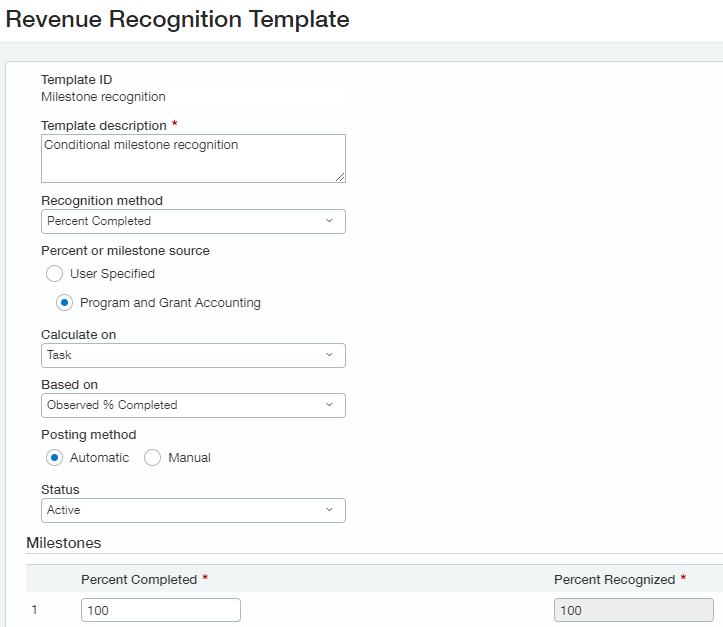 Milestone-based revenue recognition is often conditional in that nonprofits sometimes need to complete certain milestones before they can recognize grant revenue. This type of recognition often uses the Milestone or Percent completed recognition method.
For instance, let's say an organization received a conditional grant to open a youth sports center. The conditions of the grant state that a certain amount of revenue can be recognized at the following milestones:
- Acquiring property to build on
- Creating a building design
- Constructing the youth sports center
- Opening the youth sports center
For this reason, milestone-based revenue recognition often integrates with grant tracking and billing to leverage the task feature, easily letting you manage your grant project and revenue recognition schedules all at once.
An example of a revenue recognition template for milestone-based revenue recognition includes the following settings:
| Field | Setting |
|---|---|
| Recognition method | Percent completed |
| Percent or milestone source | Program and grant accounting |
| Calculate on | Task |
| Based on | Observed percent complete |
| Posting method | Automatic |
Learn more about how grant projects work with revenue recognition.
Installment revenue recognition type
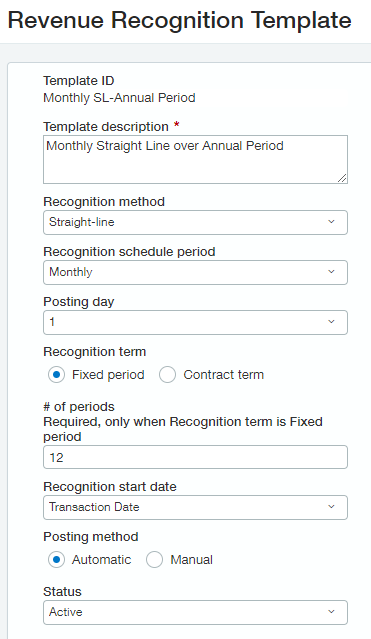 Installment-based revenue recognition often uses the Straight-line recognition method, and the revenue might be conditional in nature.
An organization might use this type of revenue recognition for annual tuition fees, for example. The organization receives an annual payment from a participant, but the revenue can't be recognized fully until the year-long membership is complete.
Learn more about revenue recognition schedules.
An example of a revenue recognition template for milestone-based revenue recognition includes the following settings:
| Field | Setting |
|---|---|
| Recognition method | Straight-line |
| Recognition schedule period | Monthly |
| Posting day | 1 |
| Recognition term | Fixed period |
| # of periods | 12 |
| Recognition start date | Transaction date |
| Posting method | Automatic |
Event revenue recognition type
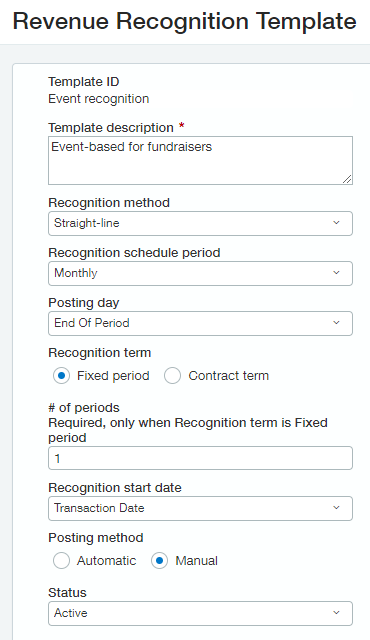 Like installment-based revenue recognition, event-based revenue recognition requires you to complete or deliver the event before you can fully recognize the revenue associated with it.
For example, an organization might host a fundraiser dinner party, where they collect payment for plates in advance. In this case, after the fundraiser dinner is completed, the organization can recognize the revenue associated with the event.
Event-based revenue recognition is especially flexible in how you decide to set it up, and it often depends on how you configure or use items in your organization. On one hand, you could set the schedule to recognize on the day after the event. Alternatively, you could use a milestone to record delivery.
| Field | Setting |
|---|---|
| Recognition method | Straight-line |
| Recognition schedule period | Monthly |
| Posting day | End of period |
| Recognition term | Fixed period |
| # of periods | 1 |
| Recognition start date | Transaction date |
| Posting method | Manual |
Learn more about revenue recognition schedules.
Track conditional and unconditional revenue
For grants and other large donations, you can also keep track of whether revenue is conditional or unconditional by adding custom fields. The best practice is to also add a field to describe how the condition was identified. If conditional, you can then align the revenue recognition steps to match the conditions. For example, you could add custom fields called Is there a right of return? and Right of return identification to fulfill these sorts of needs.
Learn more about Revenue Management
Check out the resources below to learn more about how Revenue Management works, what configuration is involved, and how to use it.
| Subject | Related information |
|---|---|
| High-level overview | |
| Usage | |
| With grant tracking and billing | |
| Configuration and implementation |
