About class groups
Related information
 Related topics
Class groups are a type of dimension group. A dimension group is a particular set of members in a dimension. You can manually select the group members or set up filters to select them automatically.
For example, you can create a class group that includes all active classes or classes with the same parent class.
The Classes dimension is managed from either the Company or Reports Setup menu. The Classes group is managed from the Reports > Setup > Dimension groups menu.
Dimension groups in reports and dashboards
Defining a dimension group gives you additional control over what appears in reports and dashboards. In general, any dimension groups that you create will appear as additional filter choices.
With a dimension group, you can do the following:
- Manually select a set of members, such as specific customers, vendors, or locations
- Filter to include members that meet certain criteria, such as items of the same type or customers of the same type
- Control the order in which the members appear in report columns and rows
- Take advantage of dimension counts to post to statistical journal entries automatically
Where can dimension groups be used?
Dimension groups can be used to filter in the following areas of Intacct:
- Financial reports
- Financial graphs
- General Ledger reports
-
Dashboards
Dimension use in dashboards is limited to components for performance cards, financial reports and graphs, and standard General Ledger reports.
| Feature | Allows filtering by dimension group? | Description |
|---|---|---|
|
Financial reports and graphs |
Yes |
Applies to reports and graphs in these lists:
When you define a report or graph, you can specify the filters as part of the report definition, or you can prompt the user for the filter at report runtime. |
|
Standard General Ledger reports |
Yes |
Applies to reports listed on the General Ledger menu, such as the Journals report or Trial Balance report. When you run a General Ledger report, you can select the filters to use. Or, you can create a prefiltered report by memorizing the report with the filters that you want. |
|
Other reports |
No |
Currently, reports outside of General Ledger do not support dimension groups.
|
|
Dashboards |
Yes (limited) |
Dashboard components can be prefiltered for a dimension group, or you can allow the user to filter the entire dashboard. Filtering is limited to components for performance cards, financial reports and graphs, and standard General Ledger reports. Learn more about dashboard filtering. |
Dimension report structures
Dimension report structures let you use dimensions on the rows or columns of financial reports. The following example shows a simple location report structure named South, which contains a location group named Southern offices.
- Dimension groups are custom groupings that are meaningful to your company.
- Dimension report structures can contain 1 or more dimension groups.
- The dimension report structure is what lets you add the dimension to a report.
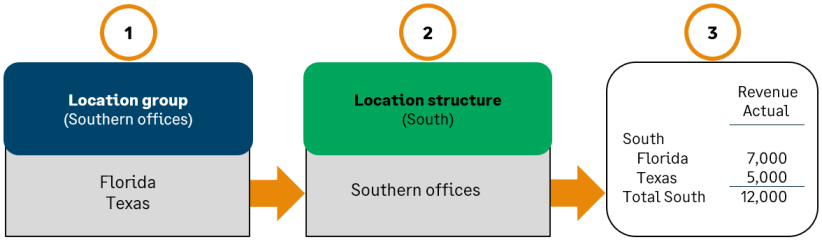
When you add a dimension group, you're given the option to create a dimension report structure automatically. Learn more about dimension structures.
