sage ai & automation
Identify high-risk transactions using AI-driven anomaly detection for AP Automation
AP Automation uses AI-driven anomaly detection that identifies potentially risky transactions before payment.
Sage Intacct analyzes vendor billing patterns and submission details to flag unusual transaction amounts and unrecognized vendor email addresses. This helps AP teams focus on higher-risk transactions, reduce manual review, and strengthen fraud controls.
Key benefits
-
Identify anomalous transactions earlier: Detect unusual amounts and unrecognized vendor email addresses before payment processing.
-
Focus review on transactions that need attention: Anomaly indicators help you prioritize potentially risky transactions instead of manually reviewing every transaction.
-
Strengthen fraud controls: Block suspicious email addresses and investigate transactions that deviate from expected patterns.
Read the release note about Blocking suspicious email addresses.
How it works
When transactions are processed through AP Automation or Purchasing, Sage Intacct detects the following issues:
-
Unusual transaction amounts
-
Unrecognized vendor email addresses
-
Multiple anomalies on the same transaction
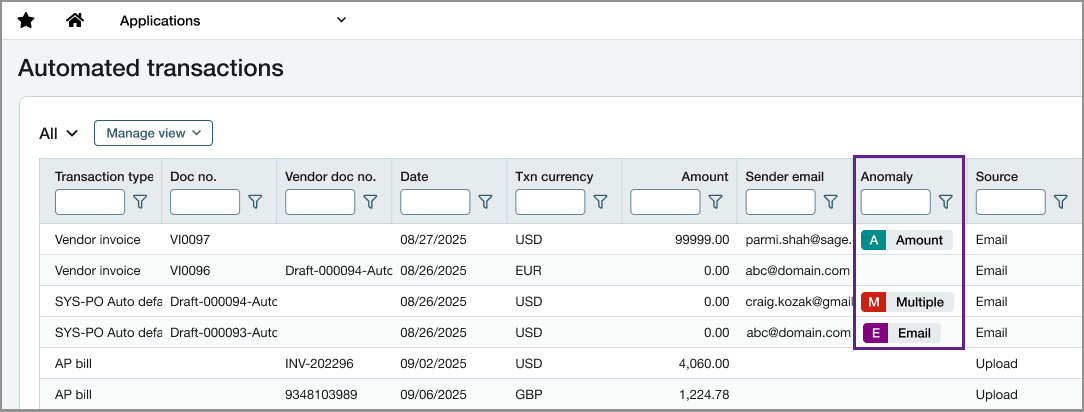
Anomaly indicators appear in the Automated transactions list so reviewers can investigate potentially risky transactions before posting.
Good to know
The Anomaly column does not appear by default. Create a custom list view and add the column to display anomaly indicators.
Anomalies are informational and do not prevent transaction posting.
Permissions and other requirements
| Subscription |
Accounts Payable AP Automation |
|---|---|
| Regional availability |
All regions |
| User type |
Business |
| Permissions |
Accounts Payable
|
