Supplier enrollment with Supplier Payments powered by CSI
Related information
 Related topics
After you enable a supplier in Intacct for Supplier Payments powered by CSI, CSI reaches out to begin the enrollment process. Suppliers also receive a remittance email from CSI after each payment.
About the supplier enrollment process
The following diagram shows how CSI communicates with and selects the payment method for each supplier.
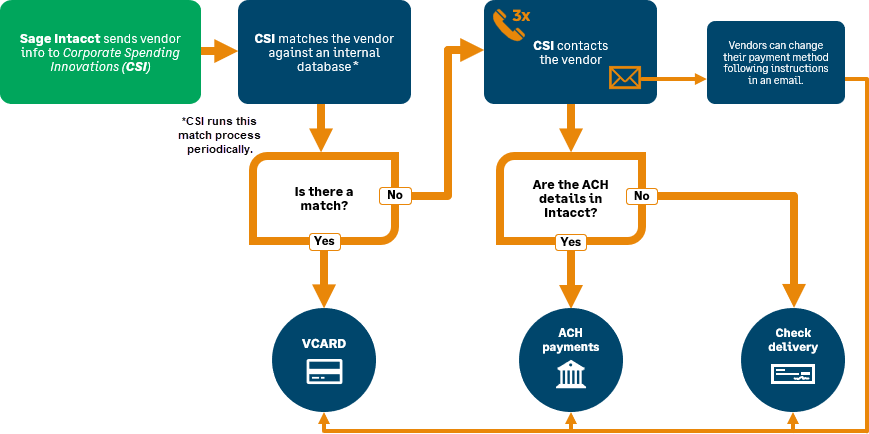
Communications from CSI
If a supplier does not already accept virtual credit cards, CSI begins their enrollment campaign with the supplier.
CSI communicates with suppliers in the following ways:
-
Email: CSI sends an enrollment email when you first enable suppliers. This email includes a registration link, which takes suppliers to a questionnaire where they select their preferred payment method.
-
Phone: CSI might also call the supplier no more than 3 times to discuss available payment methods.
The enrollment email that suppliers receive comes from noreply@csipaysystems.com. The registration link in this email is valid for 3 days.
Data retention
Supplier payment information is stored in CSI's systems and processed by CSI. You can find CSI's privacy policy, including processing and data retention periods, on the Configure Supplier Payments powered by CSI page in Intacct.
Estimated setup and payment timing for Supplier Payments powered by CSI.
-
Company name
-
Address
-
City
-
State or territory
-
Postal code
-
Country
-
Primary contact
-
Primary contact phone number
-
Business category
-
Does your company accept card payments for AR sales invoices?
-
Are you interested in card payments?
-
What credit card networks do you accept?
-
-
Are you interested in ACH payments?
-
Bank name
-
Account type
-
Bank routing number
-
Bank account number
-
-
How would you like to receive payment remittances?
-
Email address for remittance
Here are some considerations for virtual card payments:
-
Does your supplier have a credit max that they accept? Have suppliers let CSI know so that they do not pay the supplier virtual card payments over this max.
-
Cards must be processed for the full amount.
-
Do not attempt processing the card more than three times.
Send the CSI enrollment email
You can send your suppliers the enrollment email from CSI directly through Intacct. This is helpful when the original registration link expires, you need to send the enrollment email to a different address, or the supplier wants to update their preferred payment method.
If you need to send the enrollment email to a different address, make sure to update the supplier information with the correct email address before you send the CSI enrollment email. To avoid information discrepancies between Intacct and CSI, tell your suppliers to send you any updates before giving that information to CSI.
-
Go to Accounts Payable > All > Suppliers.
-
Select the suppliers from the list who needs a new enrollment email.
-
Select Send CSI enrollment email.
The supplier will receive a new enrollment email from CSI with a new registration link.
