Get support
Related information
 Related topics
Sage Intacct provides a support system to get you the help you need.
Step 1: Check out our self-service resources
Your first step is to check out our self-service resources for answers. The Help Center is thorough and can answer most of your questions.
See Find answers and get the most of out of help for information about how to best navigate the Help Center directly from the product.
If you're experiencing performance issues, see Troubleshoot Sage Intacct performance.
Step 2: Look for answers in the Community
The Community provides additional resources like forums where you can connect with other Intacct users and find knowledge base articles that are authored by our support analysts.
The Community requires a separate login. See The Sage Intacct Community for detailed instructions about self-registering for the Community, connecting with other users, and searching the knowledge base.
Step 3: Contact Support
First, collect troubleshooting information
Support will request the following information:
-
A detailed description of the problem, including:
-
The page you were using.
-
Specific steps you were performing.
-
Screenshots or video recordings that might help explain the issue.
-
-
Support IDs for any pages or error messages involved in the issue.
-
Any CSV import files and email messages containing errors related to data imports, if applicable.
-
Exact steps taken that are required to reproduce the problem.
-
Any steps you have taken to resolve the issue.
Error messages and Sage Intacct pages each have a Support ID to help determine what went wrong. Additionally, the pages include supplemental technical information to assist when troubleshooting. Provide this information to your designated support user.
Find the Support ID in one of these locations
-
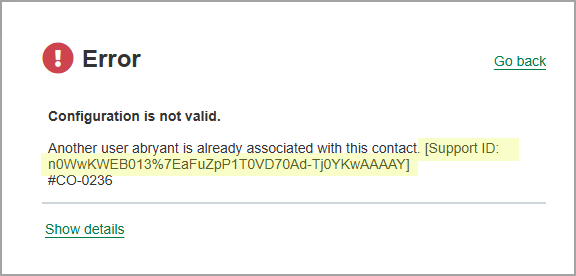
Error messages have a Support ID after the initial error message inside a pair of brackets.
-
Save this Support ID and include it in your communications to customer support.
-
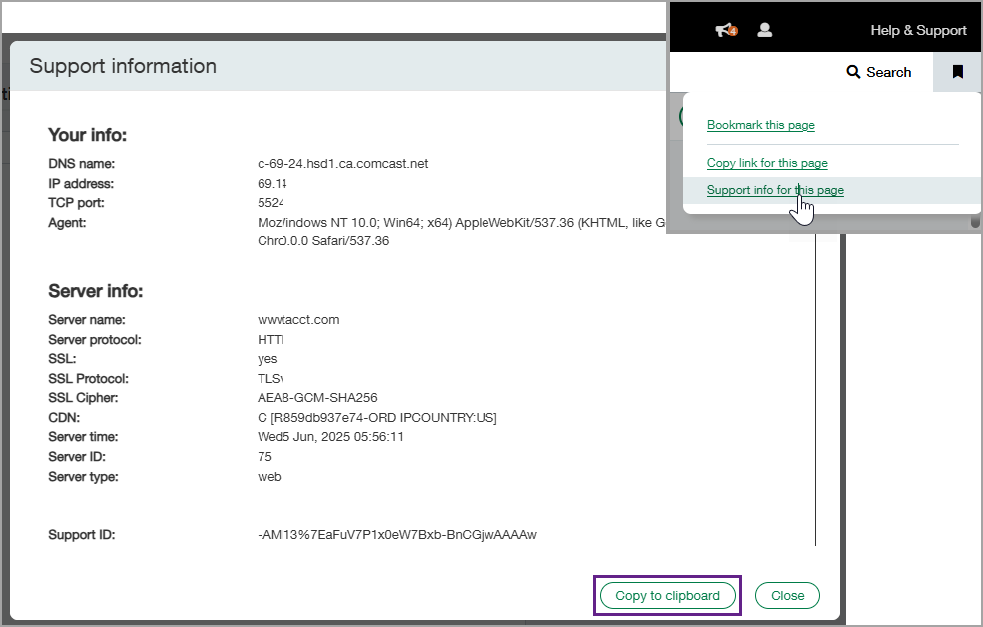
Select the bookmark icon below your username.
-
Select Support info for this page.
A window pops up with your server and user information and the Support ID.
-
Select Copy to clipboard to copy the information.
Then, log a support case
Sage Intacct Customer Support operates between the business hours of 6:00 AM to 6:00 PM local time in countries we support. After-hours support is available for high-priority cases.
The best practice is to open a support case online before calling Support so that your call can be routed to the right experts.
The number you call depends on where you are located.
-
North America: (877) 704-3700
-
United Kingdom: +44 (0)19 1479 5990
-
Australia: +61 1300 729 330
-
South Africa: +27 (0)11 304 3220
-
France: 01 70 73 16 40
-
Germany: +49 69 500076297
