Order to Cash workflow controls
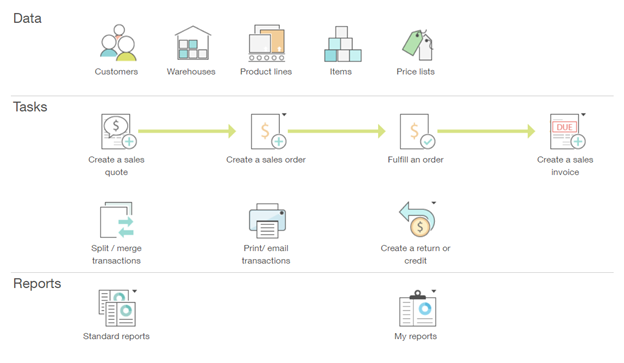
This section contains information about audit considerations, internal control options, and Sage Intacct configuration options for Order to Cash workflows. A Order to Cash Workflow can include the following business process steps and related master data records, depending on the operational and compliance requirements of the organization:
Control selections
Internal controls should be selected based on the control objectives, the functional requirements of the control and the reasonableness of practice based on the organization’s operational reality. The following list of internal control options are grouped by process step and control objective, to streamline the evaluation and selection process.
The process steps and detailed control objectives related to Order to Cash workflows are described in the following sections.
Sales order
Objective type: Existence
Related control options and Sage Intacct configuration
| Control | Sales order customer validation |
|---|---|
Control type | Preventative |
Objective types | Existence |
Functional requirement | Can only create a sales order against a valid customer |
Control rationale | Supports segregation of duties in revenue and management override of revenue |
Why it matters | This control prevents sales orders from being raised for customers not on the master file list. This is vital to prevent fraudulent customer orders and to protect the business from working with customers who have poor credit records. |
Factors to consider |
|
Sage Intacct configuration | To make a customer inactive, which removes it from being listed:
To temporarily place a customer on hold:
|
Sage Intacct Help page | |
Evidence for control | Configuration page in Sage Intacct |
How to test | See configuration test. The test should focus on ensuring the functionality of blocking inactive / non existent customers works. |
Control | Sales order approval workflow |
|---|---|
Control type | Preventative |
Objective types | Existence, Accuracy |
Functional requirement | Ability to approve or review a sales order before an issue, if it has certain characteristics |
Control rationale | To review sales orders above a certain value limit or for certain customers or classes of customers |
Why it matters | It is important to consider what the risk to be addressed is. Does this approval ensure that the sales orders don't have any mistakes? Or, are you trying to ensure that you monitor the amount of business that you do with certain customers? |
Factors to consider | What kind of sales orders need to be approved?
|
Sage Intacct configuration | With access permissions and user types, only certain users can convert or approve a sales order. Create a transaction definition for 'Sales Order Draft' that converts to an 'Approved Sales Order' transaction definition, where the convert is limited to certain users. Create a smart event to email a user when a new ‘Sales order Draft’ is created to notify them to approve. |
Sage Intacct Help page | |
Evidence for control | Configuration page in Sage Intacct |
How to test | See workflow test. |
Objective type: Completeness
Related control options and Sage Intacct configuration
Control | Unissued sales order review |
|---|---|
Control type | Detective |
Objective types | Completeness |
Functional requirement | Ability to report on sales orders that have been created but not issued to the customer |
Control rationale | Supports controls over the completeness of sales |
Why it matters | There might be good reasons for not issuing a sales order immediately. So, it's important to ensure that this control is balanced in its approach. Otherwise, it could end up being an unnecessary administrative burden. |
Factors to consider |
|
Sage Intacct configuration | Create a custom list view that's filtered by the appropriate transaction state:
|
Sage Intacct Help page | |
Evidence for control | Report with annotations by the reviewer. Follow up queries should be evidenced. Ensure it is clear what the conclusions were and how they were reached. |
How to test | See review control test. The focus of the test should be on how missing sales orders are identified and followed up. |
Control | Open sales order review |
|---|---|
Control type | Detective |
Objective types | Completeness, Accuracy, Cut-off |
Functional requirement | Ability to report on open sales order by date |
Control rationale | Supports controls on completeness of revenue. It identifies orders that have not yet been recorded as shipped so might have been fulfilled but not recorded or billed. |
Why it matters | Depending on your process, you might have a few or a lot of open sales orders at any given time. Reviewing your open sales orders can address two risks:
Using this control near month or year end can be especially useful to ensure that sales are recorded in the correct period. |
Factors to consider |
|
Sage Intacct configuration | Create a custom list view that's filtered by the appropriate transaction state:
|
Sage Intacct Help page | |
Evidence for control | Report with annotations by the reviewer. Follow up queries should be evidenced. Ensure it is clear what the conclusions were and how they were reached. |
How to test | See review control test. The focus of the test should be on how missing shipments or invoices are identified and followed up. |
Objective type: Accuracy
Related control options and Sage Intacct configuration
Control | Sales order approval workflow |
|---|---|
Control type | Preventative |
Objective types | Existence, Accuracy |
Functional requirement | Ability to approve or review a sales order before an issue, if it has certain characteristics |
Control rationale | To review sales orders above a certain value limit or for certain customers or classes of customers |
Why it matters | It is important to consider what the risk to be addressed is. Does this approval ensure that the sales orders don't have any mistakes? Or, are you trying to ensure that you monitor the amount of business that you do with certain customers? |
Factors to consider | What kind of sales orders need to be approved?
|
Sage Intacct configuration | With access permissions and user types, only certain users can convert or approve a sales order. Create a transaction definition for 'Sales Order Draft' that converts to an 'Approved Sales Order' transaction definition, where the convert is limited to certain users. Create a smart event to email a user when a new ‘Sales order Draft’ is created to notify them to approve. |
Sage Intacct Help page | |
Evidence for control | Configuration page in Sage Intacct |
How to test | See workflow test. |
| Control | Sales order item and pricing validation |
|---|---|
Control type | Preventative |
Objective types | Accuracy |
Functional requirement | Sales orders can only contain pre-existing items with pre-existing prices |
Control rationale | To enable controls over price overrides |
Why it matters | This control is ensures sales people are not undermining the commerciality of the business through over-discounting. Consider the risk factors here. For example, what would drive a salesperson to adjust the price or try to create an inappropriate product? Note that this is not strictly an accounting control (accounting controls focus on whether the sales is recorded at the correct price). If a salesperson offers an excessive discount, that's a commercial issue rather than an accounting issue. However, indirectly, if the sale price is below cost, then an auditor might raise a concern about the carrying value of inventory. |
Factors to consider |
|
Sage Intacct configuration | Configure Order Entry to enable standard price lists:
Configure sales order transaction definitions with the appropriate settings:
|
Sage Intacct Help page | |
Evidence for control | Configuration page in Sage Intacct |
How to test | See configuration test. The test should focus on the elements of the validation that ensure the integrity of financial reporting. |
| Control | Sales order data validation |
|---|---|
Control type | Preventative |
Objective types | Accuracy |
Functional requirement | Ability to define required fields before a sales order can be issued |
Control rationale | To enable controls over completeness and adequacy of the information that's captured at the start of the sales process |
Why it matters | Ensure that the mandatory fields are reasonable. Some of them are important from a financial perspective, such as payment terms. Others are more of an operational issue, such as recording the customer's needs. |
Factors to consider | What fields will be mandatory on a sales order and what fields can be left as optional? |
Sage Intacct configuration | Several fields are already required on sale orders. You can add custom fields. You can also use smart rules to require using fields that are critical to your business operations. |
Sage Intacct Help page | |
Evidence for control | Configuration page in Sage Intacct |
How to test | See configuration control test. The test should focus on the fields that are relevant for the purposes of the control framework, for example, financial reporting. |
Control | Open sales order review |
|---|---|
Control type | Detective |
Objective types | Completeness, Accuracy, Cut-off |
Functional requirement | Ability to report on open sales order by date |
Control rationale | Supports controls on completeness of revenue. It identifies orders that have not yet been recorded as shipped so might have been fulfilled but not recorded or billed. |
Why it matters | Depending on your process, you might have a few or a lot of open sales orders at any given time. Reviewing your open sales orders can address two risks:
Using this control near month or year end can be especially useful to ensure that sales are recorded in the correct period. |
Factors to consider |
|
Sage Intacct configuration | Create a custom list view that's filtered by the appropriate transaction state:
|
Sage Intacct Help page | |
Evidence for control | Report with annotations by the reviewer. Follow up queries should be evidenced. Ensure it is clear what the conclusions were and how they were reached. |
How to test | See review control test. The focus of the test should be on how missing shipments or invoices are identified and followed up. |
Fulfillment/Shipper
Objective type: Completeness
Related control options and Sage Intacct configuration
| Control | Overdue shipment review |
|---|---|
Control type | Detective |
Objective types | Completeness, Accuracy, Cut-off |
Functional requirement | Ability to report on deliveries that are overdue (by a selected period) |
Control rationale | Supports controls on completeness of revenue by identifying overdue shipments |
Why it matters | This control is not likely to be a financial reporting control, although it is part of demonstrating completeness of revenue. This control helps to ensure that all orders are shipped and billed. Ensuring that you fulfill orders on time is an important part of your shipment process. The key to ensuring this works well is to make it part of a process of follow up that can be repeated, weekly or daily, without duplication. How will you ensure that the check doesn't cover the same items again and again, while using the most up-to-date information. |
Factors to consider |
|
Sage Intacct configuration | Create a custom report: Go to Customization Services or Platform Services > All > Custom reports. |
Sage Intacct Help page | |
Evidence for control | Report with annotations by the reviewer. Follow up queries should be evidenced. Ensure it is clear what the conclusions were and how they were reached. |
How to test | See review control test. The focus of the test should be on how shipments outside the threshold of acceptable delivery times are identified and followed up. |
| Control | Review of fulfillment quantity variance |
|---|---|
Control type | Detective |
Objective types | Existence, Accuracy |
Functional requirement | Ability to report on over and under deliveries |
Control rationale | Supports control over accuracy of revenue |
Why it matters | This control can address the following risks:
|
Factors to consider |
|
Sage Intacct configuration | Use the Order Entry standard reports, which show a variety of information. Go to Order Entry > All > Reports. You can also create custom reports to get more information, if needed. |
Sage Intacct Help page | |
Evidence for control | Report with annotations by the reviewer. Follow up queries should be evidenced. Ensure it is clear what the conclusions were and how they were reached. |
How to test | See review control test. The focus of the test should be on how fulfillment with inappropriate variances are identified and followed up. |
| Control | Review of closed sales orders with quantity variance |
|---|---|
Control type | Detective |
Objective types | Existence, Accuracy |
Functional requirement | Ability to report on closed deliveries where the delivery quantity did not match order quantity |
Control rationale | Supports control over accuracy of revenue |
Why it matters | This control can address the following risks:
The difference between this control and Review of fulfillment quantity variance is that this control is for closed orders, which means that the invoice is likely to be issued with no further shipments. |
Factors to consider |
|
Sage Intacct configuration | Create a custom report: Go to Customization Services or Platform Services > All > Custom reports. |
Sage Intacct Help page | |
Evidence for control | Report with annotations by the reviewer. Follow up queries should be evidenced. Ensure it is clear what the conclusions were and how they were reached. |
How to test | See review control test. The focus of the test should be on how shipments with inappropriate variances are identified and followed up. |
Objective type: Existence, Accuracy
Related control options and Sage Intacct configuration
| Control | Overdue shipment review |
|---|---|
Control type | Detective |
Objective types | Completeness, Accuracy, Cut-off |
Functional requirement | Ability to report on deliveries that are overdue (by a selected period) |
Control rationale | Supports controls on completeness of revenue by identifying overdue shipments |
Why it matters | This control is not likely to be a financial reporting control, although it is part of demonstrating completeness of revenue. This control helps to ensure that all orders are shipped and billed. Ensuring that you fulfill orders on time is an important part of your shipment process. The key to ensuring this works well is to make it part of a process of follow up that can be repeated, weekly or daily, without duplication. How will you ensure that the check doesn't cover the same items again and again, while using the most up-to-date information. |
Factors to consider |
|
Sage Intacct configuration | Create a custom report: Go to Customization Services or Platform Services > All > Custom reports. |
Sage Intacct Help page | |
Evidence for control | Report with annotations by the reviewer. Follow up queries should be evidenced. Ensure it is clear what the conclusions were and how they were reached. |
How to test | See review control test. The focus of the test should be on how shipments outside the threshold of acceptable delivery times are identified and followed up. |
Sales invoice
Objective type: Existence
Related control options and Sage Intacct configuration
| Control | Automated population of invoices based on shipper quantity and sales order price |
|---|---|
Control type | Preventive |
Objective types | Existence, Accuracy |
Functional requirement | Invoice values are automatically calculated based on order price and fulfillment. |
Control rationale | Supports control over accuracy and existence of revenue |
Why it matters | In most cases, populating the invoice directly from the dispatch quantity and the sales order price is sufficient. However, also consider the process and controls to ensure that changes can be made where needed, without circumventing this control.
Using this control near month or year end can be especially useful to ensure that sales are recorded in the correct period. |
Factors to consider |
|
Sage Intacct configuration | Ensure that the transaction definition for the Sales Invoice and all workflow transactions that proceed it have these settings configured:
With this setup, the quantity and order unit price are transferred to the Sales Invoice during conversion. |
Sage Intacct Help page | |
Evidence for control | Configuration page in Sage Intacct |
How to test | See configuration control test. The test should focus on checking that the relevant fields are automatically populated. |
| Control | Invoice change review |
|---|---|
Control type | Detective |
Objective types | Existence, Accuracy |
Functional requirement | Ability to report on any overrides to automatic invoicing values |
Control rationale | If the control for 'Automated population of invoices based on shipper quantity and sales order price' is not applicable this becomes more important. |
Why it matters | Designing the process without the need for a lot of invoice changes is the best way to prevent inappropriate or erroneous changes to invoices. However, when changes are necessary, you might want to check them to ensure they are appropriate. Also see Automated population of invoices based on shipper quantity and sales order price. |
Factors to consider |
|
Sage Intacct configuration | Create a custom report: Go to Customization Services or Platform Services > All > Custom reports. |
Sage Intacct Help page | |
Evidence for control | Report with annotations by the reviewer. Follow up queries should be evidenced. Ensure it is clear what the conclusions were and how they were reached. |
How to test | See review control test. The focus of the test should be on how inappropriate changes to invoices are identified and followed up. |
| Control | Manual invoice listing review |
|---|---|
Control type | Detective |
Objective types | Existence, Accuracy |
Functional requirement | Ability to report on any manually generated invoices |
Control rationale | Control over accuracy and existence of revenue |
Why it matters | Manual invoices are often used to bypass the main route, which is to dispatch quantities and sales order prices to automatically populate the invoices. Therefore, use this control to enforce the manual invoice policy. Also use this control in conjunction with Restricted access to create manual invoices. |
Factors to consider |
|
Sage Intacct configuration | Create a separate 'Manual Invoice' transaction definition to make review and reporting easier. |
Sage Intacct Help page | |
Evidence for control | Report with annotations by the reviewer. Follow up queries should be evidenced. Ensure it is clear what the conclusions were and how they were reached. |
How to test | See review control test. The focus of the test should be on how inappropriate manual invoices are identified and followed up. |
| Control | Restricted access to create manual invoices |
|---|---|
Control type | Preventive |
Objective types | Existence |
Functional requirement | Ability to restrict access to creating manual invoices |
Control rationale | Supports controls over override to billing |
Why it matters | Give normal considerations as for all restricted access controls, with access minimized and excluded from those who should not have it. You can use this control in conjunction with Manual invoice listing review. |
Factors to consider | Are there any specific people who need to be prevented from having this access for segregation of duties reasons? |
Sage Intacct configuration | Create a 'Manual Invoice' transaction definition that has restricted access to certain users.
|
Sage Intacct Help page | |
Evidence for control | Access role design |
How to test |
Objective type: Accuracy
Related control options and Sage Intacct configuration
| Control | Automated population of invoices based on shipper quantity and sales order price |
|---|---|
Control type | Preventive |
Objective types | Existence, Accuracy |
Functional requirement | Invoice values are automatically calculated based on order price and fulfillment. |
Control rationale | Supports control over accuracy and existence of revenue |
Why it matters | In most cases, populating the invoice directly from the dispatch quantity and the sales order price is sufficient. However, also consider the process and controls to ensure that changes can be made where needed, without circumventing this control.
Using this control near month or year end can be especially useful to ensure that sales are recorded in the correct period. |
Factors to consider |
|
Sage Intacct configuration | Ensure that the transaction definition for the Sales Invoice and all workflow transactions that proceed it have these settings configured:
With this setup, the quantity and order unit price are transferred to the Sales Invoice during conversion. |
Sage Intacct Help page | |
Evidence for control | Configuration page in Sage Intacct |
How to test | See configuration control test. The test should focus on checking that the relevant fields are automatically populated. |
| Control | Invoice change review |
|---|---|
Control type | Detective |
Objective types | Existence, Accuracy |
Functional requirement | Ability to report on any overrides to automatic invoicing values |
Control rationale | If the control for 'Automated population of invoices based on shipper quantity and sales order price' is not applicable this becomes more important. |
Why it matters | Designing the process without the need for a lot of invoice changes is the best way to prevent inappropriate or erroneous changes to invoices. However, when changes are necessary, you might want to check them to ensure they are appropriate. Also see Automated population of invoices based on shipper quantity and sales order price. |
Factors to consider |
|
Sage Intacct configuration | Create a custom report: Go to Customization Services or Platform Services > All > Custom reports. |
Sage Intacct Help page | |
Evidence for control | Report with annotations by the reviewer. Follow up queries should be evidenced. Ensure it is clear what the conclusions were and how they were reached. |
How to test | See review control test. The focus of the test should be on how inappropriate changes to invoices are identified and followed up. |
| Control | Manual invoice listing review |
|---|---|
Control type | Detective |
Objective types | Existence, Accuracy |
Functional requirement | Ability to report on any manually generated invoices |
Control rationale | Control over accuracy and existence of revenue |
Why it matters | Manual invoices are often used to bypass the main route, which is to dispatch quantities and sales order prices to automatically populate the invoices. Therefore, use this control to enforce the manual invoice policy. Also use this control in conjunction with Restricted access to create manual invoices. |
Factors to consider |
|
Sage Intacct configuration | Create a separate 'Manual Invoice' transaction definition to make review and reporting easier. |
Sage Intacct Help page | |
Evidence for control | Report with annotations by the reviewer. Follow up queries should be evidenced. Ensure it is clear what the conclusions were and how they were reached. |
How to test | See review control test. The focus of the test should be on how inappropriate manual invoices are identified and followed up. |
Objective type: Existence, Accuracy
Related control options and Sage Intacct configuration
| Control | Tax engines |
|---|---|
Control type | Preventative |
Objective types | Existence, Accuracy |
Functional requirement | Ability to integrate with third-party tax engines for country tax, state and local tax, and similar calculations. |
Control rationale | Ensures consistent application of tax and supports optimization of cash collection and related cash flows. |
Why it matters | Where companies operate in markets where local tax rules are complex or rapidly changing, maintaining those tax rules in a core finance system can be hard to do and prone to error. In these cases it might be worthwhile to use local tax engines to calculate taxes and duties. |
Factors to consider | Are you subject to complex or rapidly changing tax regimes (such as US state & local tax) |
Sage Intacct configuration | There are several options for configuration of automated tax calculations, posting, and reporting. Each organization should review the options relevant to the compliance requirements. |
Sage Intacct Help page | |
Evidence for control | Will usually be held in documentation for the tax engine. Users should not have access to manually maintain tax rates maintained by tax engines (as this would allow them to override). |
How to test | See configuration test (for configuration of tax rates) and access control test (where access should be restricted). |
| Control | Tax reconciliation |
|---|---|
Control type | Detective |
Objective types | Completeness, Accuracy |
Functional requirement | Ability to reconcile tax control accounts both within Sage Intacct and make data available to external reconciliation engines for tax reconciliation. |
Control rationale | Ensures consistent application of tax and supports optimization of cash collection and related cash flows. |
Why it matters | A tax control account reconciliation is important to make sure that the tax balance is correct and/or the tax submission is correct. The former is done by checking the tax balance to any expectations (practicality will prevent a review of all tax transactions), while the latter is done by checking the tax balance to the tax submission, where this is done based on data outside the system. |
Factors to consider |
|
Sage Intacct configuration | Configurations will vary per tax solution. |
Sage Intacct Help page | |
Evidence for control | Reconciliation documentation, including reconciling items and follow-up. |
How to test |
Objective type: Completeness
Related control options and Sage Intacct configuration
| Control | Overdue shipment review |
|---|---|
Control type | Detective |
Objective types | Completeness, Accuracy, Cut-off |
Functional requirement | Ability to report on deliveries that are overdue (by a selected period) |
Control rationale | Supports controls on completeness of revenue by identifying overdue shipments |
Why it matters | This control is not likely to be a financial reporting control, although it is part of demonstrating completeness of revenue. This control helps to ensure that all orders are shipped and billed. Ensuring that you fulfill orders on time is an important part of your shipment process. The key to ensuring this works well is to make it part of a process of follow up that can be repeated, weekly or daily, without duplication. How will you ensure that the check doesn't cover the same items again and again, while using the most up-to-date information. |
Factors to consider |
|
Sage Intacct configuration | Create a custom report: Go to Customization Services or Platform Services > All > Custom reports. |
Sage Intacct Help page | |
Evidence for control | Report with annotations by the reviewer. Follow up queries should be evidenced. Ensure it is clear what the conclusions were and how they were reached. |
How to test | See review control test. The focus of the test should be on how shipments outside the threshold of acceptable delivery times are identified and followed up. |
| Control | Automated population of invoices based on shipper quantity and sales order price |
|---|---|
Control type | Preventive |
Objective types | Existence, Accuracy |
Functional requirement | Invoice values are automatically calculated based on order price and fulfillment. |
Control rationale | Supports control over accuracy and existence of revenue |
Why it matters | In most cases, populating the invoice directly from the dispatch quantity and the sales order price is sufficient. However, also consider the process and controls to ensure that changes can be made where needed, without circumventing this control.
Using this control near month or year end can be especially useful to ensure that sales are recorded in the correct period. |
Factors to consider |
|
Sage Intacct configuration | Ensure that the transaction definition for the Sales Invoice and all workflow transactions that proceed it have these settings configured:
With this setup, the quantity and order unit price are transferred to the Sales Invoice during conversion. |
Sage Intacct Help page | |
Evidence for control | Configuration page in Sage Intacct |
How to test | See configuration control test. The test should focus on checking that the relevant fields are automatically populated. |
Cash receipts
Objective type: Completeness
Related control options and Sage Intacct configuration
| Control | Automatic matching of receipts to customer invoices |
|---|---|
Control type | Preventive |
Objective types | Completeness, Accuracy, Cut-off |
Functional requirement | Ability to automatically match receipts to invoices within predefined tolerance limits |
Control rationale | Supports controls over bad debts and existence of revenue |
Why it matters | Suggested matches, if used, are not a guarantee of the matches being correct. Think about the process of matching and ensure that this control is one contributing factor to ensure accurate matching. |
Factors to consider | How to define tolerance thresholds that are in line with your company's policy? |
Sage Intacct configuration | Sage Intacct configuration is set as a default to make automatic payment suggestions, matching customer payments to open invoices. |
Sage Intacct Help page | |
Evidence for control | Configuration page in Sage Intacct |
How to test |
| Control | Receipts cannot be matched more than once |
|---|---|
Control type | Preventive |
Objective types | Completeness |
Functional requirement | Cash amounts can only be allocated once. |
Control rationale | Supports controls over the accuracy of cash balances. Matching cash receipts more than once could be used to conceal fraud, including customer collusion. |
Why it matters | While an important factor to consider, this control is most likely assumed by all users as a logical requirement. |
Factors to consider | Not applicable |
Sage Intacct configuration | Standard bank reconciliation functionality |
Sage Intacct Help page | |
Evidence for control | Code within system, which indicates ‘matched’ during reconciliation and ‘cleared’ when reconciliation is complete |
How to test | See configuration control test. The three-way match functionality should be tested, along with any threshold for acceptance and blocking of invoices above the threshold. |
Objective type: Existence, Accuracy
Related control options and Sage Intacct configuration
| Control | Automatic matching of receipts to customer invoices |
|---|---|
Control type | Preventive |
Objective types | Completeness, Accuracy, Cut-off |
Functional requirement | Ability to automatically match receipts to invoices within predefined tolerance limits |
Control rationale | Supports controls over bad debts and existence of revenue |
Why it matters | Suggested matches, if used, are not a guarantee of the matches being correct. Think about the process of matching and ensure that this control is one contributing factor to ensure accurate matching. |
Factors to consider | How to define tolerance thresholds that are in line with your company's policy? |
Sage Intacct configuration | Sage Intacct configuration is set as a default to make automatic payment suggestions, matching customer payments to open invoices. |
Sage Intacct Help page | |
Evidence for control | Configuration page in Sage Intacct |
How to test |
| Control | Unallocated cash review |
|---|---|
Control type | Detective |
Objective types | Existence, Accuracy |
Functional requirement | Ability to report on any unallocated cash |
Control rationale | Unallocated cash can be used to conceal fictitious invoices and revenue. |
Why it matters | A review of unallocated cash will likely be performed very frequently as users try to resolve receipts that aren't very clear or that come from unexpected places. These daily or weekly reviews do not necessarily need to be formalized because they are operational in nature. At month end, however, you can do an unallocated cash review to ensure the month-end receivables position is accurate and not overstated. |
Factors to consider |
|
Sage Intacct configuration | Standard bank reconciliation report that shows unreconciled transactions |
Sage Intacct Help page | |
Evidence for control | Report with annotations by the reviewer. Follow up queries should be evidenced. Ensure it is clear what the conclusions were and how they were reached. |
How to test | See review control test. The test should focus on how problematic unallocated cash items are reviewed and followed up. |
Returns
Objective type: Existence
Related control options and Sage Intacct configuration
| Control | Review of accruals for conditional discounts, incentives, or rebates |
|---|---|
Control type | Detective |
Objective types | Existence, Accuracy, Valuation |
Functional requirement | Ability to accrue for any conditional discounts, incentives, or rebates |
Control rationale | Controls over accounting for conditional discounts, incentives, or rebates |
Why it matters | The production of a report is a process and not a control. If the accrual is automatically calculated based on terms in the system, then it's a control. Otherwise, a manual calculation, which might dependent on a report, that leads to a journal posting is needed. However, review of the system-based report and checking against contracts can be used as an IT dependent manual control over this difficult area. |
Sage Intacct configuration | Set up price schedules to automate the calculation and application of conditional discounts, incentives, or rebates. |
Sage Intacct Help page | |
Evidence for control | Report with annotations by the reviewer. Follow up queries should be evidenced. Ensure it is clear what the conclusions were and how they were reached. |
How to test | See review control test. The test should be carefully designed to ensure the control objective is met and is not just a general check that some kind of review happened. |
| Control | Restricted access to enter customer returns |
|---|---|
Control type | Preventive |
Objective types | Existence |
Functional requirement | Ability to restrict access to those who can enter customer returns |
Control rationale | Controls over fraud and collusion with customers |
Why it matters | Give normal considerations as for all restricted access controls, with access minimized and excluded from those who should not have it. This control is primarily for fraud control, but also prevents the inappropriate use of returns instead of adjusting invoices. Use this control in conjunction with Review of customer returns. |
Factors to consider |
|
Sage Intacct configuration | Create a 'Returns' transaction definition that has restricted access to certain users.
|
Sage Intacct Help page | |
Evidence for control | Configuration page in Sage Intacct |
How to test |
| Control | Review of customer returns |
|---|---|
Control type | Detective |
Objective types | Existence, Accuracy, Completeness |
Functional requirement | Ability to report on value of customer returns by customer or person recording the return and other criteria |
Control rationale | Monitoring controls over levels of returns. |
Why it matters | This control can address the following risks:
Design this review to identify follow-up items for both risks. Be careful of the danger of it becoming a generalized review where it is not easy to evidence how the control addresses the risks. |
Factors to consider |
|
Sage Intacct configuration | Create a custom report: Go to Customization Services or Platform Services > All > Custom reports. |
Sage Intacct Help page | |
Evidence for control | Report with annotations by the reviewer. Follow up queries should be evidenced. Ensure it is clear what the conclusions were and how they were reached. |
How to test | See review control test. The test should focus on how inappropriate returns are identified and followed up. |
| Control | Restricted access to enter credit notes |
|---|---|
Control type | Preventive |
Objective types | Existence, Accuracy |
Functional requirement | Ability to restrict access to creating credit notes |
Control rationale | Control over accuracy and existence of revenue |
Why it matters | Give normal considerations as for all restricted access controls, with access minimized and excluded from those who should not have it. Use this control in conjunction with Credit note approval workflow and Credit note listing review. |
Factors to consider |
|
Sage Intacct configuration | You can create transaction definitions (for example, Customer Refund) that have restricted access to certain users.
|
Sage Intacct Help page | |
Evidence for control | Access role design |
How to test |
| Control | Credit note for customer refund approval workflow |
|---|---|
Control type | Preventative |
Objective types | Existence, Accuracy |
Functional requirement | Credit notes require approval before being issued to customer or applied to customer account |
Control rationale | Control over completeness of revenue and over fraud (collusion with customer to provide fictitious credit notes). |
Why it matters | Without an appropriate level of review and approval for credit notes that are raised, fraud or errors can result in financial loss to the company. |
Factors to consider | Is there a minimum level for which approval is needed, but below which no approval is required? |
Sage Intacct configuration | Tracking customer credit balances:
When posting transactions, ensure that each line has both the correct associated Customer and Vendor dimension record. |
Sage Intacct Help page | |
Evidence for control | Approval workflow audit trail that indicates the raisers and approvers. |
How to test |
| Control | Credit note for customer refund listing review |
|---|---|
Control type | Detective |
Objective types | Existence, Accuracy |
Functional requirement | Ability to report on credit notes by various selection criteria |
Control rationale | Credit notes can be used to support fraud, for example, through collusion with the customer. Credit notes can also conceal the impact of other control failings in the Order to Cash process, for example, failure of pricing controls. |
Why it matters | This control is a review of all credit notes to ensure that they’re valid. This should be a relatively small list. However, if it's unmanageable or inefficient to check all of them, think about the criteria that you want to apply to find problematic credit notes, such as value, user who created it, customer. |
Factors to consider |
|
Sage Intacct configuration | Create a custom report: Go to Customization Services or Platform Services |
Sage Intacct Help page | |
Evidence for control | Report with annotations by the reviewer. Follow up queries should be evidenced. Ensure it is clear what the conclusions were and how they were reached. |
How to test | See review control test. The test should focus on how inappropriate credit notes are identified and followed up. |
Objective type: Accuracy
Related control options and Sage Intacct configuration
| Control | Review of accruals for conditional discounts, incentives, or rebates |
|---|---|
Control type | Detective |
Objective types | Existence, Accuracy, Valuation |
Functional requirement | Ability to accrue for any conditional discounts, incentives, or rebates |
Control rationale | Controls over accounting for conditional discounts, incentives, or rebates |
Why it matters | The production of a report is a process and not a control. If the accrual is automatically calculated based on terms in the system, then it's a control. Otherwise, a manual calculation, which might dependent on a report, that leads to a journal posting is needed. However, review of the system-based report and checking against contracts can be used as an IT dependent manual control over this difficult area. |
Sage Intacct configuration | Set up price schedules to automate the calculation and application of conditional discounts, incentives, or rebates. |
Sage Intacct Help page | |
Evidence for control | Report with annotations by the reviewer. Follow up queries should be evidenced. Ensure it is clear what the conclusions were and how they were reached. |
How to test | See review control test. The test should be carefully designed to ensure the control objective is met and is not just a general check that some kind of review happened. |
| Control | Review of customer returns |
|---|---|
Control type | Detective |
Objective types | Existence, Accuracy, Completeness |
Functional requirement | Ability to report on value of customer returns by customer or person recording the return and other criteria |
Control rationale | Monitoring controls over levels of returns. |
Why it matters | This control can address the following risks:
Design this review to identify follow-up items for both risks. Be careful of the danger of it becoming a generalized review where it is not easy to evidence how the control addresses the risks. |
Factors to consider |
|
Sage Intacct configuration | Create a custom report: Go to Customization Services or Platform Services > All > Custom reports. |
Sage Intacct Help page | |
Evidence for control | Report with annotations by the reviewer. Follow up queries should be evidenced. Ensure it is clear what the conclusions were and how they were reached. |
How to test | See review control test. The test should focus on how inappropriate returns are identified and followed up. |
| Control | Restricted access to enter credit notes |
|---|---|
Control type | Preventive |
Objective types | Existence, Accuracy |
Functional requirement | Ability to restrict access to creating credit notes |
Control rationale | Control over accuracy and existence of revenue |
Why it matters | Give normal considerations as for all restricted access controls, with access minimized and excluded from those who should not have it. Use this control in conjunction with Credit note approval workflow and Credit note listing review. |
Factors to consider |
|
Sage Intacct configuration | You can create transaction definitions (for example, Customer Refund) that have restricted access to certain users.
|
Sage Intacct Help page | |
Evidence for control | Access role design |
How to test |
| Control | Credit note for customer refund approval workflow |
|---|---|
Control type | Preventative |
Objective types | Existence, Accuracy |
Functional requirement | Credit notes require approval before being issued to customer or applied to customer account |
Control rationale | Control over completeness of revenue and over fraud (collusion with customer to provide fictitious credit notes). |
Why it matters | Without an appropriate level of review and approval for credit notes that are raised, fraud or errors can result in financial loss to the company. |
Factors to consider | Is there a minimum level for which approval is needed, but below which no approval is required? |
Sage Intacct configuration | Tracking customer credit balances:
When posting transactions, ensure that each line has both the correct associated Customer and Vendor dimension record. |
Sage Intacct Help page | |
Evidence for control | Approval workflow audit trail that indicates the raisers and approvers. |
How to test |
| Control | Credit note for customer refund listing review |
|---|---|
Control type | Detective |
Objective types | Existence, Accuracy |
Functional requirement | Ability to report on credit notes by various selection criteria |
Control rationale | Credit notes can be used to support fraud, for example, through collusion with the customer. Credit notes can also conceal the impact of other control failings in the Order to Cash process, for example, failure of pricing controls. |
Why it matters | This control is a review of all credit notes to ensure that they’re valid. This should be a relatively small list. However, if it's unmanageable or inefficient to check all of them, think about the criteria that you want to apply to find problematic credit notes, such as value, user who created it, customer. |
Factors to consider |
|
Sage Intacct configuration | Create a custom report: Go to Customization Services or Platform Services |
Sage Intacct Help page | |
Evidence for control | Report with annotations by the reviewer. Follow up queries should be evidenced. Ensure it is clear what the conclusions were and how they were reached. |
How to test | See review control test. The test should focus on how inappropriate credit notes are identified and followed up. |
Objective type: Completeness
Related control options and Sage Intacct configuration
| Control | Review of customer returns |
|---|---|
Control type | Detective |
Objective types | Existence, Accuracy, Completeness |
Functional requirement | Ability to report on value of customer returns by customer or person recording the return and other criteria |
Control rationale | Monitoring controls over levels of returns. |
Why it matters | This control can address the following risks:
Design this review to identify follow-up items for both risks. Be careful of the danger of it becoming a generalized review where it is not easy to evidence how the control addresses the risks. |
Factors to consider |
|
Sage Intacct configuration | Create a custom report: Go to Customization Services or Platform Services > All > Custom reports. |
Sage Intacct Help page | |
Evidence for control | Report with annotations by the reviewer. Follow up queries should be evidenced. Ensure it is clear what the conclusions were and how they were reached. |
How to test | See review control test. The test should focus on how inappropriate returns are identified and followed up. |
Credit control
Objective type: Operational
Related control options and Sage Intacct configuration
| Control | Debt age calculation |
|---|---|
Control type | Preventive |
Objective types | Accuracy, Valuation |
Functional requirement | System automatically calculates the age of a debt based on the invoice date and customer payment terms. |
Control rationale | Key for bad debt reporting and calculating bad debt provisions |
Why it matters | Sage Intacct will automatically calculate the age of the debt based on the payment terms and the invoice date. |
Factors to consider | Not applicable |
Sage Intacct configuration | The Customer Aging report provides this functionality. You can run the report on invoice date or due date. Set up custom aging periods on the Configure Accounts Receivable page, set up Accounts Receivable terms, and assign the terms to customers. Sage Intacct will automate the calculated terms and age of outstanding invoices. |
Sage Intacct Help page | |
Evidence for control | Review the configured aging periods and terms. |
How to test | See configuration control test. The test should ensure that the age of the invoice is calculated correctly. |
| Control | Automatic credit limit checks |
|---|---|
Control type | Preventive |
Objective types | Accuracy, Valuation |
Functional requirement | Set credit limits for customers so that orders are automatically blocked if they would cause the credit limit to be exceeded. |
Control rationale | Operational control over bad debts, but often treated as a financial control |
Why it matters | While credits limit checks are an important standard control, make sure that processes for overriding these credit limits are not abused. |
Factors to consider |
|
Sage Intacct configuration | You can add a credit limit to a customer by editing the customer record:
You can determine what happens when a credit limit is exceeded on the Configure Accounts Receivable page:
|
Sage Intacct Help page | |
Evidence for control | Configuration page in Sage Intacct |
How to test | See configuration control test. The test should focus on checking that the block is applied automatically when the credit limit is exceeded. |
| Control | Review of customer credit limit changes |
|---|---|
Control type | Detective |
Objective types | Accuracy, Valuation |
Functional requirement | Ability to report on changes to customer credit limits |
Control rationale | Operational control over bad debts, but often treated as a compliance control |
Why it matters | This control ensures that credit limits are not circumvented and that policy is being enforced. |
Factors to consider |
|
Sage Intacct configuration | Take either or both of the following actions:
|
Sage Intacct Help page | |
Evidence for control | Report with annotations by the reviewer. Follow up queries should be evidenced. Ensure it is clear what the conclusions were and how they were reached. |
How to test | See review control test. The test should focus on how inappropriate changes to credit limits are identified and followed up. |
Objective type: Compliance, Fraud
Related control options and Sage Intacct configuration
| Control | Embargoed customer review |
|---|---|
Control type | Detective |
Objective types | Not applicable |
Functional requirement | Ability to check customer details against embargoed or blacklisted organizations, that is, interface to Governance Risk Compliance (GRC) or other tools that provide this service. |
Control rationale | This is a key control to protect against fraud, corruption, money laundering and terrorist financing. |
Why it matters | These kinds of checks are usually excluded from financial reporting control frameworks because they are mostly operational in nature, but they are critical for regulatory compliance and the organization’s reputation. |
Factors to consider |
|
Sage Intacct configuration | Create a customer compliance checklist. |
Sage Intacct Help page | |
Evidence for control | Report with annotations by the reviewer. Follow up queries should be evidenced. Ensure it is clear what the conclusions were and how they were reached. |
How to test | See review control test. The test should focus on how the checks were carried out and what evidence was inspected. |
Customer master data management
Objective type: Existence, Accuracy, Fraud
Related control options and Sage Intacct configuration
| Control | Restricted access to create customers or change customer master data |
|---|---|
Control type | Preventive |
Objective types | Existence |
Functional requirement | Ability to restrict access to creating customers |
Control rationale | This is a key control over creating customer master data to prevent creating fictitious customers. It's also a control over override to revenue. |
Why it matters | Give normal considerations as for all restricted access controls, with access minimized and excluded from those who should not have it. In particular, this is important to prevent fraud through the creation of fictitious customers against which fictitious sales could be recorded Use this control in conjunction with Review of customer master data changes. |
Factors to consider |
|
Sage Intacct configuration | Go to the roles or permissions setup page (Company > Admin> Roles or Users > Subscriptions > Permissions) and review existing permissions. |
Sage Intacct Help page | |
Evidence for control | Access role design |
How to test |
| Control | Review of customer master data changes |
|---|---|
Control type | Detective |
Objective types | Accuracy |
Functional requirement | Ability to produce an audit trail of creating or changing customer records |
Control rationale | This is a key control over creating customer master data to prevent creating fictitious customers. It's also a control over override to revenue. |
Why it matters | The control is to identify fictitious customers, which primarily new customer creations. However, it's also possible to change existing customer into a fictitious customer by making a large number of changes. Use this control in conjunction with Restricted access to create customers or change customer master data. |
Factors to consider |
|
Sage Intacct configuration | Take either or both of the following actions:
|
Sage Intacct Help page | |
Evidence for control | Report with annotations by the reviewer. Follow up queries should be evidenced. Ensure it is clear what the conclusions were and how they were reached. |
How to test | See review control test. The test should focus on how inappropriate changes to customer records are identified and followed up. |
| Control | Customer data validation |
|---|---|
Control type | Preventative |
Objective types | Accuracy |
Functional requirement | Ability to set fields as mandatory so that a customer cannot be set up without sufficient information |
Control rationale | This is primarily an operational control, but also ensures that sufficient data is captured to operate accounting controls. |
Why it matters | Ensure that these mandatory fields are reasonable. Many of them will be important from a finance perspective, but some might be more an Management Information issue. Too many mandatory fields encourage people to enter dummy data, undermining the culture of control. |
Factors to consider | What fields will be mandatory on a customer and what fields can be left as optional? |
Sage Intacct configuration | Several fields are already required in a customer record. You can add custom fields. You can also use smart rules to require using fields that are critical to your business operations. |
Sage Intacct Help page | |
Evidence for control | Configuration page in Sage Intacct |
How to test | See configuration control test. The test should focus on the fields that are relevant for the purposes of the control framework, for example, financial reporting. |
Item and price master data management
Objective type: Existence, Accuracy
Related control options and Sage Intacct configuration
| Control | Manual price override review |
|---|---|
Control type | Detective |
Objective types | Accuracy |
Functional requirement | Ability to report on manual price overrides, that is, prices or discounts given on a specific sales order |
Control rationale | Supports controls over order pricing and accuracy of revenue |
Why it matters | Price overrides can be problematic, primarily when the price is reduced. It is important to consider whether price changes are a normal part of the sales process and whether there's a risk of fraud. This control is one potential control to prevent inappropriate price changes, but consider others, such as restricting access or changing configurations. |
Factors to consider |
|
Sage Intacct configuration | Create a custom report: Go to Customization Services or Platform Services > All > Custom reports. |
Sage Intacct Help page | |
Evidence for control | Report with annotations by the reviewer. Follow up queries should be evidenced. Ensure it is clear what the conclusions were and how they were reached. |
How to test | See review control test. The focus of the test should be on how inappropriate changes to sales order pricing are identified and followed up. |
| Control | Product price change review |
|---|---|
Control type | Detective |
Objective types | Accuracy |
Functional requirement | Ability to report on changes to prices |
Control rationale | Supports controls over sales order pricing and accuracy of revenue |
Why it matters | Price master data changes can be caused by error or fraud. A review like this should be able to detect the latter. However, if you have many prices changes, set things like thresholds to make the control more efficient. If you have an annual or biannual price change, there Can be better ways to check those changes, for example, by reviewing the changed data directly. |
Factors to consider |
Use this control in conjunction with Restricted access to pricing master data. |
Sage Intacct configuration | Run the Audit History report, filtered by appropriate object data areas. |
Sage Intacct Help page | |
Evidence for control | Report with annotations by the reviewer. Follow up queries should be evidenced. Ensure it is clear what the conclusions were and how they were reached. |
How to test | See review control test. The focus of the test should be on how inappropriate changes to sales order pricing are identified and followed up. |
| Control | Restricted access to pricing master data |
|---|---|
Control type | Preventive |
Objective types | Existence, Accuracy |
Functional requirement | Ability to restrict access to maintain prices |
Control rationale | Support controls over approval of any value impacting the price charged to the customer |
Why it matters | Give normal considerations as for all restricted access controls, with access minimized and excluded from those who should not have it. You can use this control in conjunction with Product price change review. |
Factors to consider |
|
Sage Intacct configuration | Go to the roles or permissions setup page (Company > Admin> Roles or Users > Subscriptions > Permissions) and review existing permissions. |
Sage Intacct Help page | |
Evidence for control | Access role design |
How to test |
Cycle-wide activities
Objective type: Valuation
Related control options and Sage Intacct configuration
| Control | Overdue invoices review |
|---|---|
Control type | Detective |
Objective types | Existence, Valuation |
Functional requirement | Ability to report on invoices overdue by more than specified periods |
Control rationale | Supports controls on completeness of revenue by identifying overdue shipments |
Why it matters | This control primarily checks that the business is not losing money by not following up on invoices and that you log instances of late payment against your customer records to prevent future issues. However, this control also feeds into the process for bad debt write offs. It's important that the logic for the bad debt write off is clear and that the two processes do not get confused in documentation. Consider, for example, having two tabs, one for following up on customers and one for calculating the bad debt write off. |
Factors to consider |
|
Sage Intacct configuration | The Customer Aging report provides this functionality. |
Sage Intacct Help page | |
Evidence for control | Report with annotations by the reviewer. Follow up queries should be evidenced. Ensure it is clear what the conclusions were and how they were reached. |
How to test | See configuration control test. The test should focus on how problematic invoices and customers are identified and followed up. |
Objective type: Existence, Accuracy, Valuation
Related control options and Sage Intacct configuration
| Control | Revenue adjustment review |
|---|---|
Control type | Detective |
Objective types | Existence, Accuracy |
Functional requirement | Ability to report on manual adjustments to revenue through journals or by other means |
Control rationale | This is key for monitoring management override to sales (revenue) accounts. |
Why it matters | Revenue adjustments are a potentially major fraud risk. Design this control to enforce the manual journal policy and to detect fraudulent entries. Like all review controls, the review should not just be a scan, or a "sense check", as this will be insufficient evidence of review. Identify a combination of thresholds and variables to detect risky entries, and document the conclusion. More detailed investigation can always be done if the control operator wants to. |
Factors to consider |
|
Sage Intacct configuration | Standard Journals Report (General Ledger > All > Reports > Journals) |
Sage Intacct Help page | |
Evidence for control | Report with annotations by the reviewer. Follow up queries should be evidenced. Ensure it is clear what the conclusions were and how they were reached. |
How to test | See review control test. The test should focus on how inappropriate revenue adjustments are identified and followed up. |
Objective type: Existence, Fraud
Related control options and Sage Intacct configuration
| Control | Segregation of duties between ability to change customer master data and create manual invoices |
|---|---|
Control type | Preventive |
Objective types | Existence |
Functional requirement | Ability to report on users with access to maintain customer and post manual sales invoices |
Control rationale | This is a key segregation of duties control to prevent override of sales / revenue amounts. |
Why it matters | This control is important to prevent fraud. It's important to remember that segregation of duties is violated easily if access changes regularly. |
Factors to consider | In a segregation of duties control, the ideal scenario is that no one has access to do both of the activities. Even in this case, the control should ideally be operated to ensure this is true on an ongoing basis, because it is easy for someone to be given access inadvertently (or change roles and retain old access). Preventative controls within the access provisioning process should stop this occurring. However, because of the risk of fraud, check segregation of duties conflicts regularly. In the case of conflicts, simple approval of the conflict is not normally sufficient. The 'mitigating controls' should be identified, for example, a review of activity logs to ensure the conflict is not abused. |
Sage Intacct configuration | Go to the roles or permissions setup page (Company > Admin> Roles or Users > Subscriptions > Permissions) and review existing permissions. |
Sage Intacct Help page | |
Evidence for control | Conflict report, annotated with mitigating controls |
How to test |
| Control | Segregation of duties between ability to process sales invoices and match receipts to invoices |
|---|---|
Control type | Preventive |
Objective types | Existence |
Functional requirement | Ability to report on users with access to process sales invoices and perform cash application |
Control rationale | This is a key segregation of duties control to prevent override of sales / revenue amounts. |
Why it matters | This control is important to prevent fraud. It's important to remember that segregation of duties is easily violated if access changes regularly. |
Factors to consider | In a segregation of duties control, the ideal scenario is that no one has access to do both of the activities. Even in this case, the control should ideally be operated to ensure this is true on an ongoing basis, because it is easy for someone to be given access inadvertently (or change roles and retain old access). Preventative controls within the access provisioning process should stop this occurring. However, because of the risk of fraud, check segregation of duties conflicts regularly. In the case of conflicts, simple approval of the conflict is not normally sufficient. The 'mitigating controls' should be identified, for example, a review of activity logs to ensure the conflict is not abused. |
Sage Intacct configuration | Go to the roles or permissions setup page (Company > Admin> Roles or Users > Subscriptions > Permissions) and review existing permissions. |
Sage Intacct Help page | |
Evidence for control | Conflict report, annotated with mitigating controls |
How to test |
| Control | Segregation of duties between ability to match receipts to invoices and record bad debts |
|---|---|
Control type | Preventive |
Objective types | Existence |
Functional requirement | Ability to report on users with access to cash application and record bad debts |
Control rationale | Key segregation of duties controls to prevent override of sales and revenue amounts |
Why it matters | This control is important to prevent fraud. It's important to remember that segregation of duties is easily violated if access changes regularly. |
Factors to consider | In a segregation of duties control, the ideal scenario is that no one has access to do both of the activities. Even in this case, the control should ideally be operated to ensure this is true on an ongoing basis, because it is easy for someone to be given access inadvertently (or change roles and retain old access). Preventative controls within the access provisioning process should stop this occurring. However, because of the risk of fraud, check segregation of duties conflicts regularly. In the case of conflicts, simple approval of the conflict is not normally sufficient. The 'mitigating controls' should be identified, for example, a review of activity logs to ensure the conflict is not abused. |
Sage Intacct configuration | Go to the roles or permissions setup page (Company > Admin> Roles or Users > Subscriptions > Permissions) and review existing permissions. |
Sage Intacct Help page | |
Evidence for control | Conflict report, annotated with mitigating controls |
How to test |
