Bank feeds—Overview
Related information
 Related topics
A bank feed is a connection between Sage Intacct and your bank. Intacct receives bank transactions from the bank and automatically matches them using reconciliation rules to save time during the month-end close.
There are three categories of bank feeds: standard, premium, and custom. Depending on your unique business requirements, select the category that best works for you.
| Category | Type of accounts | Reliability | Bank fees | Third party fees | Sage Intacct fees | Support | Setup time | Notes and tips |
|---|---|---|---|---|---|---|---|---|
|
Standard |
Retail or basic business |
Service interruptions likely, and reconnection might not be possible. |
Not likely |
No |
No |
Sage Intacct can help through the connection process. |
Hours. Some connections can take weeks to establish. |
|
|
Premium provided by AccessPay |
Business or commercial accounts |
Very reliable |
Expected |
Yes |
No |
Resolutions expected in a timely manner provided by AccessPay. |
Weeks |
There's a fee to use the AccessPay service. This fee is determined by AccessPay. Most banks also charge a fee for transmitting data to AccessPay via the SWIFT banking network. Intacct has no control over these fees and does not charge for these connections. |
|
Custom |
Business or commercial accounts |
Very reliable |
Expected |
No |
Yes |
Resolutions expected in a timely manner provided by Systems Integration Group (SIG). |
Weeks to months |
On request, Sage Intacct can create a custom connection between your account in Sage Intacct and your bank account. Your bank may or may not support these types of connections. Contact your account manager for more information. |
If you cannot connect to a bank feed or are missing bank feed transactions, use the Bank transaction assistant file import to import bank transactions.
Learn more about what to do if you cannot connect to a bank feed or are missing bank feed transactions.
Before you begin
The success of a bank connection depends on many factors and Intacct cannot guarantee that each bank connection will succeed. Some account types and security profiles are not supported. To find out if your bank connection is supported, search for that bank in the connection page.
For beta or early adopter programs, contact Support to request access and ensure you have the necessary codes and information to establish the connection.
In the regions of Australia and the United Kingdom, bank connections are not supported in non-production environments.
View a list of recommended standard connections. Or, check out our premium bank feeds provided by AccessPay.
Some things to keep in mind before you connect:
-
Tokens are not supported.
-
MFA (multi-factor authentication) is supported.
Make sure you are in contact with the person who might receive the text or email so they can respond.
-
If you're trying to connect and are prompted to enter an email or phone number that is no longer valid, select the "Guest" option if available.
Some things to keep in mind before you connect:
- Credit card account connections may or may not be available as part of a bank's service offering.
- Specialty accounts like investments, loans, and lines of credit are limited.
Sage Intacct supports thousands of banks and many types of accounts. Most connections are successful, but some account types and security profiles may not be supported. Here are a few tips to help you connect successfully.
-
Review all options.
A bank can have multiple connections available. Review all options before selecting one.
-
To find your bank, use the search option on the connection page.
First select the country where the bank account is located.
-
Enter the bank name to see all available connections.
-
Read the descriptions to find the connection that best fits your account.
If the connection includes a URL, make sure it matches exactly to the one you use to login to your online bank.
-
Try multiple options.
If you are not initially successful, you might need to try more than one connection.
Step by step
Get an overview of how to connect to a bank feed.
Enable bank feeds for your company through Sage Cloud Services. You can connect checking accounts, savings accounts, and credit card accounts to a bank feed. The first 200 accounts that you connect are free of charge.
You can set the time stamp of bank feed transactions. This setting also controls how transactions created from creation rules are dated.
-
Go to Company > Admin > Subscriptions.
-
Find the Sage Cloud Services option and toggle the switch, then select Subscribe.
If you're returning to this page to make edits, select Configure.
-
Company information defaults from the Company information page.
Check to make sure that the information is correct.
- Select Enable bank feeds.
- Select Save.
Wait a few minutes, then check back on the Configure Sage Cloud Services page to make sure you’re subscribed.
Learn more about enabling bank feeds.
- Confirm with your bank or bank representative that the bank account is enabled for data sharing with a third-party application, such as Sage Intacct.
- Confirm with your bank or bank representative that the bank credentials to be used to connect the account have the required bank permissions to establish a connection. Sometimes being able to log into the bank portal is not enough.
- Some connections require an account with our service provider. When connecting, follow the prompts to setup a free account. These connections are labeled with the provider's name, such as Fispan or Koxa. Other providers are coming soon.
You might need to create an account with a bank feed provider.
We offer help on:
-
Creating a FISPAN account for FISPAN bank feed connections.
-
Connecting to Bank of America CashPro API for Bank of America CashPro connections.
View a list of recommended standard connections. Or, check out our premium bank feeds provided by AccessPay.
Connect a cash account to a bank feed on the Banking cloud tab of the account record.
- Multiple connections may be available. Read the description and select the connection that best matches your type of account. You may need to try another connection, as banks have various account types that often have different service connections.
- Select the country where the bank account exists. This is important as the service connection is specific to that country.
-
When connecting to AccessPay, you might not see a connection to your specific bank or country. If that is the case, do one of the following:
- If you cannot find a bank name, use the AccessPay connection that does not have a bank name.
- If annot find the country, select United States and the AccessPay connection without a bank name.
| Subscription |
Cash Management Sage Cloud Services |
|---|---|
| User type |
Business user with admin privileges |
| Permissions |
Checking accounts: Add, Edit, View, List Savings accounts: Add, Edit, View, List Credit card accounts: Add, Edit, View, List |
| Restrictions |
Only connect to a bank feed in a production company. Bank feeds are not supported for AUS or UK banks in demo or implementation companies. |
-
Go to Cash Management > All or Setup > Accounts and select the required account type.
-
Find the account you want to connect to a bank feed.
-
Select Edit at the end of the row.
-
On the Banking cloud tab select Connect.
Why can't I see this tab?-
Have you saved this account?
You can only see this tab after you save the account.
-
Is your company subscribed to Sage Cloud Services and enabled for bank feeds?
In order to view or edit the Banking cloud tab, your company must be subscribed to Sage Cloud Services and enabled for bank feeds.
After you save, from the account list find the account and select Edit at the end of the row. Then, go to the Banking cloud tab.
-
- On the Connect your bank page, select the Country where your bank is located.
-
In the search bar, search for your bank.
What to do if there's no available connection.
- Select the bank and select Agree and Connect Bank.
- Enter login credentials, typically your user name and password.
-
After you log in, select the appropriate account.
Make sure to select the correct account, especially if you have multiple accounts at a bank. It can be time-consuming to disconnect and then reconnect to the correct account.
-
Select the Start date from which you'd like to download bank transactions.
Avoid downloading transactions that you have already reconciled in Sage Intacct and check the date of the last reconciliation for the account. You can only choose your start date one time, so make sure it's correct. Most banks can provide up to 90 days of historical data. We recommend downloading only enough data to complete the next reconciliation for an account.
Tips for selecting a start date:
-
Select the day after the last reconciliation.
For example, if you reconciled on January 31, 2023, select February 1, 2023 as the start date.
-
Select the first day of the current month.
For example, you're in the middle of this month's reconciliation and you want to make sure you pull in every transaction from that month.
-
-
Select All done.
You return to the Banking cloud tab.
-
Verify that the account is correct, then select Confirm.
To select a different account, select Cancel and go through the setup process again.
-
Go to Cash Management > All or Setup > Accounts and select the required account type.
- Select Edit next to the account.
-
On the Banking cloud tab select Connect.
Why can't I see this tab?-
Have you saved this account?
You can only see this tab after you save the account.
-
Is your company subscribed to Sage Cloud Services and enabled for bank feeds?
In order to view or edit the Banking cloud tab, your company must be subscribed to Sage Cloud Services and enabled for bank feeds.
After you save, from the account list, select Edit next to the account. Then, go to the Banking cloud tab.
-
- On the Connect your bank page, select the Country where your bank is located.
-
In the search bar, search for your bank.
What to do if there's no available connection.
- Select the bank and select Agree and Connect Bank.
- Enter login credentials, typically your user name and password.
-
After you log in, select the appropriate account.
Make sure to select the correct account, especially if you have multiple accounts at a bank. It can be time-consuming to disconnect and then reconnect to the correct account.
-
Select the Start date from which you'd like to download bank transactions.
Avoid downloading transactions that you have already reconciled in Sage Intacct and check the date of the last reconciliation for the account. You can only choose your start date one time, so make sure it's correct. Most banks can provide up to 90 days of historical data. We recommend downloading only enough data to complete the next reconciliation for an account.
Tips for selecting a start date:
-
Select the day after the last reconciliation.
For example, if you reconciled on January 31, 2023, select February 1, 2023 as the start date.
-
Select the first day of the current month.
For example, you're in the middle of this month's reconciliation and you want to make sure you pull in every transaction from that month.
-
-
Select All done.
You return to the Banking cloud tab.
-
Verify that the account is correct, then select Confirm.
To select a different account, select Cancel and go through the setup process again.
It can take up to 5 business days for bank transactions to arrive in Sage Intacct after you first connect your account. When bank transactions arrive into the system, your account needs a rule set so incoming transactions automatically match against existing Intacct transactions for reconciliation.
Rules run in the following circumstances:
- When you access the account reconciliation page.
- When you import a bank file.
- When bank transactions arrive into Sage Intacct from a bank feed.
- Automatically every 4 hours.
Some banks require you to reauthorize your bank feed connection before you receive new transactions. This is a security process put in place by your bank. You'll know if you need to reauthorize if you see a bank feed status of Auth required.
Learn how to view bank transactions in Intacct.
If you have other accounts to connect at the same bank and they share the same login credentials, map accounts to a financial institution to more easily manage login information. Most banks support financial institutions. Check with your bank about whether they support multiple logins.
Before you contact support:
Many connection issues are due to the bank or the connection provider and are not in Sage Intacct's control.
-
In the case of missing transactions, wait 5 business days for transactions to appear.
-
Some banks require you to reauthorize your bank feed connection before you receive new transactions. This is a security process put in place by your bank. You'll know if you need to reauthorize if you see a bank feed status of Auth required.
-
Check out our troubleshooting content.
If you took these steps and were unable to solve the issue, ask your designated support user to call Support or log a support case.
Regional availability
Bank feeds are supported for most banks in the following countries:
-
United States
-
Ireland
-
Australia
-
France
-
South Africa
-
Spain
-
United Kingdom
-
Canada
-
Malaysia
-
New Zealand
-
Denmark
-
Italy
-
Hungary
-
Netherlands
-
Liechtenstein
-
Germany
-
Slovenia
-
Estonia
-
Latvia
-
Iceland
-
Luxembourg
-
Romania
-
Norway
-
Finland
-
Greece
-
Poland
-
Lithuania
-
Malta
-
Sweden
-
Slovakia
-
Portugal
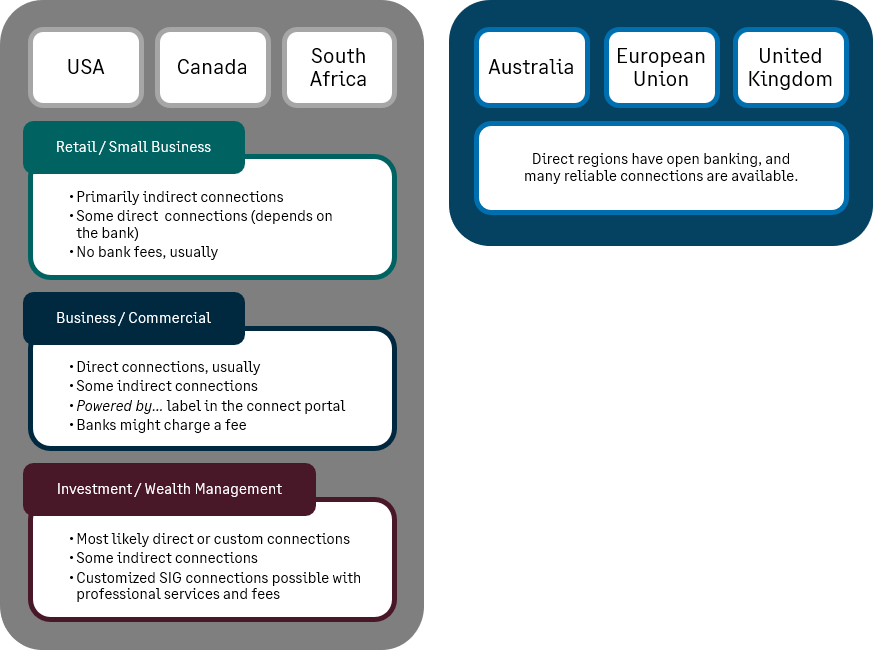
In the European Union, United Kingdom, and Australia Open Banking is available and it's easier to make a connection. In the regions of Australia and the United Kingdom, bank connections are not supported in non-production environments.
Troubleshoot
Learn how to troubleshoot bank feeds.
