About dimension structures
Informations connexes
 Related topics
Les structures de dimensions offrent un moyen flexible d’organiser les données de dimension que vous souhaitez voir sur les lignes ou les colonnes d’un rapport financier.
Vous pouvez ajouter autant de structures de rapport que vous le souhaitez pour les dimensions que vous suivez.
Afficher les structures de dimension
Atteindre Grand livre > Tout > Structures de rapports financiers > Structures de dimension.
- Affichez la liste des structures de rapport pour chaque dimension activée dans votre société.
| Abonnement | Société |
|---|---|
| Disponibilité régionale | Toutes les régions |
| Type d’utilisateur | Entreprise, Admin, Chef de projet, Collaborateur (affichage) |
| Permissions | Groupes de dimension Liste, Afficher, Ajouter, Modifier, Supprimer |
Que sont les structures de dimension ?
Les structures de dimensions sont des structures représentant les données dimensionnelles que vous comptez utiliser sur les lignes ou les colonnes des rapports financiers.
Par exemple, vous pouvez créer des structures de dimension qui affichent :
- Départements sélectionnés
- Clients par type
- Articles par ligne de produits
Créez autant de structures de dimensions que vous le souhaitez pour représenter les différentes façons dont vous souhaitez segmenter vos données. Par exemple, vous pouvez créer plusieurs structures de clients qui vous permettent d’analyser vos « Clients par type », « Clients par territoire de vente », etc.
Ces structures de dimensions réutilisables peuvent être utilisées sur l’ensemble des lignes ou des colonnes, quel que soit le nombre de rapports financiers.
En savoir plus sur les groupes de dimension.
L’exemple suivant montre une structure d’établissement simple nommée « Sud », qui contient un groupe d’établissements du même nom.
- Les groupes de dimensions constituent des groupes personnalisés qui sont significatifs pour votre société.
- Les structures de rapport de dimension peuvent contenir un ou plusieurs groupes de dimensions.
- The dimension report structure is what lets you add the dimension to a report.
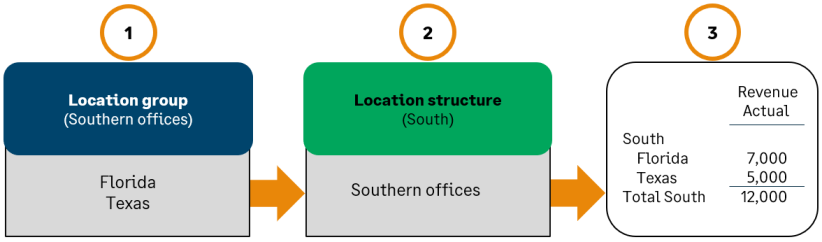
Lorsqu’elle est utilisée dans les lignes d’un rapport, chaque structure obtient une ligne d’en-tête, un détail pour l’emplacement (niveau de détail par défaut) et une ligne de total.
Rechercher et afficher des structures de dimensions existantes
Even if you have not yet created any dimension structures, you might already have some in your lists. If you have existing dimension groups, such as location groups that represent different regions, Intacct automatically creates corresponding dimension structures.
Atteindre Grand livre > Tout > Structures de rapports financiers > Structures de dimension. Sélectionnez ensuite la dimension.
Par exemple, pour afficher les structures de votre service, accédez à Grand livre > Tout > Structures de rapports financiers > Structures de dimension > Ministères.
- Dans la liste des structures du rapport, effectuez une recherche verticale pour obtenir plus d’informations sur une structure particulière.
- Vue et Éditer Vous permettent de voir comment la structure est définie.
- To see the members within a structure, select Members.
- Pour voir quels rapports et graphiques utilisent la structure, sélectionnez Rapports ou Graphiques.
Quelle est la différence entre les types de structures ?
There are 2 types of dimension report structures, which allow you to create different types of report output.
Dans les listes de structures de rapport, le type de structure peut être « Groupes » ou « Hiérarchie des structures de dimensions ».
- Groupes Il s’agit d’une structure plate qui contient les membres d’un ou plusieurs groupes de dimensions. Par exemple, vous pouvez créer une structure d’emplacement « Côte Ouest » qui contient les groupes d’emplacements pour la Californie et Washington. Lorsqu’elle est incluse dans un rapport, la structure « Côte ouest » peut répertorier des lieux tels que San Francisco, Los Angeles, Portland et Seattle.
- Hiérarchie Une structure de dimension hiérarchique contient d’autres structures, ce qui vous permet d’afficher l’organisation, les regroupements et les sous-totaux sur les rapports.
Learn more about the different types of dimension structures.
